
Exit
  • Global community
    • Language:
      • Deutsch
      • English
      • Español
      • Français
      • Português
  • 日本語コミュニティ
  • 한국 커뮤니티
0

Issues with importing FM Glossary into RH

Mentor ,
Apr 21, 2014 Apr 21, 2014

Hi

I have created the Glossary in FM using the following procedure:

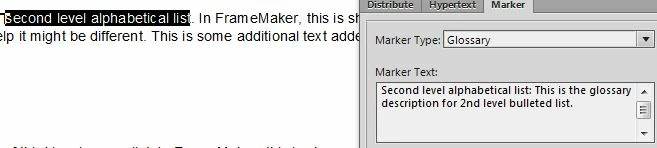
1,  Select the text for Glossary term and assign the Glossary marker to it.

2.  In the Marker window, add a colon next to the term (as a separator) and enter the description.
GlossaryInFM.jpg

3.  Click New Marker.

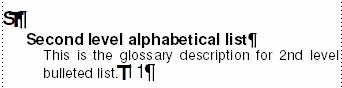
When I generate the Glossary in FM, I get it right.
GlossaryInFM2.jpg

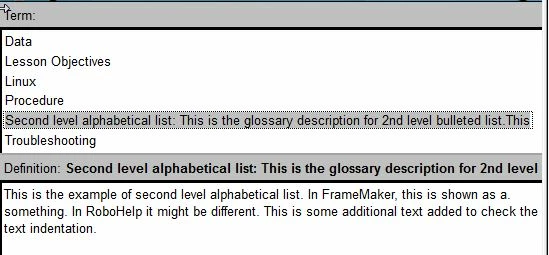
However, when I import this to RH, the entire text in the Marker window is considered as the Glossary term and the paragraph which has the selected text comes out as the Glossary description.
GlossaryInRH.jpg

Where am I going wrong? Please advise.

Sreekanth

688
Translate
Report
Community guidelines
Be kind and respectful, give credit to the original source of content, and search for duplicates before posting. Learn more
community guidelines
Community Expert ,
Apr 22, 2014 Apr 22, 2014

I think you’ve a space after your colon in the marker text – that might be throwing it off

Translate
Report
Community guidelines
Be kind and respectful, give credit to the original source of content, and search for duplicates before posting. Learn more
community guidelines
Mentor ,
Apr 22, 2014 Apr 22, 2014

I removed the space. Still no use.

Sreekanth

Translate
Report
Community guidelines
Be kind and respectful, give credit to the original source of content, and search for duplicates before posting. Learn more
community guidelines
Community Expert ,
Apr 22, 2014 Apr 22, 2014

What version of TCS are you doing this in?

See if this thread helps - http://forums.adobe.com/message/1043852#1043852

Translate
Report
Community guidelines
Be kind and respectful, give credit to the original source of content, and search for duplicates before posting. Learn more
community guidelines
Mentor ,
Apr 22, 2014 Apr 22, 2014

I am using TCS4.

Even the GLO file is showing incorrect format.

<glossentry>

                    <glossterm>Second level alphabetical list:This is the glossary description for 2nd level bulleted list.This</glossterm>

                    <glossdef>This is the example of second level alphabetical list. In FrameMaker, this is shown as a. something. In RoboHelp it might be different. This is some additional text added to check the text indentation.</glossdef>

          </glossentry>

Sreekanth

Translate
Report
Community guidelines
Be kind and respectful, give credit to the original source of content, and search for duplicates before posting. Learn more
community guidelines
Participant ,
Sep 03, 2014 Sep 03, 2014

sreekanth_kls

This seems important. Any status update since April?

Translate
Report
Community guidelines
Be kind and respectful, give credit to the original source of content, and search for duplicates before posting. Learn more
community guidelines
Community Expert ,
Sep 03, 2014 Sep 03, 2014

@max_drawdown – it just may be a limitation of the FM to RH integration that it can’t handle multi-level glossary entries; it’s probably got the same problem with multi-level index entries too

Translate
Report
Community guidelines
Be kind and respectful, give credit to the original source of content, and search for duplicates before posting. Learn more
community guidelines
Mentor ,
Sep 03, 2014 Sep 03, 2014

@max_drawdown: The issue is not resolved. We decided to drop that feature then. However, now that you reminded me I have logged a bug report with Adobe. I will keep you posted on any update I receive.

@Jeff_Coatsworth: I guess I took the wrong term here as an example. The glossary and the Index are at first level only. No issues with the Index though.

Sreekanth

Translate
Report
Community guidelines
Be kind and respectful, give credit to the original source of content, and search for duplicates before posting. Learn more
community guidelines
Community Expert ,
Sep 03, 2014 Sep 03, 2014

So have you ever tried bringing over a multi-level index entry? It never worked for me because of a fatal crash that FM would throw if you used the “book of books” concept with an entry like Animals:Canada:Beaver

Translate
Report
Community guidelines
Be kind and respectful, give credit to the original source of content, and search for duplicates before posting. Learn more
community guidelines
Mentor ,
Sep 03, 2014 Sep 03, 2014

@Jeff

I had never tried.

But I did try now. I selected a text Animals on page 4 of 22 of my FM document, marked it as Index, and gave the text you mentioned in the Marker pod's Marker Text field.

On updating the book, the Index FM file had three levels. And, on importing it to RH, Index showed three levels in the Webhelp output.

However, I might be doing it wrong, as I am not sure what you meant by "Book of books" concept.

Sreekanth

Translate
Report
Community guidelines
Be kind and respectful, give credit to the original source of content, and search for duplicates before posting. Learn more
community guidelines
Community Expert ,
Sep 03, 2014 Sep 03, 2014
LATEST

Nope, that’s exactly it – good to know it works ok.

I could never get the FM index to be generated correctly because there was a bug that caused FM to blow up. It only happened when you had a master book that had your ToC and Index (both all based on .fm files contained within “sub-books”), and the sub-books themselves. So you would have a master book that had sub-books (like modules), each of which had a number of .fm files making them up – a “book of books” concept.

Translate
Report
Community guidelines
Be kind and respectful, give credit to the original source of content, and search for duplicates before posting. Learn more
community guidelines
Resources
RoboHelp Documentation
Download Adobe RoboHelp