
Participating Frequently
September 19, 2013
Question

Link/Map IDs just... disappeared.

  • September 19, 2013
  • 1 reply
  • 5097 views

Hi all -

I'm using RH HTML 9 to maintain our help file, and I've come into a fairly big (okay, devastating) issue with our map files. The issue is that they are just... gone. All my topics were correctly linked yesterday, but when I opened up RH today the links were gone from the Topic Properties menu and I am unable to add/link new IDs:
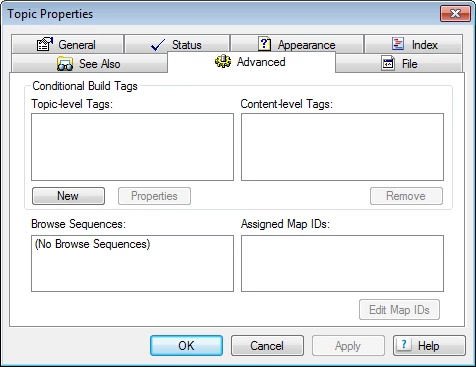
I'm not quite sure what would have caused this, as the file location hasn't changed and I haven't done anything other than generate a new version of the project. Anyone have any ideas?

I'm not well-versed in the behind-the-scenes workings of RH, so I'm not quite sure what to do here. Please help!

Thanks,

Erin

This topic has been closed for replies.

1 reply

RoboColum_n_
Legend
September 20, 2013

Are there any map files displayed in the Project Setup pod. If there are, open these and see if the mapids are displayed there and whether they are assigned to anything.

If as it sounds you have no map files at all in the project, not even the default BSSCDefault.h file, try opening Windows Explorer and looking for any files that maybe there with a .h, .hh or .hm extension. If you can find your map file there, open it up in Notepad and see if it looks something like this.

This file contains a list of the mapids that you use to map to your topics. Next see if you have a <projectname>.ALI file. Open this up in Notepad and see it it looks anything like this.

This file is the link between your mapids and the topics. Come back when you have done this and we'll take things to the next step. If things appear OK, there is the option to import a map file which may correct things, but let's take things one step at a time.

PrismRBSAuthor
Participating Frequently
September 20, 2013

So... I found some interesting things.

My map files *are* there - it just looks like all of them are unlinked. I opened up a few of the .h/.hh files and all of them look like your second screen capture.

I also opened the .ali file - it's completely blank, and it obviously shouldn't be...

Any ideas for a next step, or am I just stuck with this mess?

Known Participant
December 3, 2013

I didn't receive an email. Do you still require help?

Greet,

Willam


Hello,

Can you tell me if this issue was ever resolved? I have recently had the same problem of disappearing links between Map IDs and topics. I started another discussion before I found this one.

Thanks.

Carma