
Main book heading
Hi,
I have problem with wep page, with Main book heading getting reflected as separate page heading ( resulting in a separate topic) . Let me put it this way. I am given a word document, which has "Heading 1" and "Heading 2" below it. While mapping in css, I map Heading 1 for Heading 1 and so on. While generating I mark heading 1 and so on for generating new topics based on headings. After final output generation what happens is the Title ( heading 1 ) gets assigned as main book which is correct, but when u click it, it is a separate topic. the snap shot is as below to make it more clearer:
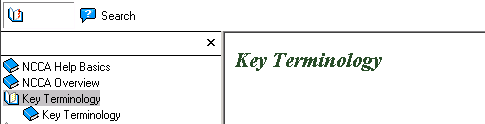
Here, my main book topic is Key terminology, however that when clicked gets displayed as above with footer as though its separate topic. If I exclude Heading 1 mapping from topic generation as described below, the heading gets included in the Previous topic.
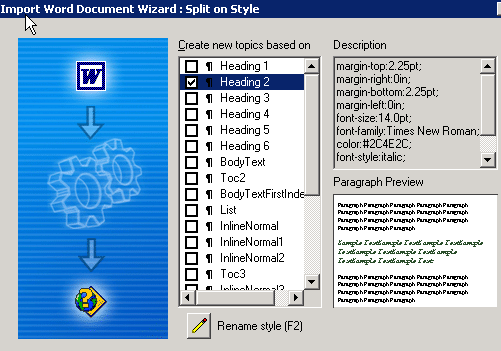
Does the problem lie in the document's headings or the way it is being mapped? Let me know ur sugestions..
Thanks,
Pallavi
 AdChoices