
Exit
  • Global community
    • Language:
      • Deutsch
      • English
      • EspaƱol
      • FranƧais
      • PortuguĆŖs
  • ę—„ęœ¬čŖžć‚³ćƒŸćƒ„ćƒ‹ćƒ†ć‚£
  • ķ•œźµ­ ģ»¤ė®¤ė‹ˆķ‹°
0

Main book heading

New Here ,
Nov 13, 2009 Nov 13, 2009

Hi,

I have problem with wep page, with Main book heading getting reflected as separate page heading ( resulting in a separate topic) . Let me put it this way. I am given a word document, which has "Heading  1" and "Heading 2" below it. While mapping in css, I map Heading 1 for Heading 1 and so on. While generating I mark heading 1 and so on for generating new topics based on headings. After final output generation what happens is the Title ( heading 1 ) gets assigned as main book which is correct, but when u click it, it is a separate topic. the snap shot is as below to make it more clearer:
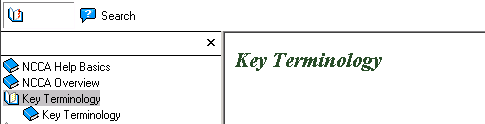
Book title.gif

Here, my main book topic is Key terminology, however that when clicked gets displayed as above with footer as though its separate topic. If I exclude Heading 1 mapping from topic generation as described below, the heading gets included in the Previous topic.
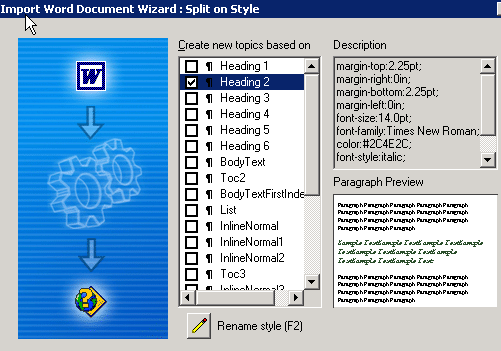
spilit style.gif

Does the problem lie in the document's headings or the way it is being mapped? Let me know ur sugestions..

Thanks,

Pallavi

442
Translate
Report
Community guidelines
Be kind and respectful, give credit to the original source of content, and search for duplicates before posting. Learn more
community guidelines

correct answers 1 Correct answer

Advisor , Nov 13, 2009 Nov 13, 2009

It's because there is no content between H1 and H2.

You can solve this very simply:

  1. Right click that book in the TOC and select Properties.
  2. On the General tab, unselect the "Book with Link" check box.

You can either then delete that topic, or leave it alone; your choice.

Good luck,

Leon

Translate
Advisor ,
Nov 13, 2009 Nov 13, 2009

It's because there is no content between H1 and H2.

You can solve this very simply:

  1. Right click that book in the TOC and select Properties.
  2. On the General tab, unselect the "Book with Link" check box.

You can either then delete that topic, or leave it alone; your choice.

Good luck,

Leon

Translate
Report
Community guidelines
Be kind and respectful, give credit to the original source of content, and search for duplicates before posting. Learn more
community guidelines
New Here ,
Nov 20, 2009 Nov 20, 2009
LATEST

Hey thanks. That worked..

Cheers

Pallavi

Translate
Report
Community guidelines
Be kind and respectful, give credit to the original source of content, and search for duplicates before posting. Learn more
community guidelines
Resources
RoboHelp Documentation
Download Adobe RoboHelp