
May 3, 2012
Question

Menu path above header not displaying
  • May 3, 2012
  • 2 replies
  • 5900 views

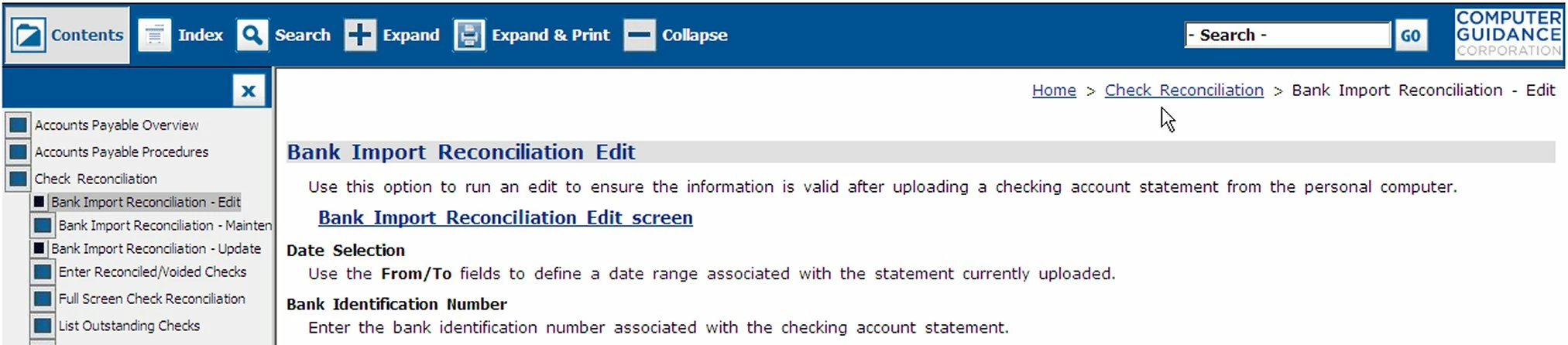
On most topics there is a menu path, in what appears to be the area above the header, that can be used as a navigation aid. I say above the header because the header for this Master Page is blank. It is missing in some topics and I would like to find out why. Does anyone know how this menu path gets there/where it comes from?

This topic has been closed for replies.

2 replies

Captiv8r
Legend
May 3, 2012

Hi there

This is called a Breadcrumb Trail. You may selectively apply them by inserting a Breadcrumbs placehoder into a topic directly or by adding one to a Master Page, then associating the Master Page with one or more topics.

Or, you may globally apply breadcrumbs to ALL topics by enabling them in the Single Source Layout recipe.

Cheers... Rick

Helpful and Handy Links

RoboHelp Wish Form/Bug Reporting Form

Begin learning RoboHelp HTML 7, 8 or 9 within the day!

Adobe Certified RoboHelp HTML Training

SorcerStone Blog

RoboHelp eBooks

Jeff_Coatsworth
Community Expert
Community Expert
May 3, 2012

That "menu path" you refer to is called "breadcrumbs" - they can be configured in 2 different ways - through a placeholder on the master page or through the SSL recipe for your output.

May 3, 2012

Thanks Jeff. I read up on breadcrumbs but still don’t understand why a few topics, that use the same master page as the rest of the project, would not show the breadcrumbs. The output is set to “Add Breadcrumb Links”.

May 3, 2012

Hi there

First, you edit the Master Page.

Then, choose where you want the placeholder to be inserted.

If you insert the placeholder inside the Body placeholder, you will only get a breadcrumb trail if you create a new topic based on the Master Page.

If you insert the placeholder inside the Header or Footer area, ANY TOPIC associated with the Master Page should present the breadcrumbs. This also seems to apply to placeholders inserted into what I call the "no man's land" area between the proper Header or Footer area.

As you say you have breadcrumbs enabled in the Single Source Layout recipe, I'm surprised that you aren't seeing them in each and every topic you view. Are you certain you are viewing the published topics?

Cheers... Rick

Helpful and Handy Links

RoboHelp Wish Form/Bug Reporting Form

Begin learning RoboHelp HTML 7, 8 or 9 within the day!

Adobe Certified RoboHelp HTML Training

SorcerStone Blog

RoboHelp eBooks


Not sure what you mean by, “Are you certain you are viewing the published topic?” Modifications to the topic are showing up when I generate the project.

Can you point me to some good documentation on breadcrumbs?