Exit
  • Global community
    • Language:
      • Deutsch
      • English
      • Español
      • Français
      • Português
  • 日本語コミュニティ
  • 한국 커뮤니티
0

Menu path above header not displaying

Guest
May 03, 2012 May 03, 2012

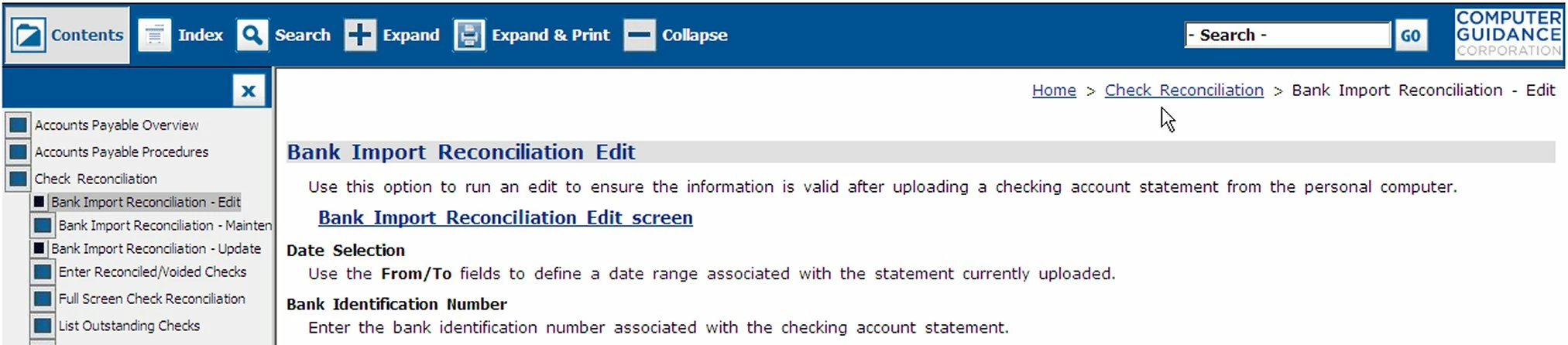
Bank Import.jpg

On most topics there is a menu path, in what appears to be the area above the header, that can be used as a navigation aid. I say above the header because the header for this Master Page is blank. It is missing in some topics and I would like to find out why. Does anyone know how this menu path gets there/where it comes from?

5.9K
Translate
Report
Community guidelines
Be kind and respectful, give credit to the original source of content, and search for duplicates before posting. Learn more
community guidelines
Community Expert ,
May 03, 2012 May 03, 2012

That "menu path" you refer to is called "breadcrumbs" - they can be configured in 2 different ways - through a placeholder on the master page or through the SSL recipe for your output.

Translate
Report
Community guidelines
Be kind and respectful, give credit to the original source of content, and search for duplicates before posting. Learn more
community guidelines
Guest
May 03, 2012 May 03, 2012

Thanks Jeff. I read up on breadcrumbs but still don’t understand why a few topics, that use the same master page as the rest of the project, would not show the breadcrumbs. The output is set to “Add Breadcrumb Links”.

Translate
Report
Community guidelines
Be kind and respectful, give credit to the original source of content, and search for duplicates before posting. Learn more
community guidelines
Community Expert ,
May 03, 2012 May 03, 2012

So you're not using the breadcrumb placeholder on the master page method, right? If that's the case, then all topics would get "crumbed" when help was created. If some topics aren't getting them, something else must be going on. What's different about those "non-crumbed" pages?

Translate
Report
Community guidelines
Be kind and respectful, give credit to the original source of content, and search for duplicates before posting. Learn more
community guidelines
Guest
May 03, 2012 May 03, 2012

I believe I may have imported them from another project (I generally refer to my memory in the past tense).

Translate
Report
Community guidelines
Be kind and respectful, give credit to the original source of content, and search for duplicates before posting. Learn more
community guidelines
Guest
May 03, 2012 May 03, 2012

How is the “breadcrumb placeholder on the master page method” set up?

Translate
Report
Community guidelines
Be kind and respectful, give credit to the original source of content, and search for duplicates before posting. Learn more
community guidelines
LEGEND ,
May 03, 2012 May 03, 2012

Hi there

First, you edit the Master Page.

Then, choose where you want the placeholder to be inserted.

If you insert the placeholder inside the Body placeholder, you will only get a breadcrumb trail if you create a new topic based on the Master Page.

If you insert the placeholder inside the Header or Footer area, ANY TOPIC associated with the Master Page should present the breadcrumbs. This also seems to apply to placeholders inserted into what I call the "no man's land" area between the proper Header or Footer area.

As you say you have breadcrumbs enabled in the Single Source Layout recipe, I'm surprised that you aren't seeing them in each and every topic you view. Are you certain you are viewing the published topics?

Cheers... Rick

Helpful and Handy Links

RoboHelp Wish Form/Bug Reporting Form

Begin learning RoboHelp HTML 7, 8 or 9 within the day!

Adobe Certified RoboHelp HTML Training

SorcerStone Blog

RoboHelp eBooks

Translate
Report
Community guidelines
Be kind and respectful, give credit to the original source of content, and search for duplicates before posting. Learn more
community guidelines
Guest
May 03, 2012 May 03, 2012

Not sure what you mean by, “Are you certain you are viewing the published topic?” Modifications to the topic are showing up when I generate the project.

Can you point me to some good documentation on breadcrumbs?

Translate
Report
Community guidelines
Be kind and respectful, give credit to the original source of content, and search for duplicates before posting. Learn more
community guidelines
Community Expert ,
May 03, 2012 May 03, 2012

Rick means are you looking at the created help output that's in the project's \!SSL!\ folder? Looking at the topics themselves while still in the RH project may not show you what's actually there (same as using the Review option when finished creating the help).

Translate
Report
Community guidelines
Be kind and respectful, give credit to the original source of content, and search for duplicates before posting. Learn more
community guidelines
Guest
May 03, 2012 May 03, 2012

Our OLH projects were set up by the previous tech writer and I’ve had to take them over due to her departure. I was a print docs person. First time I’ve been in the SSL. All files are dated 2010.

Translate
Report
Community guidelines
Be kind and respectful, give credit to the original source of content, and search for duplicates before posting. Learn more
community guidelines
Community Expert ,
May 03, 2012 May 03, 2012

That kind of implies that you haven't been creating the help (at least in that folder). Try generating the help & have a look at it.

Translate
Report
Community guidelines
Be kind and respectful, give credit to the original source of content, and search for duplicates before posting. Learn more
community guidelines
Guest
May 03, 2012 May 03, 2012

Generated and, except for a couple topics, everything had breadcrumbs.

The file structure I inherited has the Main project folder with two subfolders APP Help and Webhelp (where APP is the project name, stands for Accounts Payable Processing).

The APP Help folder has the subfolders !Language!, !SkinSubFolder!, !SSL!, and Accounts Payable (this is a collection of subfolders folders where I store the .jpg’s and the system stores the generated .htm)

The Webhelp file is where all the generated data ends up.

It doesn’t look like the folder gets touched.

Translate
Report
Community guidelines
Be kind and respectful, give credit to the original source of content, and search for duplicates before posting. Learn more
community guidelines
Community Expert ,
May 04, 2012 May 04, 2012

Your SSL recipe must have specified a different folder other than the default path of \project_name\!SSL!\output_type\ - if you just generated, then the date stamp on the output files will have the same date as the generated date; when help is generated each time, the output folder is wiped and new files are created in its place. make sure you're actually looking at the currently generated help output.

Translate
Report
Community guidelines
Be kind and respectful, give credit to the original source of content, and search for duplicates before posting. Learn more
community guidelines
Guest
May 04, 2012 May 04, 2012

The file your referring to is the Webhelp file in our file system. Do most people use the SSL folder for this? Is there a downside to doing it this way?

Translate
Report
Community guidelines
Be kind and respectful, give credit to the original source of content, and search for duplicates before posting. Learn more
community guidelines
Community Expert ,
May 04, 2012 May 04, 2012

No, it doesn't really make any difference where the output location is placed (other than it shouldn't be pointed at a network location). Best practices usually dictate that your RH projects are happiest when they are located in c:\projects\project_name\ - then the output gets generated by default to c:\projects\project_name\!SSL!\WebHelp\starting_page.htm. Once generated, the whole WebHelp folder can be packaged up, moved, given to your developers, etc. for publication.

With your issue, we're just trying to see if you're actually looking at the generated output to see if the breadcrumbs are all there or not.

Translate
Report
Community guidelines
Be kind and respectful, give credit to the original source of content, and search for duplicates before posting. Learn more
community guidelines
Guest
May 04, 2012 May 04, 2012

The datestamp is current with all others and I made a dummy modification to the file which came through.

Translate
Report
Community guidelines
Be kind and respectful, give credit to the original source of content, and search for duplicates before posting. Learn more
community guidelines
Community Expert ,
May 04, 2012 May 04, 2012

Can you use the camera icon in the web interface to give us a screenshot of your SSL recipe? - as Rick says, I also find it hard that the breadcrumbs aren't appearing if they are flagged to do so in the SSL layout.

Translate
Report
Community guidelines
Be kind and respectful, give credit to the original source of content, and search for duplicates before posting. Learn more
community guidelines
Guest
May 04, 2012 May 04, 2012

I’ll try. Where is it?

Translate
Report
Community guidelines
Be kind and respectful, give credit to the original source of content, and search for duplicates before posting. Learn more
community guidelines
Community Expert ,
May 04, 2012 May 04, 2012

Which "it" are you asking about? the camera icon in the forum's web interface or the SSL in your project?

Translate
Report
Community guidelines
Be kind and respectful, give credit to the original source of content, and search for duplicates before posting. Learn more
community guidelines
Guest
May 04, 2012 May 04, 2012

The camera icon

Translate
Report
Community guidelines
Be kind and respectful, give credit to the original source of content, and search for duplicates before posting. Learn more
community guidelines
Community Expert ,
May 04, 2012 May 04, 2012

See this link - http://forums.adobe.com/thread/467760?tstart=0

Some of the content is a little out of date, but the idea is that you compose your post and use the camera icon to insert image files into it.

Translate
Report
Community guidelines
Be kind and respectful, give credit to the original source of content, and search for duplicates before posting. Learn more
community guidelines
LEGEND ,
May 04, 2012 May 04, 2012
Translate
Report
Community guidelines
Be kind and respectful, give credit to the original source of content, and search for duplicates before posting. Learn more
community guidelines
Guest
May 04, 2012 May 04, 2012

Everything in the SSL folder. We don’t use it to hold generated files. The project uses a folder called Webhelp instead.

Translate
Report
Community guidelines
Be kind and respectful, give credit to the original source of content, and search for duplicates before posting. Learn more
community guidelines
Guest
May 04, 2012 May 04, 2012

SSL.jpg

Don't know if you can see this, but the SSL folder isn't being used by the project. All output is directed to a "Webhelp" folder.

Webhelp.jpg

Translate
Report
Community guidelines
Be kind and respectful, give credit to the original source of content, and search for duplicates before posting. Learn more
community guidelines
Community Expert ,
May 04, 2012 May 04, 2012

Umm, those shots are just of Explorer - I need you fire up RH and show me the SSL layout recipe screen of the project where you have turned on breadcrumbs.

Translate
Report
Community guidelines
Be kind and respectful, give credit to the original source of content, and search for duplicates before posting. Learn more
community guidelines
Resources
RoboHelp Documentation
Download Adobe RoboHelp