
Participating Frequently
November 30, 2010
Question

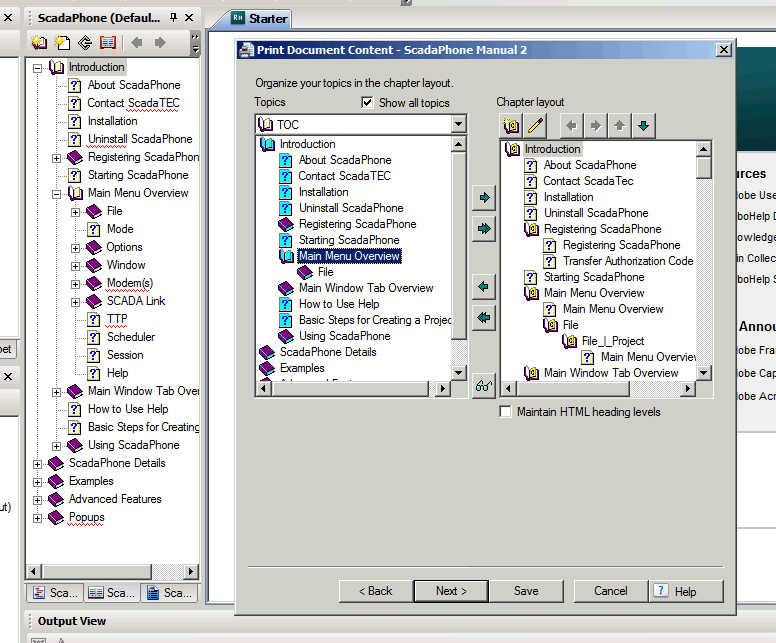
Missing Topics in Topics box
  • November 30, 2010
  • 1 reply
  • 1103 views

As you can see there is a lot of missing subtopics under the Main Menu Overview topic in the left hand Topics Box. These topics all show up in the ,.chm file. Can anyone tell me how to correct this. I can't add the missing topics to the printed doc. If they do not show up in the Topics Box.

I am using RoboHelp HTML version 7.03

Lee

This topic has been closed for replies.

1 reply

Captiv8r
Legend
November 30, 2010
Participating Frequently
November 30, 2010

Thanks for your prompt reply Rick.

I have read everything on your site on the subject but I still have no idea why the Topics are missing.

Lee

Participating Frequently
December 1, 2010

If the TOC has all topics in it and there is no build expression, then in a new print layout you will see all the topics.

If the TOC only has some topics in it, then you need to change the dropdown from TOC to Folders and add them.

Without testing again, I believe the purpose of the Show All check box is to allow you to see topics excluded by the build expression, so if there isn't one it will make no difference.

Try again and post back.


See www.grainge.org for RoboHelp and Authoring tips

@petergrainge


Hi Peter,

I have discovered that if I leave the 'Create TOC pages for mid-topic links

(bookmarks)' checkbox on the Auto-Create TOC dialog box un-checked then all

the topics show up.

Thanks for all your help.

Lee