
Participating Frequently
November 16, 2010
Question

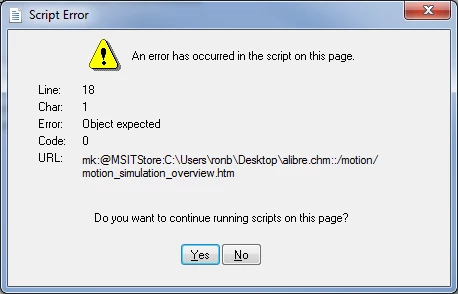
mk:@MSITStore Script Error

  • November 16, 2010
  • 2 replies
  • 903 views

I recently took over doing the Help and am unable to figure this issue. For only a certain folder I get the attached error message when I click on any link internal link. I've done some extensive searching on the Forums, but I can only find solutions to needing a service pack for RoboHelp 8; I'm currently on RoboHelp 7.

I've tried the following:

  • unlinking and relinking
  • moving the HTML files out of the folder and into the root/another folder
  • making sure that there are no spaces/special characters in the file name
    This topic has been closed for replies.

    2 replies

    ronb1Author
    Participating Frequently
    November 17, 2010

    Well, I was able to "fix" it, but it was a long, manual process. Here is how I got it to work without receiving any more of the error messages....

    1. Create a new Book in the Table of Contents column
    2. Create new Topics
    3. Copy the original topic and paste them into the new ones that I created
    4. Manually fix the links so they point to the new Topics.....

    - Ron

    Community Expert
    November 17, 2010

    Hmm, maybe comparing the old and new topics could find the code causing the error. A comparison tool like Beyond Compare can be set up to just show differences, rather than having to trawl through the entire file line by line. Depends how much you care about finding the root cause.

    ronb1Author
    Participating Frequently
    November 18, 2010

    There were 2 files that were in the old folder that were not in the folder: file.fpj and open_parent.js

    Unfortunately I had already removed the old Book so I can't go back and test what would had happened if I had deleted those files.

    Since I just started taking over the Help, I don't know how the last person created the Book. Luckily everything seems to be working now though.

    Community Expert
    November 16, 2010

    Are you double-clicking on the link? A user here gets a similar message and it seems to be caused by a double-click rather than a single click.

    ronb1Author
    Participating Frequently
    November 17, 2010

    Hi Amber.

    Nope, I'm just single clicking on it. After I get that error message I can click again on the link and it will open up in a new window.

    - Ron