
Participating Frequently
November 15, 2012
Question

Modifying Screen Layout colours in Multiscreen HTML 5

  • November 15, 2012
  • 1 reply
  • 931 views

I have recently downloaded roboHelp 10 and am invesitgating the various layouts for tablets.

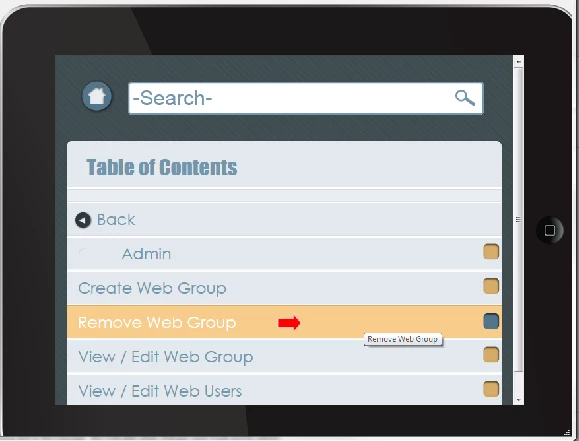
I am happy with the general layouts however the colours used when hovering over homepage and TOC options are a bit 'out there' (bright green for android, orange for ipad).

Is it possible to change these colours?
This topic has been closed for replies.

1 reply

Willam van Weelden
Inspiring
November 15, 2012

Hi,

You can change all colours, but it will require you to do a little work.

To change the colours you have to modify the CSS. You can use the RoboHelp CSS editor or a text editor such as Notepad++. Modify all the :active and :hover styles of the hyperlink types that you want to change: TOC, Index, Glossary, Widgets, etc.

By far the easiest way to accomplish this is to open the CSS in Notepad++, find the a:active style near the top of the CSS and do a find and replace operation on the background colour.

Greet,

Willam

edu_KateAuthor
Participating Frequently
November 15, 2012

Thanks Willam

I am familiar with modifying the CSS and I have begun changing various components.

Where I have run into trouble is the references to webkits and the use of rgba.

Also trying map the elements in the CSS to what I am seeing on screen.

Is there documentation that outlines what is what?

Willam van Weelden
Inspiring
November 17, 2012

Hi,

The -webkit, and -moz styles are backward compatibility style for specific browsers (WebKit and Mozilla). Try to google any style you don't know. Most styles are minutely described on many different sites.

The RGBA means Red, Green, Blue, Opacity. So rgba(255,255,255,.5) is white, half opaque. This is used to show what lies below an element.

I believe I have an overview somewhere of the widget styles used. But I'll have to look it up so give me a day or two. Personally, I create an output and use Firebug with FF or Chrome to find the styles used for every element.

Greet,

Willam