
Exit
  • Global community
    • Language:
      • Deutsch
      • English
      • Español
      • Français
      • Português
  • 日本語コミュニティ
  • 한국 커뮤니티
0

New books and topics don't appear in the ToC after generated in DHTML (RoboHelp v8)

Guest
Sep 16, 2013 Sep 16, 2013

Until recently, when I wanted to add a topic to a book in the Table of Contents, I just dragged it from the Project Manager into the Table of Contents.  I'm not sure what is different now, but the new topics appear in the Table of Contents pod but not in the generated DHTML.  To make it more confusing, to me anyway, some newly added topics DO show.
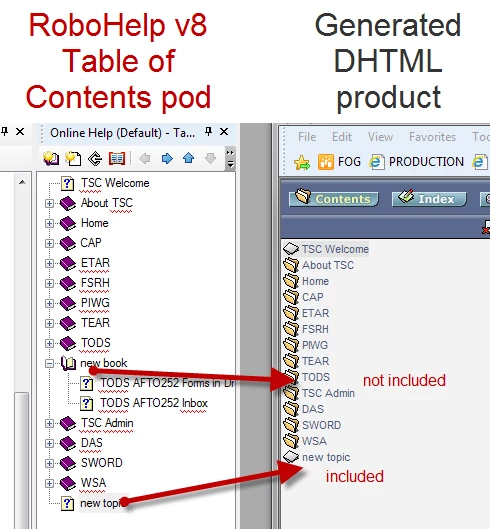
ToC problem.png

825
Translate
Report
Community guidelines
Be kind and respectful, give credit to the original source of content, and search for duplicates before posting. Learn more
community guidelines

correct answers 1 Correct answer

LEGEND , Sep 17, 2013 Sep 17, 2013

Hi there

I do suppose "massive" searches and replaces could affect things. But we need to check a few other things first.

When you examine the SSL recipe, are you using any kind of a Conditional Build Expression? If so, perhaps you have tagged the content and it's not appearing for that reason.

Cheers... Rick

Translate
LEGEND ,
Sep 16, 2013 Sep 16, 2013

Hi there

How do you get the content from the output folder to the server? Do you manually copy it or are you using the Publishing feature? For that matter, where exactly *IS* the content when you are trying to view it?

Perhaps you need to clear the browser cache?

Cheers... Rick

Translate
Report
Community guidelines
Be kind and respectful, give credit to the original source of content, and search for duplicates before posting. Learn more
community guidelines
Guest
Sep 17, 2013 Sep 17, 2013

After I generate WebHelp, in RoboHelp a box pops up, "Result: WebHelp has been successfully generated".  I click "View Result", but I don't see some of the newly added topics.  Because I don't see the new things in the preview, I haven't copied the files to the server yet.

Translate
Report
Community guidelines
Be kind and respectful, give credit to the original source of content, and search for duplicates before posting. Learn more
community guidelines
Community Expert ,
Sep 17, 2013 Sep 17, 2013

“Preview” is not exactly what you may get - hop out of RH and browse to the \!SSL!\ folder to browse the starting file of your output to get a better idea

Translate
Report
Community guidelines
Be kind and respectful, give credit to the original source of content, and search for duplicates before posting. Learn more
community guidelines
LEGEND ,
Sep 17, 2013 Sep 17, 2013

Jeff, I politely disagree here.

My reason is because clicking the "View Result" *SHOULD* provide the same experience as you are advising. At that point, RoboHelp is simply opening the browser and handing things off.

Gwen, this causes me to ponder the following question. In recent versions of RoboHelp, it's possible to configure more than one Table Of Contents (TOC). Are you certain you have specified the desired TOC in your SSL recipe? That's what I'd be checking.

Cheers... Rick

Translate
Report
Community guidelines
Be kind and respectful, give credit to the original source of content, and search for duplicates before posting. Learn more
community guidelines
Community Expert ,
Sep 17, 2013 Sep 17, 2013

@Rick - I did say "may get" not "will get" - YMMV ;>)

Translate
Report
Community guidelines
Be kind and respectful, give credit to the original source of content, and search for duplicates before posting. Learn more
community guidelines
LEGEND ,
Sep 17, 2013 Sep 17, 2013

True that, but you were suggesting that this is a "preview", when it isn't. It's actually viewing the output in pretty much exactly the same way you were suggesting. Hence, the clarification.

Translate
Report
Community guidelines
Be kind and respectful, give credit to the original source of content, and search for duplicates before posting. Learn more
community guidelines
Guest
Sep 17, 2013 Sep 17, 2013

In the Project Manager pod under Table of Contents, I have only one entry.  I cleared the cache and then copied the !SSL! folder to the server. 

The topics and book marked "not included" above still do not appear.  The topic marked "included" still appears.

I recently did a massive search and replace.  Could have anything to do with my current problem?

Translate
Report
Community guidelines
Be kind and respectful, give credit to the original source of content, and search for duplicates before posting. Learn more
community guidelines
LEGEND ,
Sep 17, 2013 Sep 17, 2013

Hi there

I do suppose "massive" searches and replaces could affect things. But we need to check a few other things first.

When you examine the SSL recipe, are you using any kind of a Conditional Build Expression? If so, perhaps you have tagged the content and it's not appearing for that reason.

Cheers... Rick

Translate
Report
Community guidelines
Be kind and respectful, give credit to the original source of content, and search for duplicates before posting. Learn more
community guidelines
Guest
Sep 17, 2013 Sep 17, 2013
LATEST

Conditional Build Expressions was the problem.  I have a fairly complex set.  Although I had looked at that once, I hadn't looked carefully enough.  The "not included" topics and book had one tag that excluded them.

Many thanks to everyone for their help!

Translate
Report
Community guidelines
Be kind and respectful, give credit to the original source of content, and search for duplicates before posting. Learn more
community guidelines
Resources
RoboHelp Documentation
Download Adobe RoboHelp