
Participating Frequently
October 1, 2009
Answered

Numbered and bulleted lists carriage returns not the same size with WebHelp and PDF Rendering

  • October 1, 2009
  • 1 reply
  • 1735 views

I have RH 8.0 HTML

I have created a new project.

I have created one topic with the default style sheet applied.

I have created a numbered list with some bulleted subpoints per numbered line item.

RH Source Screen Shot
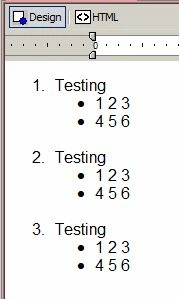
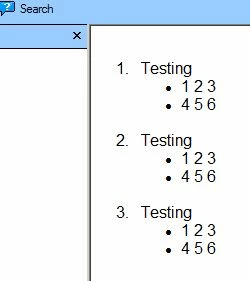
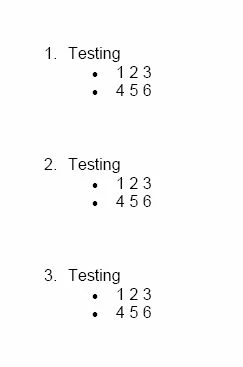
When RH generates the output for WebHelp and as Printed PDF, the distance between the carriage returns of the lines looks to be about twice as much white space between the items in the PDF document as compared to the WebHelp generated document displayed via IE 7.

WebHelp Screen Shot after Generation from above source:
PDF Screen Shot after Generation from above source:
Anybody have any idea what is causing this?  I'd be willing to believe that it had something to do with how I had some of the things in my Style Sheet configured, but this is using the default.css.

I can send the project if needed as it contains nothing of any value.

This topic has been closed for replies.
Correct answer Peter Grainge

There will always be a difference between the way the lists display in the browser and in print, indeed different browsers may well have differences.

When you create a PDF, behind the scenes a Word document is created, then PDF'd and trashed. Word lists will be different.

The options are to accept the difference as long as both are acceptable or generate to Word first, tweak that and then PDF.

There is more about this in my printed documentation pages. Also RH8 allows you to specify a different CSS when generating printed documentation and using that may enable you to play with the definitions to achieve what you want.


See www.grainge.org for RoboHelp and Authoring tips

1 reply

Willam van Weelden
Inspiring
October 2, 2009

Hi, can you post your style sheet, as wel as this topic so we can have a look?

Greet,

Willam

Peter Grainge
Community Expert
Peter GraingeCommunity ExpertCorrect answer
Community Expert
October 2, 2009

There will always be a difference between the way the lists display in the browser and in print, indeed different browsers may well have differences.

When you create a PDF, behind the scenes a Word document is created, then PDF'd and trashed. Word lists will be different.

The options are to accept the difference as long as both are acceptable or generate to Word first, tweak that and then PDF.

There is more about this in my printed documentation pages. Also RH8 allows you to specify a different CSS when generating printed documentation and using that may enable you to play with the definitions to achieve what you want.


See www.grainge.org for RoboHelp and Authoring tips

Use the menu (bottom right) to mark the Best Answer or Highlight particularly useful replies. Found the answer elsewhere? Share it here.
diamondesAuthor
Participating Frequently
October 2, 2009

When you said you wanted extra paragraphs I assumed you meant extra paragraphs with content, not blank liines.

To generate blank space between list items you need to use a CSS and define the LI tag to have the required space below it.


See www.grainge.org for RoboHelp and Authoring tips


Ahhh, okay, I'll give that a shot then.

Thanks again.