
Pagination RH10
I'm trying to apply pagination to my projects, but the following instructions don't always work:
Even though you can set pagination for any Word paragraph style, the topic generated must contain relevant, complete information for the reader. For example, if you set pagination for Heading 3, you run the risk of creating topics with only task-level instructions. In this case, the required contextual information required to complete the task is isolated in another Heading 3 level topic. To avoid such disjointed, incomplete topics, set the pagination at a higher level.
- Do one of the following:
- Select File > Import > Word Document.
- Select File > Link > Word Document.
- Select File > Project Settings.
- Click Edit under Word Document.
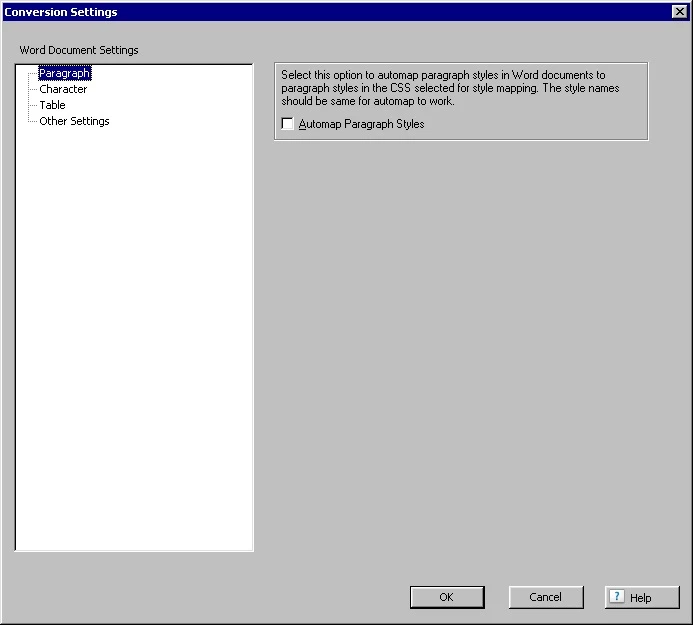
- In the Conversion Settings dialog box, in the Paragraph group, select the paragraph style on which to base pagination.
- Select the option marked Pagination (Split into topics based on this style) and click OK.
RoboHelp splits the documents into topics using the specified pagination styles.
When I get to Step 3 - in some projects, NOT ALL projects, I have nothing to select. This is what I see. There is no plus sign beside any of the Word Document Settings items, so I can't expand the item and there are no paragraph styles for me to select for pagination.
All projects have the same style sheet attached to all topics. The same styles are in every Word document I import. I created some projects in RH9 and some in RH10. I haven't gone back to check for a pattern on RH version yet. Other than that, I can't think of anything that might be causing this. Do you have any thoughts? Thanks!
 AdChoices