
Exit
  • Global community
    • Language:
      • Deutsch
      • English
      • Español
      • Français
      • Português
  • 日本語コミュニティ
  • 한국 커뮤니티
0

Preview does not pay attention to conditional text definitions (RoboHelp HTML)

Community Beginner ,
Mar 14, 2016 Mar 14, 2016

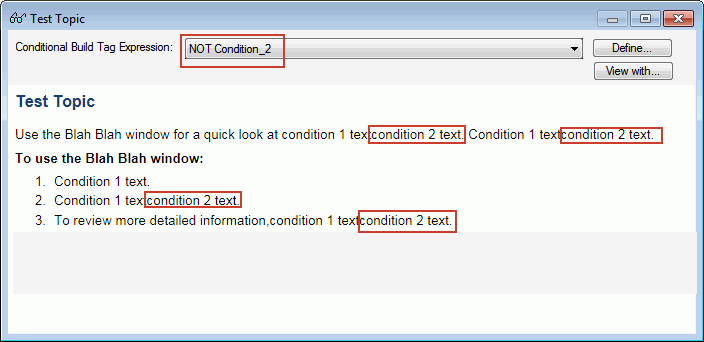
In RBH 11.04.291, I am previewing a topic with two type of conditional text using the binoculars. I set the Conditional Build Tag Expression to one or the other, but regardless of my selection, the other conditional text remains.
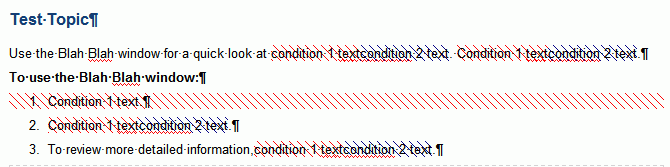
testtopic.gif

BuildExp.gif

I've also tried using the Advanced build expression (instead of Not Condition_2, using Condition_1) with the same results.
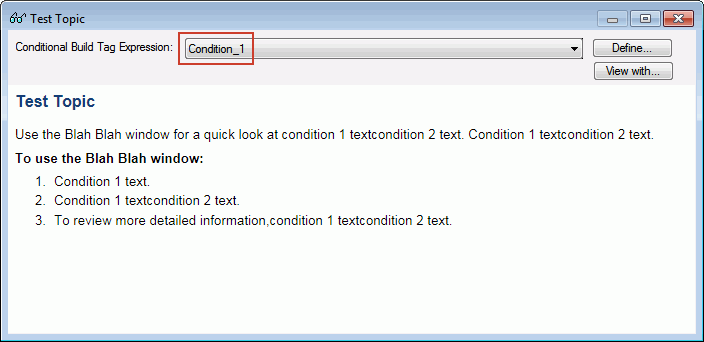
BuildExp2.gif

I previewed in Chrome, IE, and Firefox. Also the same results.

629
Translate
Report
Community guidelines
Be kind and respectful, give credit to the original source of content, and search for duplicates before posting. Learn more
community guidelines
LEGEND ,
Mar 14, 2016 Mar 14, 2016

Can you also share screen captures of what your expressions look like?

Translate
Report
Community guidelines
Be kind and respectful, give credit to the original source of content, and search for duplicates before posting. Learn more
community guidelines
Community Beginner ,
Mar 14, 2016 Mar 14, 2016

The conditions are merely Condition_1 and a color and Condition_2 and another color.

ConditionalBT1.gifConditionalBT2.gif

Translate
Report
Community guidelines
Be kind and respectful, give credit to the original source of content, and search for duplicates before posting. Learn more
community guidelines
Community Beginner ,
Mar 14, 2016 Mar 14, 2016

In the actual help topics, the conditions reflect the two modes of the application.

Translate
Report
Community guidelines
Be kind and respectful, give credit to the original source of content, and search for duplicates before posting. Learn more
community guidelines
LEGEND ,
Mar 14, 2016 Mar 14, 2016

You show the properties. Not the expressions.

Let's try again. When you are previewing your topic, click the Define button and show us what the dialog looks like where things aren't working.

Cheers... Rick

Translate
Report
Community guidelines
Be kind and respectful, give credit to the original source of content, and search for duplicates before posting. Learn more
community guidelines
Community Beginner ,
Mar 14, 2016 Mar 14, 2016

I thought that was odd. Sorry, I misunderstood you.

DefineBuildCondition1.gif

DefineBuildCondition2.gif

Translate
Report
Community guidelines
Be kind and respectful, give credit to the original source of content, and search for duplicates before posting. Learn more
community guidelines
LEGEND ,
Mar 14, 2016 Mar 14, 2016

Wow, this one is weird. From all I have seen it would appear that it *SHOULD* be working.

I think if I were in your shoes, I'd begin with a brief "sanity check". Create a totally new and fresh topic. Select a word or perhaps an entire sentence and apply only one tag. Then preview the topic and choose the expression that excludes the tag. If all is working as it should be, the tagged content should perform a disappearing act.

So give that a go and see if it works. If so, it means the entire conditional feature is working and you have something going on with that single topic.

Cheers... Rick

Translate
Report
Community guidelines
Be kind and respectful, give credit to the original source of content, and search for duplicates before posting. Learn more
community guidelines
Community Beginner ,
Mar 15, 2016 Mar 15, 2016
LATEST

Good idea. I made a completely new project and tested it - worked fine. Something's off with my project. I'll poke around and see what I can find. Thanks Rick and Captiv8r.

Translate
Report
Community guidelines
Be kind and respectful, give credit to the original source of content, and search for duplicates before posting. Learn more
community guidelines
Resources
RoboHelp Documentation
Download Adobe RoboHelp