
Known Participant
December 9, 2011
Question

Printed doc topics listed in WinXP Recent Documents list

  • December 9, 2011
  • 1 reply
  • 760 views

I recently upgraded to RoboHelp 9 from 7. I generated a printed doc and each topic is listed in the Recent Documents list in Windows XP, as follows:
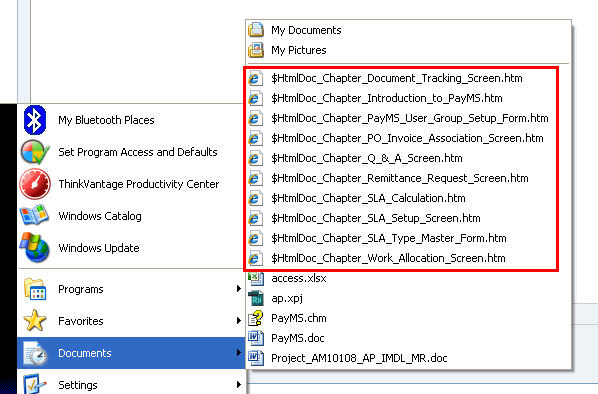
The file names all begin with $HtmlDoc_Chapter_... By the way, these files can't be found once you click one of the names. It looks like some temporary files made during generation. The point is, I don't want them in my Recent Documents list. How can I prevent this from happening?

Thank you.

This topic has been closed for replies.

1 reply

Peter Grainge
Community Expert
Community Expert
December 9, 2011

Am I right in thinking you are generating a Master Document and Sub Documents?

The problem here is that RoboHelp has to create a number of temporary documents in the process and Word notes any documents created. I doubt that RoboHelp can stop Word doing what it is set up to do. There is no interface option so pPlease follow this link and report it as a bug or feature request, depending on your point of view.

http://www.Adobe.com/cfusion/mmform/index.cfm?name=wishform&product=38


See www.grainge.org for RoboHelp and Authoring tips

@petergrainge

Use the menu (bottom right) to mark the Best Answer or Highlight particularly useful replies. Found the answer elsewhere? Share it here.
DMilkesAuthor
Known Participant
December 9, 2011

I tried it again by deselecting the Create master document check box in the Print Document General dialog, and the same thing happened. So I guess generating a single document is always considered a master/sub-document situation by Word. I think I will submit a request.

Thanks, Peter.

Peter Grainge
Community Expert
Community Expert
December 9, 2011

More likely Master / Sub is just something that creates lots of temp docs whereas a single RoboHelp document creates a single addition, either way they are going to appear in your list.


See www.grainge.org for RoboHelp and Authoring tips

@petergrainge

Use the menu (bottom right) to mark the Best Answer or Highlight particularly useful replies. Found the answer elsewhere? Share it here.