
Exit
  • Global community
    • Language:
      • Deutsch
      • English
      • Español
      • Français
      • Português
  • 日本語コミュニティ
  • 한국 커뮤니티
0

Printed Documentation option is not available for RoboHelp 11

New Here ,
Jun 27, 2019 Jun 27, 2019

Hi,

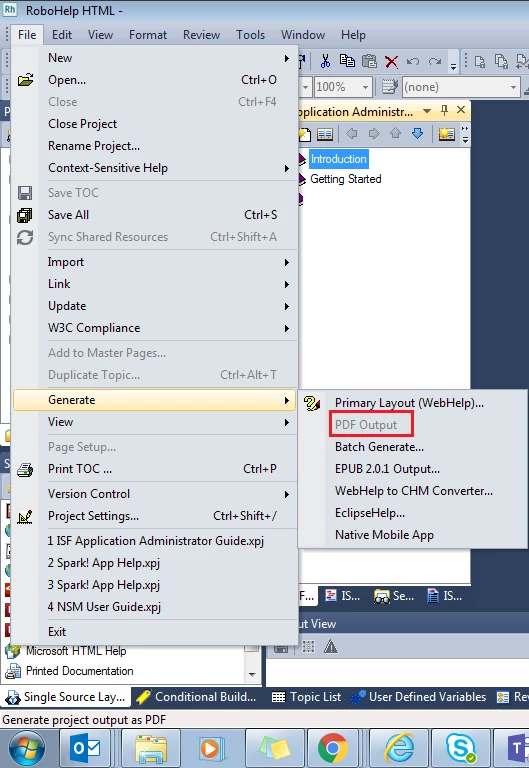
Currently I am using RoboHelp 11. My project requires to generate PDF and Word outputs on regular basis. However, with my utter surprise, I have found that both Printed Documentation and PDF generation options are deactivated for me!

When I am trying to generate PDF output (File >> Generate >> PDF Output) then PDF output generation option is appearing as inactive:
1.png

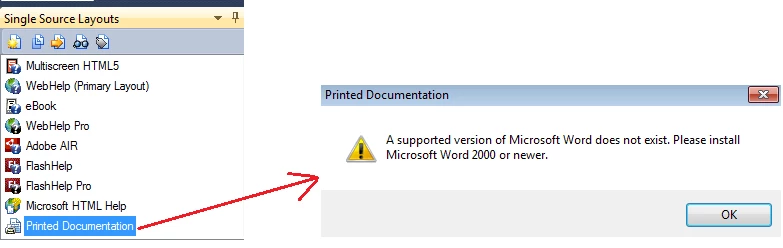
In addition, when I am trying to generate the Word output by clicking Printed Documentation option from the Single Source Layouts pod, RoboHelp is giving me an error message that I need to install MS-Word 2000 or later version, though I am currently using Word 2016:
4.png

It would be great if anybody can provide me the solution to get the printed documentation and PDF generation activated for me.

Thanks in advance!

295
Translate
Report
Community guidelines
Be kind and respectful, give credit to the original source of content, and search for duplicates before posting. Learn more
community guidelines
Community Expert ,
Jun 28, 2019 Jun 28, 2019

Thread moved to correct forum. RoboHelp for Word is a separate program that was used to author the help in Word. It no longer ships.

The error message is misleading. The error is because you are using a version of Word that is not compatible with RoboHelp 11. See Versions of Windows and MS Word compatible with RoboHelp

To create a PDF, RoboHelp first creates a Word document on the fly. No compatible version of Word so no PDF.

You either need to upgrade RoboHelp or downgrade Word, if you can.


See www.grainge.org for free RoboHelp and Authoring information.

@petergrainge

Help others by clicking Correct Answer if the question is answered. Found the answer elsewhere? Share it here. "Upvote" is for useful posts.
Translate
Report
Community guidelines
Be kind and respectful, give credit to the original source of content, and search for duplicates before posting. Learn more
community guidelines
Community Expert ,
Jul 02, 2019 Jul 02, 2019

I can confirm that RH11 works with Word 2013, if you can get that version installed instead of Word 2016.

If you end up upgrading Robohelp, I don't believe Word (well, ODF) output is available in the 2019 New version yet, so you would need to use 2019 Classic for the moment. (Hopefully Peter will correct me if I'm wrong on this.)

Translate
Report
Community guidelines
Be kind and respectful, give credit to the original source of content, and search for duplicates before posting. Learn more
community guidelines
Community Expert ,
Jul 02, 2019 Jul 02, 2019
LATEST

Amber is correct re needing to use 2019 Classic to generate a Word document. The new 2019 does support PDF output as in 2019 the PDF is generated without needing a Word document first.

Hopefully the ODF output will be supported soon. That can be opened in Word as well as other editors such as Libre Office.


See www.grainge.org for free RoboHelp and Authoring information.

@petergrainge

Help others by clicking Correct Answer if the question is answered. Found the answer elsewhere? Share it here. "Upvote" is for useful posts.
Translate
Report
Community guidelines
Be kind and respectful, give credit to the original source of content, and search for duplicates before posting. Learn more
community guidelines
Resources
RoboHelp Documentation
Download Adobe RoboHelp