
Copy link to clipboard
Copied
Hi all,
in this import project all title formats result in topic splits. However, each time there is a chapter in Framemaker that has no text content, Robohelp fails to create separate topics and packs both title lines into one topic. They are both linked from the TOC via bookmarks. The result in the online help are two TOC entries with apparently identical content (alltough it actually is just the same topic being referenced twice).
I know that empty chapters like this are bad style, but it would be no problem to simply receive corresponding emtpy topics as they will be never displayed by a context-sensitive call.
Is there a possibility to force Robohelp to apply the topic splitting rules as defined in the import settings, even if a resulting topic will be empty?
Robert
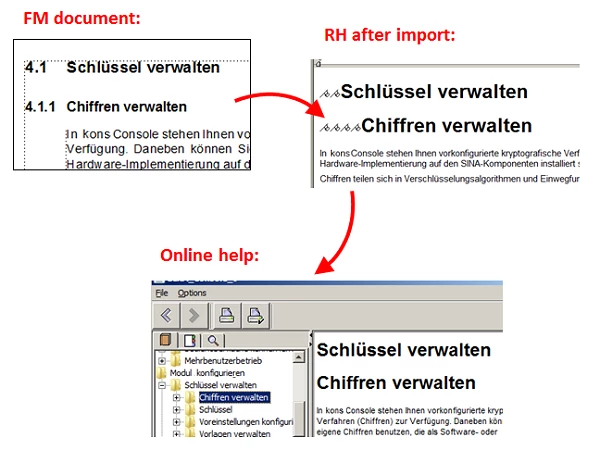
Refer back to my first suggestion above...
Copy link to clipboard
Copied
I’d be tempted to add a conditional body paragraph tag in the FM content so that the Headingxxx isn’t really “empty” and the see how it comes over to RH. I’d condition it in FM so that it doesn’t mess up how the content looks in your PDFs – but if that’s not a concern, then skip the conditioning.
Copy link to clipboard
Copied
Hi Robert,
Your experience is different than mine with regard to topic splits.
In my (and client/student) projects (in the US version of Fm), the topic splits as expected, resulting in Schlussel verwalten as its own topic, with no content. And yes, this is bad.
However, there are 2 points to make here:
-Matt
Matt R. Sullivan
co-author Publishing Fundamentals: Unstructured FrameMaker 11
Copy link to clipboard
Copied
I tried to things now. Inserting "PageBreak" markers does not change anything. Inserting a dummy paragraph works, but only when there is at least one space in the paragraph. If the paragraph is emtpy then the topic is not spilt. I'm not sure if this is a feature or a bug.
Of course I agree that there should not be emtpy chapters like this without any indtriductory text. However I am stuck with converting a text that I did not write myself.
So thanks for the ideas, I will probably get it to work one way or another.
Robert
Copy link to clipboard
Copied
It seemed from reading Matt’s post that his US copy works, but your DE one doesn’t – you should report that to Adobe - https://www.adobe.com/cfusion/mmform/index.cfm?name=wishform
Copy link to clipboard
Copied
Refer back to my first suggestion above...
Best,
Matt
Copy link to clipboard
Copied
I'll mark as correct and just want to add that I solved it a bit different to avoid working with conditions.
I inserted paragraphs with spaces and used a certain format that has a height of 2pt which does not mess up the PDF print directly from FM. In the import settings in Robohelp I excluded this paragraph. This works for me, even though the paragraph is dropped in the import the topics are still split correctly.
Thanks for the ideas!
Robert
Copy link to clipboard
Copied
Interesting...
That certainly would do the trick, and have the advantage of allowing a Next Paragraph setting to automate new content.
I am somewhat surprised that the "dropped" paragraph got you over the hurdle of splitting those headings into separate topics, but, hey...whatever works!!
Get ready! An upgraded Adobe Community experience is coming in January.
Learn more