Exit
  • Global community
    • Language:
      • Deutsch
      • English
      • Español
      • Français
      • Português
  • 日本語コミュニティ
  • 한국 커뮤니티
0

"Go" Button in Search Window

Participant ,
Dec 14, 2011 Dec 14, 2011

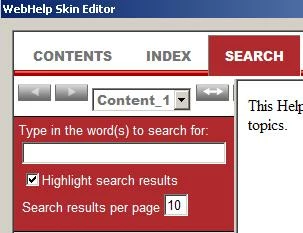
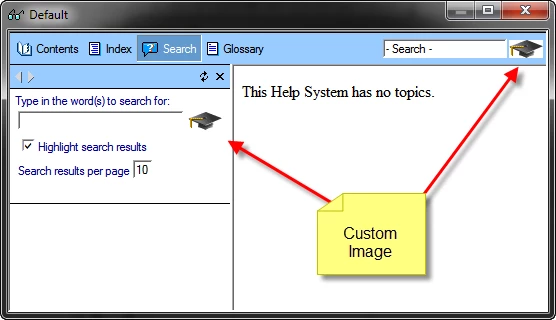
I created a new project with a different skin. I can't seem to locate where to go to attach the "Go" button to the search field in the search window. I've compared the WebHelp Skin Editor and the WebHelp Settings in the Single Source Layouts, and I'm not seeing what is different. Where is the field that lets me upload an image to that window?

Thank you!
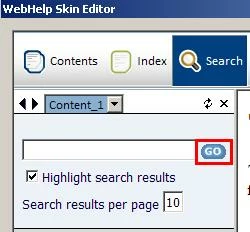
U-Go.JPG

R-Go.JPG

527
Translate
Report
Community guidelines
Be kind and respectful, give credit to the original source of content, and search for duplicates before posting. Learn more
community guidelines

correct answers 1 Correct answer

LEGEND , Dec 14, 2011 Dec 14, 2011

Hi there

Open the WebHelp skin editor.

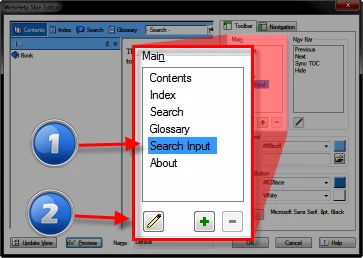
Click the Search Input item followed by the pencil item.

tmp1.PNG

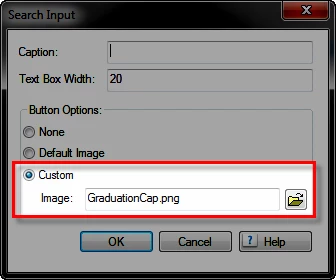
Choose Custom from the dialog and set the image you want.

tmp2.png

tmp3.png

Cheers... Rick

Helpful and Handy Links

RoboHelp Wish Form/Bug Reporting Form

Begin learning RoboHelp HTML 7, 8 or 9 within the day!

Adobe Certified RoboHelp HTML Training

SorcerStone Blog

RoboHelp eBooks

Translate
LEGEND ,
Dec 14, 2011 Dec 14, 2011

Hi there

Open the WebHelp skin editor.

Click the Search Input item followed by the pencil item.

tmp1.PNG

Choose Custom from the dialog and set the image you want.

tmp2.png

tmp3.png

Cheers... Rick

Helpful and Handy Links

RoboHelp Wish Form/Bug Reporting Form

Begin learning RoboHelp HTML 7, 8 or 9 within the day!

Adobe Certified RoboHelp HTML Training

SorcerStone Blog

RoboHelp eBooks

Translate
Report
Community guidelines
Be kind and respectful, give credit to the original source of content, and search for duplicates before posting. Learn more
community guidelines
Participant ,
Dec 14, 2011 Dec 14, 2011
LATEST

That worked! Thank you!

Translate
Report
Community guidelines
Be kind and respectful, give credit to the original source of content, and search for duplicates before posting. Learn more
community guidelines
Resources
RoboHelp Documentation
Download Adobe RoboHelp