
Exit
  • Global community
    • Language:
      • Deutsch
      • English
      • Español
      • Français
      • Português
  • 日本語コミュニティ
  • 한국 커뮤니티
0

"Unable to convert to Robohelp" information message

Guest
Sep 18, 2012 Sep 18, 2012

Hello,

I'm trying to open in RHv7 a project .hpj created in RHx5.

I take the following question
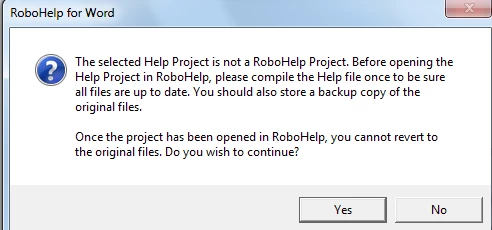
screen1.png

and applying yes  I take the follwoing information:
Unable to convert to Robohelp. The "........\general.rtf" file is missing.

However, the file is present in the location specified.

Finally I cannot open this project.

Any ideas what might go wrong?

1.2K
Translate
Report
Community guidelines
Be kind and respectful, give credit to the original source of content, and search for duplicates before posting. Learn more
community guidelines
LEGEND ,
Sep 18, 2012 Sep 18, 2012

This would seemto suggest that the help project's HPJ file was not created using RoboHelp. Are you sure it was? Do you have access to the HLP file? Could you try importing this into a new project?

Translate
Report
Community guidelines
Be kind and respectful, give credit to the original source of content, and search for duplicates before posting. Learn more
community guidelines
Guest
Sep 20, 2012 Sep 20, 2012

Hi,

thanks a lot for your reply!
I have the output .hlp file. How can I import it and produce the output again?
If I import it, it is loaded as external help file and no other files are loaded.

If I load manually each .rtf file I have, I don't take exactly the original outout.

Any suggestions?

Translate
Report
Community guidelines
Be kind and respectful, give credit to the original source of content, and search for duplicates before posting. Learn more
community guidelines
LEGEND ,
Sep 20, 2012 Sep 20, 2012

If you create a new project you can import a HLP file as part of the project's creation. It has been a long while since I've used RH for Word in anger but I don't believe you can import a HLP file however once the project has been created. You can and should be able to import your RTF files without any issue. Can you please provide us with some additional information as to what you are getting. A screen shop would be a good idea. You can add these via the forum's web interface by using the camera icon (see below).

adobe_forum_camera_icon.png

Translate
Report
Community guidelines
Be kind and respectful, give credit to the original source of content, and search for duplicates before posting. Learn more
community guidelines
Guest
Sep 21, 2012 Sep 21, 2012

Hello, thank you for the prompt reply.
Actually there is no issue while importing the rtf files. But comparing the output hlp file of my project with the original one, I can see much less topics.

In addition the format does not look that ok...For example, bullets in the unordered list are shown twice:

help_output.png

Translate
Report
Community guidelines
Be kind and respectful, give credit to the original source of content, and search for duplicates before posting. Learn more
community guidelines
LEGEND ,
Sep 21, 2012 Sep 21, 2012
LATEST

Do you have any Conditional Build Tags inside the source that your single source layout is filtering out? This won't explain the formatting but may explain the lack of expected content. As for the formatting it may just be a case of having to tidy up the source. RH for Word hasn't changed since before RHX5 so I'd have expected the content to upgrade successfully. If you want me to take a quick look at the project, zip up the source and the old RHX5 HLP file and email it to me at the email in my profile.

Translate
Report
Community guidelines
Be kind and respectful, give credit to the original source of content, and search for duplicates before posting. Learn more
community guidelines
Resources
RoboHelp Documentation
Download Adobe RoboHelp