
ShawnF_TechWriter
Known Participant
June 27, 2019
Question

Real Estate on Left Hand Side

  • June 27, 2019
  • 1 reply
  • 1196 views

The Facts:

RoboHelp 2019

Output to Responsive HTML 5

Import Word Doc

Azure_Blue Skin

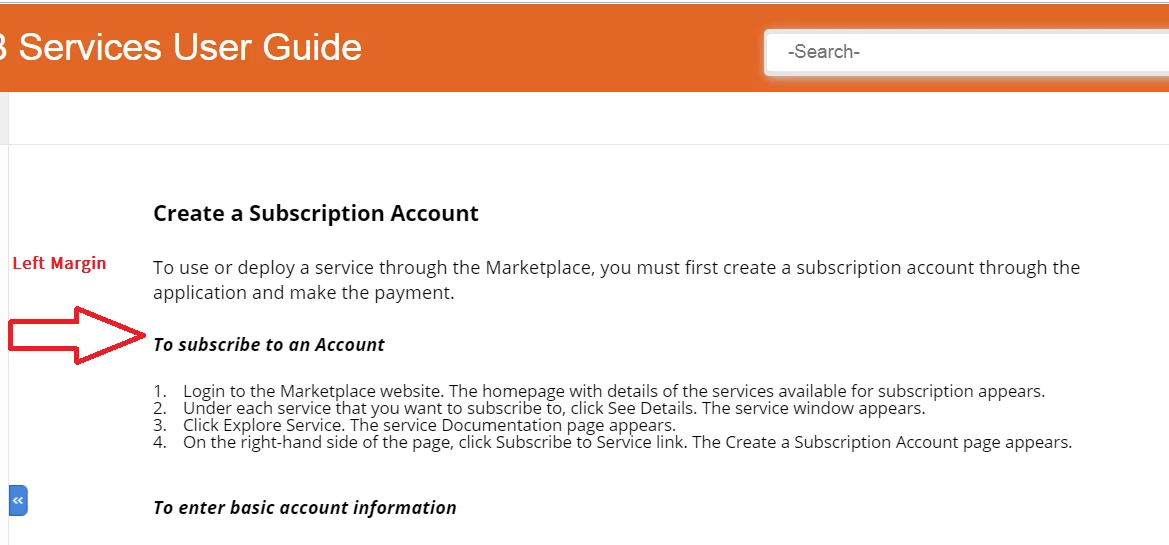
My RoboHelp projects (Import from Word) output is not flush to the left margin.

A coworker has produced RoboHelp projects (Responsive HTML 5) that were imported from FrameMaker and the output is flush to the left margin.

Is this configurable or a limitation?
    This topic has been closed for replies.

    1 reply

    Peter Grainge
    Community Expert
    Community Expert
    June 28, 2019

    You are both importing different documents so I think we can discount what is coming in from Fm.

    Does the Word document have margins applied to the styles?

    Have you looked at the CSS of the topic(s) created? It looks like a margin has been applied to the body tag.


    See www.grainge.org for free RoboHelp and Authoring information.

    @petergrainge

    Use the menu (bottom right) to mark the Best Answer or Highlight particularly useful replies. Found the answer elsewhere? Share it here.
    ShawnF_TechWriter
    Known Participant
    June 28, 2019

    No margins applied to styles in Word.

    Here's a screen cap of a typical topic in the project. No margins here, either. Unless I'm not looking in the right place.

    ShawnF_TechWriter
    Known Participant
    July 1, 2019

    Thanks for your responses. It appears that each topic uses two CSS.

    I've looked at each CSS file and I cannot see any left margin indentation or manipulation.

    Can't figure out how to attach the CSS files for your to take a look at.


    More discovery. So I first removed the default CSS from the topic and compiled. No change in left margin.

    However, after I removed the MongoDB CSS from the topic and compiled, the left margin is much better/reduced.