
Exit
  • Global community
    • Language:
      • Deutsch
      • English
      • Español
      • Français
      • Português
  • 日本語コミュニティ
  • 한국 커뮤니티
0

Remove borders around background images in toolbar..

Community Beginner ,
Aug 26, 2010 Aug 26, 2010

I'm using RH8 in Win 7 to output webhelp, and I'm creating a new skin. I've used the Webhelp skin editor to add button images and a toolbar background. But after generation, if the browser is resized to > the image width then the image repeats and the join between them is obvious:
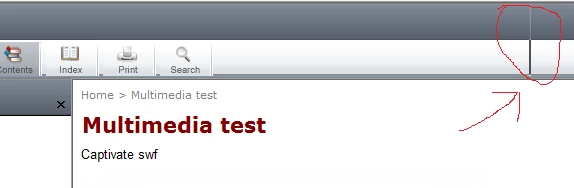
toolbar.png

I'm guessing that this is a css setting somewhere, but I don't know where.

I also want to remove the gap between the button images, and assume that there's a css tweak that can do that to.

Does anyone know how these borders and gaps can be removed?

Thanks

431
Translate
Report
Community guidelines
Be kind and respectful, give credit to the original source of content, and search for duplicates before posting. Learn more
community guidelines
Community Beginner ,
Aug 27, 2010 Aug 27, 2010
LATEST

OK, cancel this error - RH8 was bevhaving fine - the graphic came back from gfx with a thin border around it, and that caused the vertical bar when it repeated. Should have spotted this earlier, my bad.

Translate
Report
Community guidelines
Be kind and respectful, give credit to the original source of content, and search for duplicates before posting. Learn more
community guidelines
Resources
RoboHelp Documentation
Download Adobe RoboHelp