
Exit
  • Global community
    • Language:
      • Deutsch
      • English
      • Español
      • Français
      • Português
  • 日本語コミュニティ
  • 한국 커뮤니티
0

Resize Width of the frame in BrowserBasedHelp

Guest
Nov 23, 2010 Nov 23, 2010

Hi for All,

How can I do to resize the "width" of the frame as described in the example picture? The frame I want to increase the size is represented with a number (1) in the image.
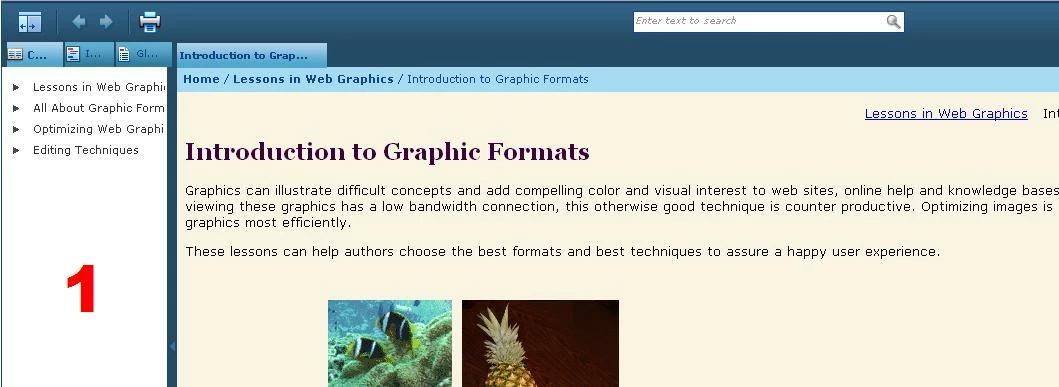
image.JPG

Regards,

Christian

951
Translate
Report
Community guidelines
Be kind and respectful, give credit to the original source of content, and search for duplicates before posting. Learn more
community guidelines
Community Expert ,
Nov 23, 2010 Nov 23, 2010

Here's an answer off one of the other threads in the RH HTML subject:

1. You can do this whole operation with the project open in RoboHelp. I would create a new custom skin first to try it on.

2. If your project is in source control, check out the skin file first (example fred.skn).

3. In Windows Explorer, find the .skn file - by default, it's stored in projectfolder\!SkinSubFolder!\skinfolder.

4. Open the .skn file in any text editor. Notepad works fine.

5. There are two lines that start with "frameset cols=" in the skin file. Default is <frameset cols="220,*"  etc.

6. Change the 220 to the number of columns you want. Make sure you change it in both places.

7. Save the skin file.

8. Generate the project with the edited skin and display the project. (If you open it in IE and your settings suppress ActiveX content, you will need to allow active content before the TOC pane resizes.


Good luck!

Translate
Report
Community guidelines
Be kind and respectful, give credit to the original source of content, and search for duplicates before posting. Learn more
community guidelines
Community Expert ,
Nov 23, 2010 Nov 23, 2010

Found the thread link - http://forums.adobe.com/message/2006771

Translate
Report
Community guidelines
Be kind and respectful, give credit to the original source of content, and search for duplicates before posting. Learn more
community guidelines
Guest
Nov 23, 2010 Nov 23, 2010

Hello Jeff,

Thanks for your reply. However, this setting does not work for me. That's because I'm using Browser Based Help.

Ragards,

Christian

Translate
Report
Community guidelines
Be kind and respectful, give credit to the original source of content, and search for duplicates before posting. Learn more
community guidelines
LEGEND ,
Nov 23, 2010 Nov 23, 2010

Hi there

Jeff gave you the information for WebHelp or FlashHelp and both of those are "browser based". Am I correct in assuming from your response that you are using the "Browser Based" version of AIR Help?

If that's the case, I'm not sure I've ever seen anyone document how to modify that.

Cheers... Rick

Helpful and Handy Links

RoboHelp Wish Form/Bug Reporting Form

Begin learning RoboHelp HTML 7 or 8 moments from now - $24.95!

Adobe Certified RoboHelp HTML Training

SorcererStone Blog

RoboHelp eBooks

Translate
Report
Community guidelines
Be kind and respectful, give credit to the original source of content, and search for duplicates before posting. Learn more
community guidelines
Guest
Nov 23, 2010 Nov 23, 2010

That's right Rick, I am using Browser Based Help version of AIR Help in RH v8.02.

Regards,

Christian

Translate
Report
Community guidelines
Be kind and respectful, give credit to the original source of content, and search for duplicates before posting. Learn more
community guidelines
Community Expert ,
Nov 23, 2010 Nov 23, 2010
LATEST

Yes, Christian, you got to stop calling it "BrowserBasedHelp" - it's known as browser-based AIR help (to distinguish it from the "regular" AIR help). As far as I've ever seen, there's no "skin" editing for either flavour of AIR help (yet - someday it will come, hopefully).

Translate
Report
Community guidelines
Be kind and respectful, give credit to the original source of content, and search for duplicates before posting. Learn more
community guidelines
Resources
RoboHelp Documentation
Download Adobe RoboHelp