
Known Participant
May 17, 2019
Question

Responsive HTML5 Output don't show all tabs and Next and Previous buttons also.

  • May 17, 2019
  • 2 replies
  • 2247 views

When I generate the Responsive HTML5 Output, sometimes all the tabs (Table of Contents, Indexd, Glossary, Filter, and Search), Previous button, and Next button don't appear in the output.
Why it happens and how to fix it? Any idea? I am using RH17.

Also, during the generation of the output, I see this message:
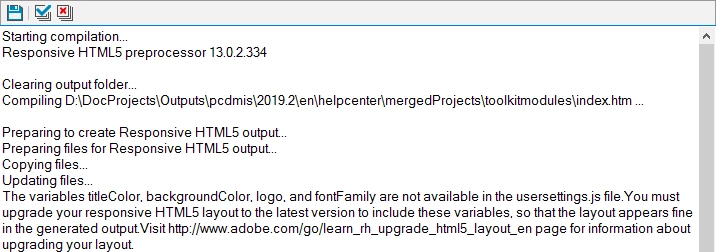
When I check the usersettings.js file, all the four variables are available in the file.

So, I am not sure. What's going on!

This topic has been closed for replies.

2 replies

Captiv8r
Legend
May 17, 2019

Have you defined a Browse Sequence? That's what those buttons are for.

Known Participant
May 17, 2019

Yes, I defined a browse sequence now and it brought back the Previous and Next buttons. But, still not those tabs.

Peter Grainge
Community Expert
Community Expert
May 20, 2019

Yes, I did that and its not working only in one of the merged project.


Please show me a screenshot of the project with the supplied skin missing the tabs.


See www.grainge.org for free RoboHelp and Authoring information.

@petergrainge

Use the menu (bottom right) to mark the Best Answer or Highlight particularly useful replies. Found the answer elsewhere? Share it here.
Jeff_Coatsworth
Community Expert
Community Expert
May 17, 2019

I suspect that you need to apply patches to your version of RH2017 and then reselect your HTML5 layout (using a slightly different name). One of them (I forget which) had issues that Adobe corrected, but couldn't apply to existing projects unless they were selected again.

Known Participant
May 17, 2019

I already applied patches for 2017. This is working for me for my other projects. It is not only working for one specific project even though it has the same structure as other projects.