
Restart Numbering does not work for a specific style inRH 2022.2.22
I have a style that I've used for every ordered list in my system (Proc 1). I've just recently updated to RH2022 from RH2020 and today noticed that I'm unable to use the Restart Numbering from tool in the Properties pane.
For example:
- To create the two following examples, I clicked the Numbered List icon in the header bar and selected the far left option, and:
- For the first example, i applied no style
- For the second example, i applied style "Proc 1"
- I added the text for the first step of the procedure
- I pressed shift+enter
- I added the intermitted line of text
- I pressed enter again
- I repeated step 1
- I added the text for the second step of the procedure
- In the properties pane, I entered the number 2 in the Restart Numbering from field.
This is the resulting HTML from the an ordered list with no style applied to the list.
<ol>
<li>This is the first step in a procedure</li>
</ol>
<p>This is a line of text. </p>
<ol>
<li style="" value="2">This is the second step in the procedure. </li>
</ol>
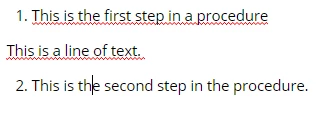
Here is a screenshot of how the text displays in the WYSIWYG editor:
This is the resulting HTML from when I do the same procedure with the "Proc 1" style applied.
<ol class="Proc1">
<li>This is the first step in the procedure</li>
</ol>
<p>This is a line of text. </p>
<ol class="Proc1">
<li style="counter-set: item1 1;">This is the second step in the procedure. </li>
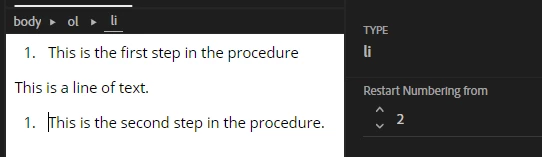
Here is a screenshot of how this appears in the WYSIWYG editor:
Using the HTML to change the values in "counter-set: item 1 1;" does nothing.
I have followed this exact same process dozens of times for this project and have never encountered this error before. Can someone please help me understand why my style is broken all of a sudden and how to fix it?
 AdChoices