
RH 10 Table editor
I am trying to create a standard table style using the table editor as part of my CSS:
- the header row needs to be bold
- it needs to have all borders, except the very first and last vertical borders.
I have spent most of the day struggling with the borders. At first I have getting double borders. I think there might be a bug in the table editor, because I get the borders perfect, but when I want to make row 1 bold, the borders disappear from row 1.
At last I got the borders 99% correct, except for one cell's border. The left side of the table is perfect. The right side of the table has a verticle border only on the first row, last column (see the image). I have copied the code from my stylesheet below. I don't understand why one rule would work for all rows, except row 1. Please help!
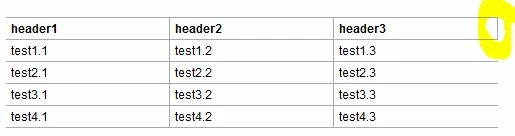
table.Table_Normal {
padding: 0px;
x-border-spacing: 0px;
x-row-pat-1: 1;
x-row-pat-1-name: t1Row;
x-row-pat-count: 2;
x-row-pat-2: 1;
x-row-pat-2-name: t2Row;
border-left-style: None;
border-left-width: 1px;
border-left-color: #a7a9ac;
border-top-style: Solid;
border-top-width: 1px;
border-top-color: #a7a9ac;
x-1st-row: 1;
x-1st-row-name: t1st;
x-last-col: 1;
x-last-col-name: last;
font-size: 9pt;
}
table.Table_Normal td {
padding-left: 4px;
padding-right: 4px;
padding-top: 2px;
padding-bottom: 2px;
}
table.Table_Normal tr.t1st td {
font-size: 9pt;
font-weight: bold;
border-right-style: Solid;
border-right-width: 1px;
border-right-color: #a7a9ac;
border-bottom-style: Solid;
border-bottom-width: 1px;
border-bottom-color: #a7a9ac;
}
table.Table_Normal tr.t1Row td {
font-size: 9pt;
border-right-style: Solid;
border-right-width: 1px;
border-right-color: #a7a9ac;
border-bottom-style: Solid;
border-bottom-width: 1px;
border-bottom-color: #a7a9ac;
}
table.Table_Normal tr.t2Row td {
font-size: 9pt;
border-right-style: Solid;
border-right-width: 1px;
border-right-color: #a7a9ac;
border-bottom-style: Solid;
border-bottom-width: 1px;
border-bottom-color: #a7a9ac;
}
table.Table_Normal tr.t1st td.last {
font-size: 9pt;
border-right-style: None;
border-right-width: 1px;
border-right-color: #a7a9ac;
}
table.Table_Normal tr.t1Row td.last {
font-size: 9pt;
border-right-style: None;
border-right-width: 1px;
border-right-color: #a7a9ac;
}
table.Table_Normal tr.t2Row td.last {
font-size: 9pt;
border-right-style: None;
border-right-width: 1px;
border-right-color: #a7a9ac;
}
 AdChoices