
Exit
  • Global community
    • Language:
      • Deutsch
      • English
      • Español
      • Français
      • Português
  • 日本語コミュニティ
  • 한국 커뮤니티
0

RH 10 Table editor

New Here ,
Sep 10, 2012 Sep 10, 2012

I am trying to create a standard table style using the table editor as part of my CSS:

  • the header row needs to be bold
  • it needs to have all borders, except the very first and last vertical borders.

I have spent most of the day struggling with the borders. At first I have getting double borders. I think there might be a bug in the table editor, because I get the borders perfect, but when I want to make row 1 bold, the borders disappear from row 1.

At last I got the borders 99% correct, except for one cell's border. The left side of the table is perfect. The right side of the table has a verticle border only on the first row, last column (see the image). I have copied the code from my stylesheet below. I don't understand why one rule would work for all rows, except row 1. Please help!
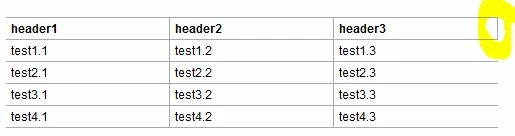
Table.JPG

table.Table_Normal {

padding: 0px;

x-border-spacing: 0px;

x-row-pat-1: 1;

x-row-pat-1-name: t1Row;

x-row-pat-count: 2;

x-row-pat-2: 1;

x-row-pat-2-name: t2Row;

border-left-style: None;

border-left-width: 1px;

border-left-color: #a7a9ac;

border-top-style: Solid;

border-top-width: 1px;

border-top-color: #a7a9ac;

x-1st-row: 1;

x-1st-row-name: t1st;

x-last-col: 1;

x-last-col-name: last;

font-size: 9pt;

}

table.Table_Normal td {

padding-left: 4px;

padding-right: 4px;

padding-top: 2px;

padding-bottom: 2px;

}

table.Table_Normal tr.t1st td {

font-size: 9pt;

font-weight: bold;

border-right-style: Solid;

border-right-width: 1px;

border-right-color: #a7a9ac;

border-bottom-style: Solid;

border-bottom-width: 1px;

border-bottom-color: #a7a9ac;

}

table.Table_Normal tr.t1Row td {

font-size: 9pt;

border-right-style: Solid;

border-right-width: 1px;

border-right-color: #a7a9ac;

border-bottom-style: Solid;

border-bottom-width: 1px;

border-bottom-color: #a7a9ac;

}

table.Table_Normal tr.t2Row td {

font-size: 9pt;

border-right-style: Solid;

border-right-width: 1px;

border-right-color: #a7a9ac;

border-bottom-style: Solid;

border-bottom-width: 1px;

border-bottom-color: #a7a9ac;

}

table.Table_Normal tr.t1st td.last {

font-size: 9pt;

border-right-style: None;

border-right-width: 1px;

border-right-color: #a7a9ac;

}

table.Table_Normal tr.t1Row td.last {

font-size: 9pt;

border-right-style: None;

border-right-width: 1px;

border-right-color: #a7a9ac;

}

table.Table_Normal tr.t2Row td.last {

font-size: 9pt;

border-right-style: None;

border-right-width: 1px;

border-right-color: #a7a9ac;

}

995
Translate
Report
Community guidelines
Be kind and respectful, give credit to the original source of content, and search for duplicates before posting. Learn more
community guidelines

correct answers 1 Correct answer

LEGEND , Sep 17, 2012 Sep 17, 2012

Hi,

Sorry this took so long, but it ended up below a string of other things. Anyway, why it doesn't work is simple: The RoboHelp table editor does not consider the last cell of the first row to be part of the 'last column' definition. But here is some CSS that fixed it:

Replace your style for table.Table_Normal tr.t1st td.last with:

table.Table_Normal tr.t1st td:last-child {

          font-size: 9pt;

          border-right-style: None;

          border-right-width: 1px;

          border-right-color: #a

...
Translate
LEGEND ,
Sep 11, 2012 Sep 11, 2012

Hi,

Try to replace the code for the last cell with this:

table.Table_Normal tr.t1st td.last {

font-size: 9pt;

border-right-style: none !important;

}

Greet,

Willam

Translate
Report
Community guidelines
Be kind and respectful, give credit to the original source of content, and search for duplicates before posting. Learn more
community guidelines
New Here ,
Sep 12, 2012 Sep 12, 2012

Hi Willem

No luck.

Translate
Report
Community guidelines
Be kind and respectful, give credit to the original source of content, and search for duplicates before posting. Learn more
community guidelines
LEGEND ,
Sep 17, 2012 Sep 17, 2012

Hi,

Sorry this took so long, but it ended up below a string of other things. Anyway, why it doesn't work is simple: The RoboHelp table editor does not consider the last cell of the first row to be part of the 'last column' definition. But here is some CSS that fixed it:

Replace your style for table.Table_Normal tr.t1st td.last with:

table.Table_Normal tr.t1st td:last-child {

          font-size: 9pt;

          border-right-style: None;

          border-right-width: 1px;

          border-right-color: #a7a9ac;

}

This will target only the last cell of the first row of your table.

Greet,

Willam

Translate
Report
Community guidelines
Be kind and respectful, give credit to the original source of content, and search for duplicates before posting. Learn more
community guidelines
New Here ,
Sep 18, 2012 Sep 18, 2012
LATEST

Hi William

Thank you very much! I appreciate your help.

Kind regards

Translate
Report
Community guidelines
Be kind and respectful, give credit to the original source of content, and search for duplicates before posting. Learn more
community guidelines
Resources
RoboHelp Documentation
Download Adobe RoboHelp