
October 12, 2009
Question

RH 7: Share topics across multiple RH files?

  • October 12, 2009
  • 1 reply
  • 1424 views

I'm working on an application with over a dozen separate modules.  Each of those modules has its own RoboHelp file, but there are 6 or 7 introductory topics that we really need to share across all of the modules.

Currently, we're copying and pasting those pages individually into each file/module.  As you can imagine, when we need to update one of those introductory topics it's a real pain cascading those changes through all 12+ files.

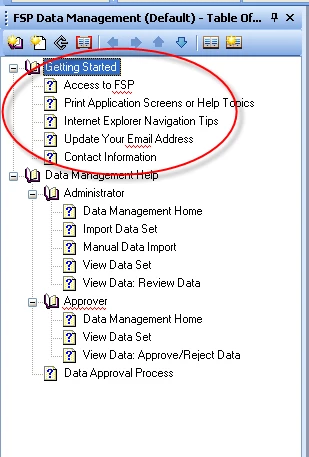
Is there any way that we can store those files in a central location but share them within all the other files so that they appear as the first topics in each file's table of contents?  (As in the picture below--the Getting Started topics would be the shared topics, but they would appear to be an organic part of any given module's Help TOC.)
Thanks so much!

(PS, if the solution is "Buy RH 8, that would be good to know, too.)

    This topic has been closed for replies.

    1 reply

    Captiv8r
    Legend
    October 12, 2009

    Hi there

    This would seem to cry out for creating a merged setup. In a Merged setup you have one project that is the "control" or the "master". Then you have the subordinate projects that are added. So each of the individual projects could be made a master, then you would merge in the smaller project with the common files.

    You create a Merge by inserting a reference within the Table of Contents. And there is no need to acquire 8 to do it. You have been able to create Merged projects for several RoboHelp versions now.

    Cheers... Rick

    Helpful and Handy Links

    RoboHelp Wish Form/Bug Reporting Form

    Begin learning RoboHelp HTML 7 or 8 within the day - $24.95!

    Adobe Certified RoboHelp HTML Training

    SorcerStone Blog

    RoboHelp eBooks

    October 13, 2009

    My fellow TWs & I started playing with merging this morning, per your recommendation.  It is definitely better than the present arrangement (making the same updates to the intro for all umpteen modules by hand), but it still requires a regenerate for all modules every time there is a single change to the intro.  This is particularly awkward because we don't self-publish; all updates have to go through development, testing, and IV&V.  That's a lot of person-hours to put in just because someone's contact info needed to be updated, for example.

    But based on some of the info in the link Leon sent us, it seems like it might be possible to create dummy pages in each of our modules, all of which invidibly re-direct to independent overview pages that would be maintained in a separate folder.  We haven't had time to really tear into this possibility, and I think it may require our developers' help, but I thought I'd post here in case anyone knows of a simple way to do this or of any dreadful pitfalls to avoid.

    Thanks so much--this has been very helpful for us so far!

    --Melanie

    October 15, 2009

    Hi Melanie

    Unless you are doing something dreadfully wrong, there should be no need to regenerate to see changes. This is because the content of the merged file is inserted at the time the help system loads up.

    It would be helpful if you could explain what your output is. CHM, WebHelp, FlashHelp?

    Cheers... Rick

    Helpful and Handy Links

    RoboHelp Wish Form/Bug Reporting Form

    Begin learning RoboHelp HTML 7 or 8 within the day - $24.95!

    Adobe Certified RoboHelp HTML Training

    SorcerStone Blog

    RoboHelp eBooks


    Hi Rick--

    The output is WebHelp. We generate each module and then send the generated files to the developers to integrate into the application and build.

    The problem (if I understand the process correctly) is that we'd be merging the same set of topics--the overview--with a bunch of different modules.  So duplicates of the overview files are stored within each module and the TOC points to those internal duplicates.  So to make edits to the overview topics, the topics have to be edited and then re-merged with each module, generated, and sent to the developers.

    For the moment, our sloppy workaround is to create a dummy topic for each overview topic that automatically redirects to the overview content, which is published separately.

    To redirect, we put this code in the head, where the amazon.com url is replaced with the url of the destination page.

     <script language="javascript" type="text/javascript">
         <!--
         window.location="http://www.amazon.com";
         // -->
    </script>

    If have any further suggestions, we'd be happy to hear them--thanks so much for your help!

    --Melanie