
Exit
  • Global community
    • Language:
      • Deutsch
      • English
      • Español
      • Français
      • Português
  • 日本語コミュニティ
  • 한국 커뮤니티
0

RH PDF generation problems: wrong (A4) page size and Word 2013

New Here ,
Nov 15, 2013 Nov 15, 2013

I am trying to generate a review PDF of a handful or topics. It generates, but first I get an error:
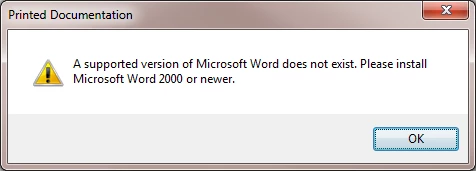
Capture2.png

(I have Word 2013 installed.)

Then the PDF generates, but it is A4. I never use metric for anything, so where it is picking up A4 I can't imagine. I have all my PDF settings to letter. I checked Edit > Properties > PDF settings > Advanced settings, everything. It's all set correctly. Even all of my Word templates (which I am not using for this project anyway) are letter. Like I said: No metric pages or units of measure used ever. Not in Word, not in FrameMaker, not in Acrobat. Why does RoboHelp default to A4?

And why does it not consider Word 2013 "newer" than Word 2000?

1.0K
Translate
Report
Community guidelines
Be kind and respectful, give credit to the original source of content, and search for duplicates before posting. Learn more
community guidelines
Community Expert ,
Nov 18, 2013 Nov 18, 2013

Word 2013 is not supported by any version of Rh. The first part is correct so Rh throws the error message notwithstanding the second part is wrong.

You haven't mentioned the version of Rh you are using (please see the forum sticky topics) but you might find you can right click Properties in the print layout and generate to Word there. Using that route you may find the answer to the A4 issue. I'm puzzled by that as normally Rh defaults to Letter.

Are you using the PDF add-on or a full version of Acrobat, if the latter which one?


See www.grainge.org for RoboHelp and Authoring tips

@petergrainge

Help others by clicking Correct Answer if the question is answered. Found the answer elsewhere? Share it here. "Upvote" is for useful posts.
Translate
Report
Community guidelines
Be kind and respectful, give credit to the original source of content, and search for duplicates before posting. Learn more
community guidelines
New Here ,
Nov 18, 2013 Nov 18, 2013

RH v10.

Acrobat Professional vXI.

Here's what the right-click properties menus look like. The last one shows letter page size.

Capture1.png

Now, however, I cannot generate a PDF at all. It stops at the Word error message. I do not want to use Word for this project at all. How do I stop RH from even looking for a version of Word? I tried to stick with PDF (not Word doc...see first screen). But I get the Word error and nothing else now.

Translate
Report
Community guidelines
Be kind and respectful, give credit to the original source of content, and search for duplicates before posting. Learn more
community guidelines
Community Expert ,
Nov 19, 2013 Nov 19, 2013

Try this. If you right click Properties on the layout, you can generate to Word 2013. Create a Word document but not a PDF from Rh. In Word, generate the PDF. Same problem?

That will at least establish whether the issue is between Word and Acrobat.

You cannot stop Rh looking for Word because a document has to be created to be sent to PDF. Same for any PDF tool, it has to be given the source, it cannot create it.


See www.grainge.org for RoboHelp and Authoring tips

@petergrainge

Help others by clicking Correct Answer if the question is answered. Found the answer elsewhere? Share it here. "Upvote" is for useful posts.
Translate
Report
Community guidelines
Be kind and respectful, give credit to the original source of content, and search for duplicates before posting. Learn more
community guidelines
New Here ,
Nov 19, 2013 Nov 19, 2013

No difference.

Capture1.png

So do I have to remove Office 2013 an reinstall an older version? Or is there some way to make RH use FrameMaker to produce the PDF? I'm not a big Word fan, so if I can avoid it altogether and use Frame instead, that is a plus.

Translate
Report
Community guidelines
Be kind and respectful, give credit to the original source of content, and search for duplicates before posting. Learn more
community guidelines
Community Expert ,
Nov 21, 2013 Nov 21, 2013
LATEST

I just reread and realised you are using the Review menu. Word 2013 will not work with that. The workaround I mentioned is only for Printed Documentation.

Fm output was never an option.


See www.grainge.org for RoboHelp and Authoring tips

@petergrainge

Help others by clicking Correct Answer if the question is answered. Found the answer elsewhere? Share it here. "Upvote" is for useful posts.
Translate
Report
Community guidelines
Be kind and respectful, give credit to the original source of content, and search for duplicates before posting. Learn more
community guidelines
Resources
RoboHelp Documentation
Download Adobe RoboHelp