
RH10 Create New Style Sheet from Existing
The instructions Adobe posted for Robohelp 10 are as follows:
Create a style sheet
The new style sheet (default.css) is the default until you create a style sheet or link another style sheet to a new topic.
- Click the Style Sheet button
 . If necessary, select View > Toolbars > Formatting to view the toolbar.
 - Select New.
- In Name, type a filename and include the .css extension.
- In Folder, select a location.
- (Optional) To base your new style sheet on an existing one, select Copy Styles From. Select a style sheet.
- Click Create, create new styles, and click OK.
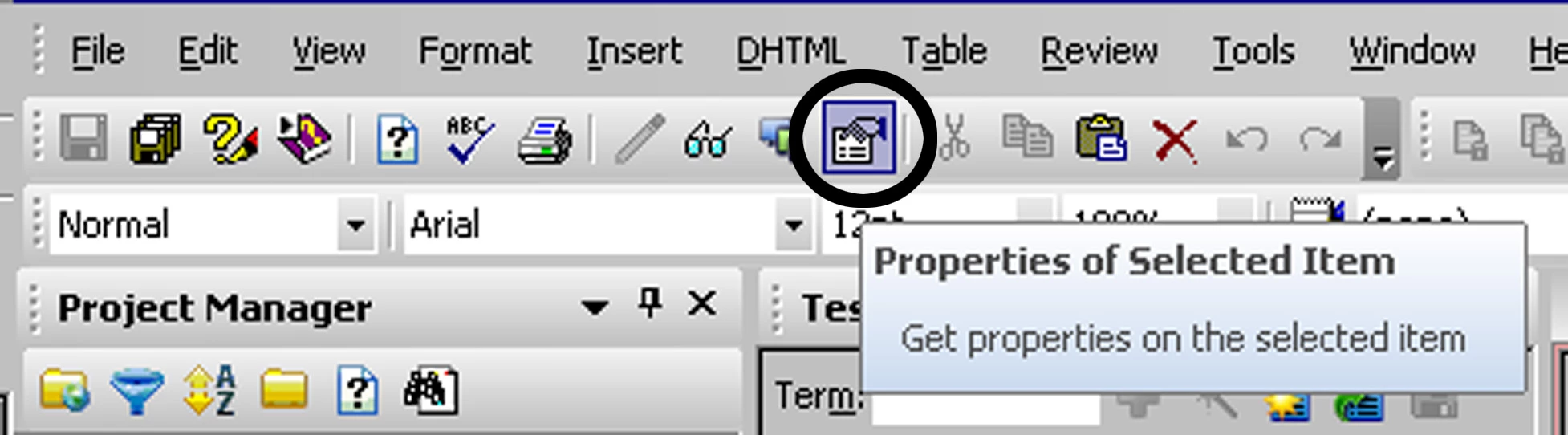
The problem is, I don't have the Style Sheet icon (shown in Step 1) on my formatting menu, or any other menu. The closest thing I have is the Properties of Selected Item icon, which opens to your style sheets when you click it from a topic. However, there is no "Copy Styles From" selection on any tab, or in any dropdown.
I can copy the .css file and give it a new name, attach it to a topic and edit the attributes of the styles and hence create a new style sheet. But if Adobe says there's a way to do it within Robohelp with a "Copy Styles From" selection, I'd like to know how it works. Does anyone know where it is? Thanks!
 AdChoices