


Tejas Dandekar
Inspiring
June 8, 2021
Question

RH2020 - 'Skip to Main Content' link seen above header for some users

  • June 8, 2021
  • 8 replies
  • 2064 views

Hello,

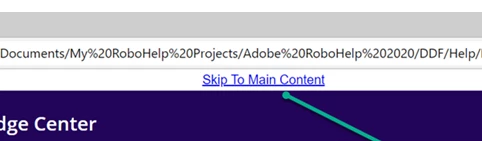
We have an online help developed by using the frameless output. Everything works fine. One of the user noticed this link Skip to Main Content above the header. Any idea how can this link be disabled?
This topic has been closed for replies.

8 replies

Participant
February 22, 2023

I am using 2020.32 and see

<button class="placeholder skip-to-content-link" data-trigger="EVT_FOCUS_ELEMENT_IN_IFRAME" data-attr="title:@KEY_LNG.SkipToMainContent; aria-label:@KEY_LNG.SkipToMainContent;" data-text="@KEY_LNG.SkipToMainContent" style="width: auto;" role="link"></button>


It is showing up in the middle of the generated HTML page. But we don't see it any of the project source and we don't know how to disable it before generating the output.


HELP?!

Jeff_Coatsworth
Community Expert
Community Expert
July 22, 2024

@Vicki2854470683xy - you wouldn't see it in the project source because it's added upon generation from the skin (as shown above).

Peter Grainge
Community Expert
Community Expert
June 18, 2021

The link should only be seen by anyone who has configured their browser with accessibility settings.

________________________________________________________
See www.grainge.org for free Authoring and RoboHelp Information

Use menu (bottom right) to mark as Best Answer or to Highlight particularly useful replies. Found the answer elsewhere? Share it here.
Vivek Kumar
Adobe Employee
Adobe Employee
June 18, 2021

Amber is correct. This was added to comply with the accessibility guidelines. It is for the users who want to use keyboard only for the navigation. When you have lots of links to navigate to reach the main content, this helps bypass those.

Known Participant
July 22, 2024

Hi

A problem I am encountering with the Link to Main Content is with SharePoint.  We pubslish our Frameless RH output to a SharePoint Document library.  When I click on the Link to Main Content, it takes the use to the SharePoint library, displaying the full directory of files there.  That is not good.


John

Jeff_Coatsworth
Community Expert
Community Expert
July 22, 2024

@johnhaller - that sounds like either a bad link or a bad setting in the SP settings. What version of RH are you using? Does it behave properly if you generate locally (not using the SP flavour of output)?

Community Expert
June 8, 2021

I don't exactly know what it's used for, but it sounds like an accessibility feature for people with a disability to quickly jump to the content rather than tabbing through all menus and things.


So if accessibility is important for you, it might be a bad idea to disable.


(This does suggest that maybe the affected users have some sort of accessibility extension installed? or javascript blocked or a browser that doesn't support some feature? Just a couple more ideas to check out.)

Inspiring
June 8, 2021

Hi Tejas,

If you want to completely disable it, then select the Display as "None" in the skip to main container options.

In Output Preset, Edit your preset, go to Layout-->Skin Edit -->In Skin tab, go to Homepage --> Top Section--> Skip content container-->Layout-->Display-->None


Participant
February 10, 2023

Hey @Achal__ , Getting the same issue with HTML5 skins in RoboHelp 2019. And this solution is not applicable as there is no "Skip content container" option to disable. Can you help?

Community Expert
June 8, 2021

Also could be something to do with extensions, so check that as well.


Tejas Dandekar
Inspiring
June 8, 2021

Ok. Let me check.

Tejas Dandekar
Inspiring
June 8, 2021

Would it be some accessibility setting related to the browser?

Community Expert
June 8, 2021

Sounds like a browser issue then. Do you now what they are using?

Community Expert
June 8, 2021

You've set a height for skip-content-container in the skin and changed some other settings for skip-content-link?

Tejas Dandekar
Inspiring
June 8, 2021

Hmm, no. Also, only some users reported this. I tried and I don't see this.