
Rasterdan2U
Known Participant
February 16, 2010
Question

RH8 crashes when starting the application

  • February 16, 2010
  • 1 reply
  • 1380 views

Everytime i attempt to start RH8 the splash screen pops up and starts loading but when it gets to Loading HTML Editors, it crashes with the following:
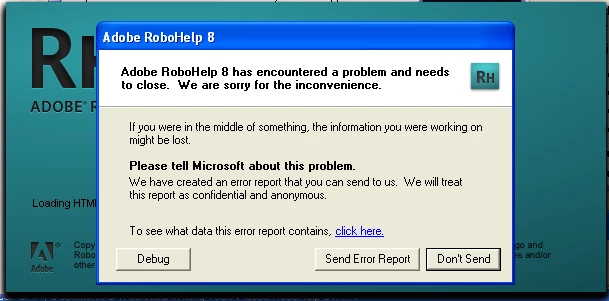
I have performed a repair and nothing has changed.  I suppose it will be the uninstall then reinstall but i did not want to go that route without checking to see if anyone else has encountered this problem.

    This topic has been closed for replies.

    1 reply

    Rasterdan2U
    Known Participant
    February 16, 2010

    Uninstall and reinstall did not work either.  Same problem.  RoboHelp 8 crashes starting up every time it gets to loading html editors.

    Peter Grainge
    Community Expert
    Community Expert
    February 16, 2010

    Are you starting RH from the start menu (no specific project) or opening a project from Windows Explorer?

    I've seen RH throw the error but the second attempt works. Certainly I have not know it repeatedly error other than when a specific project is involved.

    This was working for you so has something in the environment changed?


    See www.grainge.org for RoboHelp and Authoring tips

    @petergrainge

    Use the menu (bottom right) to mark the Best Answer or Highlight particularly useful replies. Found the answer elsewhere? Share it here.
    johndaigle
    Legend
    February 16, 2010

    Nasty one this. Normally you can identify that it is project related - some projects cause issues and others don't - or it is installation related - an uninstall and reinstall fixes it. You are not at the point of opening a project but a reinstall hasn't fixed it.

    It might be worth trying the uninstall again but this time with the free RevoUninstaller. A number of people have had success with that. Use the most advanced option but do not the instructions and only delete stuff marked bold at the end. Obviously, at your own risk.

    Adobe's site does have a troubleshooting guide for this sort of situation. Post back if the above does not help and you cannot find the article.


    See www.grainge.org for RoboHelp and Authoring tips

    @petergrainge


    What's really odd is that it apparently was working before this happened, so Peter's right to be asking "what changed"?  I don't know that much about hibernation, but that does seem to be a candidate for mischief since it was coming out of hibernation when this happened.

    I don't suppose you have a Windows Restore Point you could revert to at the time everything was ok? That's worth a try given the trouble you've already gone through.

    It may not make any difference, but it would also be helpful to know what OS (XP, Vista, Win7) you are using. 64-bit?

    Also, the error dialog has a Debug button and a Click here link to see the data that is being sent. It might be helpful to have that info as well if we need to go to engineering with this.

    ...just graspin' here.

    John

    John DaigleAdobe Certified RoboHelp and Captivate InstructorNewport, Oregon