
Rasterdan2U
Known Participant
February 16, 2010
Question

RH8 crashes when starting the application

  • February 16, 2010
  • 1 reply
  • 1380 views

Everytime i attempt to start RH8 the splash screen pops up and starts loading but when it gets to Loading HTML Editors, it crashes with the following:
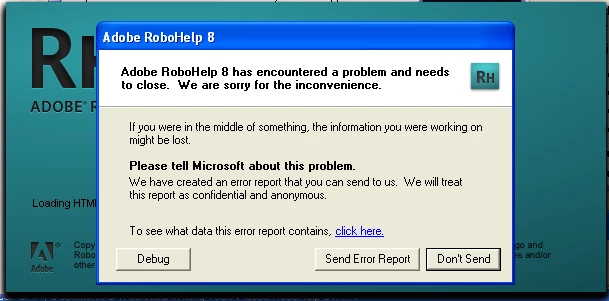
I have performed a repair and nothing has changed.  I suppose it will be the uninstall then reinstall but i did not want to go that route without checking to see if anyone else has encountered this problem.

    This topic has been closed for replies.

    1 reply

    Rasterdan2U
    Known Participant
    February 16, 2010

    Uninstall and reinstall did not work either.  Same problem.  RoboHelp 8 crashes starting up every time it gets to loading html editors.

    Peter Grainge
    Community Expert
    Community Expert
    February 16, 2010

    Are you starting RH from the start menu (no specific project) or opening a project from Windows Explorer?

    I've seen RH throw the error but the second attempt works. Certainly I have not know it repeatedly error other than when a specific project is involved.

    This was working for you so has something in the environment changed?


    See www.grainge.org for RoboHelp and Authoring tips

    @petergrainge

    Use the menu (bottom right) to mark the Best Answer or Highlight particularly useful replies. Found the answer elsewhere? Share it here.
    Rasterdan2U
    Known Participant
    February 18, 2010

    I have solved my problem.  Switching to one video card got me on the right track in the previous post.  I was attempting to try a previous restore point and hit the F2 button which opened the BIOS for my laptop.  I started poking around in there to see what options were available and what setting options were selected.

    I found an interesting dock setting that allows the video card in the laptop to act as a primary and the dock video card to work as a secondary.  This allows my laptop screen to stay on and not require a hot dock.  It also allows RoboHelp to open properly.  There must be something in RH8 that was not happy about running from the secondary video card set as primary.  It has been working perfectly for years this way but I guess some windows update changed that now.

    This is a very nice setup though, a dell laptop in a d-dock with a pci dual video card.  It allows the laptop screen plus another monitor off the dvi port on back of the dock, plus 2 more monitors off the dual video card allowing 4 monitors.  It sounds like a lot but it allows me to use the laptop for email and helpdesk calls while using on monitor for solidworks, another with robohelp, and the 4th with photoshop, word and sometimes illustrator.

    Anyway, my system works better than ever and RH8 seems to be working normally now.  I think that there was a windows update the other day that started this whole problem rolling.  A rather odd solution to a nonstandard setup.  I wish our IT guys would have told me about this BIOS setting.  They are just trying to keep their heads above water while a few of us are pushing our computers to the maximum of their capabilities and they don't want to use their resources to really fix our problems.  They would rather reformat our drives and load the last image that worked to solve problems.  Brutal.


    One additional note, the DVI connection on the back of my docking station was also causing some problems with RH8.  Once i switched my display from the DVI to VGA, it seems to be working with all displays.