Exit
  • Global community
    • Language:
      • Deutsch
      • English
      • Español
      • Français
      • Português
  • 日本語コミュニティ
  • 한국 커뮤니티
0

RH9 and Visio Error

Participant ,
Jul 08, 2011 Jul 08, 2011

I created a flow chart in Visio, and saved it as an html file. I imported that file into RH9, and got an error message when I tried to view it. This error displays even after I close Visio. I verfied that the file is not displaying in the browser.
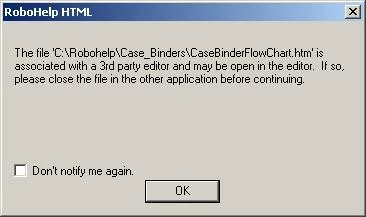
RHError.JPG

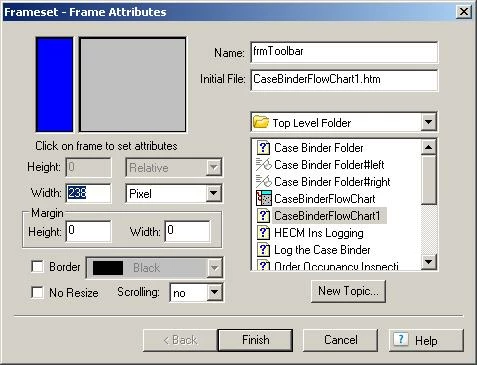
When you click OK, you get this:

RHError2.JPG

When you click Finish, the dialog closes. If you click New Topic, you create a new empty topic with that name as the topic title - the flowchart isn't in the topic. If you attempt to view the original flowchart, the sequence begins again. I have no idea what the second dialog is for, but so far it hasn't done anything useful.

I could save the flowchart as a PDF, but I was hoping to create hotspots on the chart to link to topics. Is this not do-able?

Thanks!

644
Translate
Report
Community guidelines
Be kind and respectful, give credit to the original source of content, and search for duplicates before posting. Learn more
community guidelines

correct answers 1 Correct answer

Community Expert , Jul 08, 2011 Jul 08, 2011

You need to create a JPG from Visio and then in RoboHelp you can create hotspots linking to topics.


See www.grainge.org for RoboHelp and Authoring tips

@petergrainge

Translate
Community Expert ,
Jul 08, 2011 Jul 08, 2011

You need to create a JPG from Visio and then in RoboHelp you can create hotspots linking to topics.


See www.grainge.org for RoboHelp and Authoring tips

@petergrainge

Help others by clicking Correct Answer if the question is answered. Found the answer elsewhere? Share it here. "Upvote" is for useful posts.
Translate
Report
Community guidelines
Be kind and respectful, give credit to the original source of content, and search for duplicates before posting. Learn more
community guidelines
Participant ,
Jul 08, 2011 Jul 08, 2011
LATEST

The jpg worked perfectly. Thanks!

Translate
Report
Community guidelines
Be kind and respectful, give credit to the original source of content, and search for duplicates before posting. Learn more
community guidelines
LEGEND ,
Jul 08, 2011 Jul 08, 2011

Hi there

To fix the initial issue, click Tools > Options > File Association and enable "Use Default Editor".

tmp1.PNG

The fact that you are seeing the Frameset properties seems to suggest that Visio creates a frameset to present this stuff. Do you see other HTML pages?

Cheers... Rick

Helpful and Handy Links

RoboHelp Wish Form/Bug Reporting Form

Begin learning RoboHelp HTML 7, 8 or 9 within the day!

Adobe Certified RoboHelp HTML Training

SorcerStone Blog

RoboHelp eBooks

Translate
Report
Community guidelines
Be kind and respectful, give credit to the original source of content, and search for duplicates before posting. Learn more
community guidelines
Resources
RoboHelp Documentation
Download Adobe RoboHelp