Participating Frequently
May 16, 2011
Answered

RH9 - resource manager notifies about files out of sync, but all attempts to fix it fail

  • May 16, 2011
  • 2 replies
  • 1828 views

Hello,

I tried to find similar posts but with the forum search feature broken I could not find anything useful.


I am a new user of RoboHelp HTML 9 and am learning the product.

My platform is a desktop PC running Windows XP with SP3.


As I proceed I am building a trial project using new features as I go.

When I open the project now I get this message:
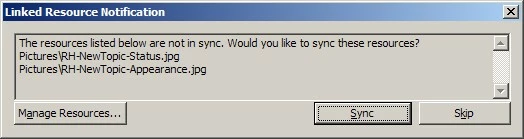
Even if I just click Skip and close it, it pops up again later.

Clicking Sync or going to the Resource Manager (RM) fails to fix these links.


In Manage Linked Resources in the RM I get the following:
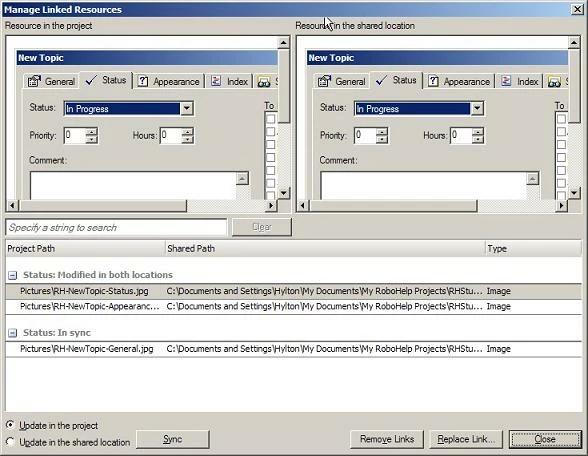

The first "Modified in both locations" photo displayed in the left "Resource in the project" pane visually looks the same as the one in the right "Resource in the shared location" pane.


The same applies to the second photo.


in my attempts to fix this problem, clicking any combination of the buttons (Sync/Replace Link) and radio-buttons (Update in the project/Update in the shared location) do not work for either file. I always get the same result: "Unable to update file(s)".


I am wary of using Remove Links because I want the link to be retained so RM can notify if someone changes the file, and if removed I don't know how to restore the links (if at all possible).


What could be the cause of the problem? How can I fix it? (i.e. resync the links).

Thanks!

This topic has been closed for replies.
Correct answer Peter Grainge

Aditi should be safely tucked up in bed now so I'll respond.

The idea of Resource Manager is that it is somewhere that you can access for all your projects. You may also want it accessible by others who update the files, Marketing may update images for example. For that reason I guess the idea of someone saving it within a single project might not have occurred to anyone.

You can move the folder using Windows Explorer but it will break all the links and you will have to relink them. Aditi may know a back door way of fixing it and I'll have to leave her to comment on whether it will fix the problem for sure.


See www.grainge.org for RoboHelp and Authoring tips

@petergrainge


This is a longshot so only try it on a copy of your project.

Create a copy of the Resource folder, it is important you do not delete the existing folder at this stage.

With the copy of your project closed, open rhsharedresource.apj in a text editor such as Notepad. You will see the current path and can edit it there to show the path to the new Resource folder.

Trash the CPD file in the copy and then reopen the project.

I haven't tried it and I have to say I am doubtful it will work because of other data in rhsharedresource.apj. However, the worst that can happen is it doesn't work. Your original project will still be pointing to the resource within the project and untouched by this procedure.

Let us know if it works.


See www.grainge.org for RoboHelp and Authoring tips

@petergrainge

2 replies

Peter Grainge
Community Expert
Community Expert
May 17, 2011

Welcome to the forum Hylton.

This is new functionality in RoboHelp 9 so we don't have much experience with it. I see you have stored your project in My Documents and often this leads to path names exceeding the 255 character limit.

If you move the project it may  break the links anyway but after fixing them all maybe then synchronising will work.


See www.grainge.org for RoboHelp and Authoring tips

@petergrainge

Use the menu (bottom right) to mark the Best Answer or Highlight particularly useful replies. Found the answer elsewhere? Share it here.
hsb3852Author
Participating Frequently
May 17, 2011

Hello Peter,

Thank you.

So there is a limit of 255 characters in a file path-name? That is a Windows-imposed limit, not a limitation of RH, right?

Anyway, I checked the length of the file names including the full path, and they are all less than 130 characters, so I assume this is not the cause.

Someone by the name of Aditi Roongta has also responded to my post with a different suggestion, which I will try later. I assume you can see her response on the forum. If it works, I will of course indicate so on the forum.

Best regards,

Hylton

Peter Grainge
Community Expert
Community Expert
May 17, 2011

That is what I was referring to and clearly that isn't the problem. Aditi certainly should be able to help.


See www.grainge.org for RoboHelp and Authoring tips

@petergrainge

Use the menu (bottom right) to mark the Best Answer or Highlight particularly useful replies. Found the answer elsewhere? Share it here.
May 17, 2011

Hi,

Can you please share the snapshot of the error dialog which says "Unable to update file(s)".

In addition, try the below mentioned steps :

1.Close your project.

2. Delete the .cpd file from the project folder.

3. Re-open the project.

4. Sync the resources by selecting "update in the project" radio button and click Sync.

Let me know your findings.

Thanks,

Aditi

hsb3852Author
Participating Frequently
May 18, 2011

Hello Aditi,

This is the snapshot of the error dialog you requested:

I performed the steps you suggested. The result is the same as before (no change in behaviour).

Clicking Sync in step 4 produced this:

I then clicked Override (this popup is confusing - I would expect "yes" and "no" buttons to answer that question).

Next popped up the same Linked Resources Notification but naming the other file.

I then clicked Override again, and the error dialog at the top appeared.

I did notice that the original .cpd file that I removed was a 1MB fle (I just moved it to another location).

After reopening the project a new .cpd file was created which is only 876kB.

Any further ideas?

Thanks,

Hylton

Peter Grainge
Community Expert
Community Expert
May 23, 2011

My pleasure. I half expected that their may be other "gotchas" resulting from this fix, but so far I have not encountered any surprises.

Do you know if Adobe is actively working on this issue? Something else I think users may be wanting is a one-click method (say, in the File menu) of duplicating a project...


Let's just say I have suggested some changes.

It always helps when others report bugs or make feature requests. The more people who report a bug or request a feature, the more likely it is to be actioned. Please follow this link.

http://www.Adobe.com/cfusion/mmform/index.cfm?name=wishform&product=38


See www.grainge.org for RoboHelp and Authoring tips

@petergrainge

Use the menu (bottom right) to mark the Best Answer or Highlight particularly useful replies. Found the answer elsewhere? Share it here.