
Participant
August 29, 2012
Answered

RoboHelp 10 - Silent Deployment

  • August 29, 2012
  • 3 replies
  • 7049 views

Hi,

We want to deploy RoboHelp 10 on our users clients, therefore I created an MSI with Adobe Application Manager Enterprise Edition 3.0. MSI creating was quite easy, but when installing the MSI does not work. The command line I used was:

     msiexec /i Robohelp.msi /qn

That didn't work, so I used /l for MSI logging:

     CustomAction CADeploy returned actual error code 1603 (note this may not be 100% accurate if translation happened

     inside sandbox)

     Action ended 10:35:36: InstallFinalize. Return value 3.

     Action ended 10:35:37: INSTALL. Return value 3.

     MSI (s) (B0:84) [10:35:37:446]: Product: Robohelp10 -- Installation operation failed.

     MSI (s) (B0:84) [10:35:37:446]: Windows Installer installed the product. Product Name: Robohelp10. Product Version:

     1.2.0000. Product Language:      1033.      Manufacturer: Adobe Systems Incorporated. Installation success or error

     status: 1603.

     === Logging stopped: 8/29/2012  10:35:37 ===

I also tried that one before: http://helpx.adobe.com/tech-comm-suite/kb/silent-installation-instructions-technical-communication.html, but that didn't worked for me. Installation was silent, but Robohelp was not licensed (although the license key and product code were definitely NOT wrong) and the user had to log on with an Adobe ID. Any help on this object would be greatly appreciated!

Best regards,

JeeCay

This topic has been closed for replies.
Correct answer moszapy1

I recreated the MSI (customized it to leave out RoboHelp for Word) but no success . In the logs the same error message is shown. There were no payloads deleted before.
Another interesting thing: During Installation process, the shortut for the "Adobe Application Manager" appears on the desktop and disappears again - this software is being installed and uninstalled again.


Hi Jeecay,

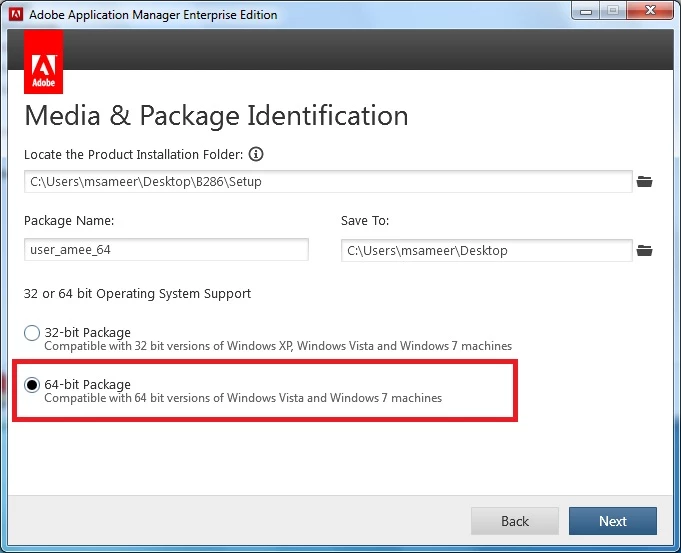
Your OS is 64bit. So while creating msi package via Adobe Application Manager Enterprise Edition you should chose 64 bit option. It looks like your creating 32bit msi package and deploying it on64 bit machine.

Please confirm.

3 replies

Participating Frequently
August 30, 2012

Hi JeeCay,

Can you please share the installer logs present at "<OS_drive>\Program Files\Common Files\Adobe\Installers".

Also, please be sure that you are running command promt in admin while installing RH and no conflicting process such as MS Word or Outlook is running on the system.

JeeCayAuthor
Participant
August 30, 2012

Hi moszapy1,

Here is what the logfile says:

[    2972] Thu Aug 30 09:09:12 2012  INFO

DEVersion: 6.2.0.0

Loading library from C:\Program Files (x86)\Common Files\Adobe\OOBE\PDApp\DECore\DE6\Setup.dll

[    2972] Thu Aug 30 09:09:12 2012  INFO

::START TIMER:: [Total Timer]

CHECK: Single instance running

CHECK : Credentials

Load Deployment File

Create Required Folders

Assuming uninstall mode

Lookup for master payload

[    2972] Thu Aug 30 09:09:12 2012 ERROR

DW040: The product "{2A1BD797-627C-485A-A1D2-847361E5A693}" is not installed. Cannot proceed with the uninstall

[    2972] Thu Aug 30 09:09:12 2012  INFO

##### Running EDT Workflow #####

:: END TIMER :: [Total Timer] took 5.46927 milliseconds (0.00546927 seconds) DTR = 731.359 KBPS (0.714218 MBPS)

[    2972] Thu Aug 30 09:09:13 2012  INFO

Uninstalling AAM

* Logfile path changed to: C:\Program Files (x86)\Common Files\Adobe\Installers\Adobe RoboHelp 10 10 08-30-2012.log *

Why "assuming uninstall mode"?

@Peter Grainge: Many thanks for your help, but at the moment I got lots off other stuff to do, so this one was the least time consumption way.

JeeCayAuthor
Participant
August 31, 2012

Hi JeeCay,

Thanks for sending the log files. The error message shown in log is Exit Code 26:"Some of the payloads cannot be located. Please verify your installer."

It looks like msi package was not created properly.

Possible Resolution:-"try recreating installer package, to ensure that all payloads are present in the payloads folder"


I recreated the MSI (customized it to leave out RoboHelp for Word) but no success . In the logs the same error message is shown. There were no payloads deleted before.

Another interesting thing: During Installation process, the shortut for the "Adobe Application Manager" appears on the desktop and disappears again - this software is being installed and uninstalled again.

Peter Grainge
Community Expert
Community Expert
August 29, 2012

There are some links at the end of this page for earlier versions. Hopefully the information is still valid.


See www.grainge.org for RoboHelp and Authoring tips

@petergrainge

Use the menu (bottom right) to mark the Best Answer or Highlight particularly useful replies. Found the answer elsewhere? Share it here.
Jeffrey_A_Wright
Community Manager
Community Manager
August 29, 2012

Moving this discussion to the Robohelp forum.

Jeff_Coatsworth
Community Expert
Community Expert
August 29, 2012

Probably should be moved to the Tech Comm. Suite Installation thread