
September 26, 2012
Question

RoboHelp 10 - SVN Issue

  • September 26, 2012
  • 1 reply
  • 5167 views

Hi there,

We are having an issue with RoboHelp 10 and SVN (Subversion 1.7.5).

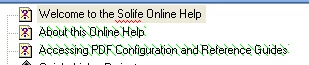
Say, for example, I add three new topics to an online help project, close the project and commit the changes. My colleague performs an SVN update - she can see that the new files are brought down from the server. The new files are then visible in the physical RoboHelp project folder - so SVN has done its job. However, when she opens the online help project on her machine, the three new files are appearing with the red 'X' in the table of contents - suggesting RoboHelp cannot find the files (as per the image below). The files are also not displayed in the project manager pod. However, if we perform a manual import in the project manager, the files are added to the project manager and no longer displayed with the red 'X' in the table of contents.

This has only happened since we upgraded to RH 10 from RH 9. Could it be that there is some setting that we need to configure?
This topic has been closed for replies.

1 reply

RoboColum_n_
Legend
September 26, 2012

I wonder if it would be worth uninstalling and reinstalling the SVN plugin. Chances are that the RH10 update has disturbed something somewhere.

September 26, 2012

Hi there,

We don't use an SVN plug-in for our version control. All our version control is using Subversion outside of RoboHelp. This has worked fine in previous versions of RoboHelp - but now it seems to have a problem seeing the added files.

Thanks a lot,

Niamh

RoboColum_n_
Legend
September 26, 2012

No problem. I'll let you know how I get on tomorrow.


Whoa! You mentioned "network". Would you have all your RH source located on a network drive? If so, that could well be the issue. I know that RH10 says that you can now store your projects on a network drive but I would still strongly advise against that. If you have your source on a network drive, try moving it to a local drive and try again.