

chelluvsGod
Inspiring
October 24, 2017
Answered

RoboHelp 11-Remove Glossary

  • October 24, 2017
  • 2 replies
  • 1546 views

How can I remove the glossary from a guide?

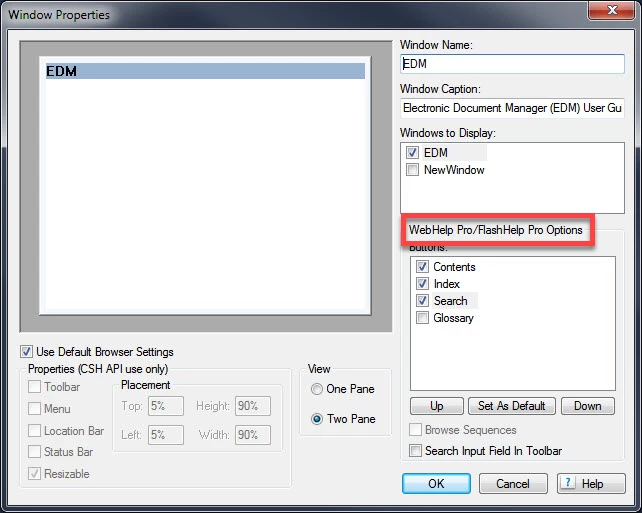
I tried to hide it in the output but have not found a way. I am unable to delete it from the Project Manager and when I went to the Project Set-up pod and right clicked on Windows, Properties is unavailable.

Thank you.
This topic has been closed for replies.
Correct answer Captiv8r

If you look at that image you shared, you will note that those options are only for WebHelp Pro and FlashHelp Pro. Responsive is a totally different animal.

That's why the image is still showing up.

I'll see if I can look at my version 11 and figure a way to banish the Glossary. If so, I'll post back.

Cheers... Rick


Okay, see if the video linked below helps.

I created this using my computer with version 11 on it. When I try to view from this computer, the volume seems kind of low. So you may need to adjust your volume.

Click here to view

Let me know if this worked for you!

Cheers... Rick

2 replies

Captiv8r
Legend
October 24, 2017

What version of RoboHelp are you using?

Earlier versions that began supporting the Responsive output may not sport the options to turn off the Glossary.

Cheers... Rick

Jeff_Coatsworth
Community Expert
Community Expert
October 24, 2017

She's on RH11 - make sure you're patched up & then go grab his layout from https://www.wvanweelden.eu/blog/2015/05/14/adobe-robohelp-responsive-theme-1-layout-toc-only to play around with under the hood.

Jeff_Coatsworth
Community Expert
Community Expert
October 24, 2017

What output format are you trying to hide it in?

chelluvsGod
Inspiring
October 24, 2017

Responsive HTML5 Output. Sorry for not including that.

Thanks,

Michele

chelluvsGod
Inspiring
October 25, 2017

Hello again

Happy to hear it worked for you!

As for those window properties, it's just the way RoboHelp works. Aside from the CHM file, the window properties depend on how the help is being opened. So those properties you saw for WebHelp PRO and FlashHelp PRO would only work if you were using one of the PRO outputs and you were using the included API to open the help. The API allows specifying the window you want to use.

Cheers... Rick


One other quick question...since I am on RoboHelp 11, I am two versions behind. If I were to upgrade to the newest version, is it compatible with version 11?

Thanks once again.

Michele