

chelluvsGod
Inspiring
October 24, 2017
Answered

RoboHelp 11-Remove Glossary

  • October 24, 2017
  • 2 replies
  • 1541 views

How can I remove the glossary from a guide?

I tried to hide it in the output but have not found a way. I am unable to delete it from the Project Manager and when I went to the Project Set-up pod and right clicked on Windows, Properties is unavailable.

Thank you.
This topic has been closed for replies.
Correct answer Captiv8r

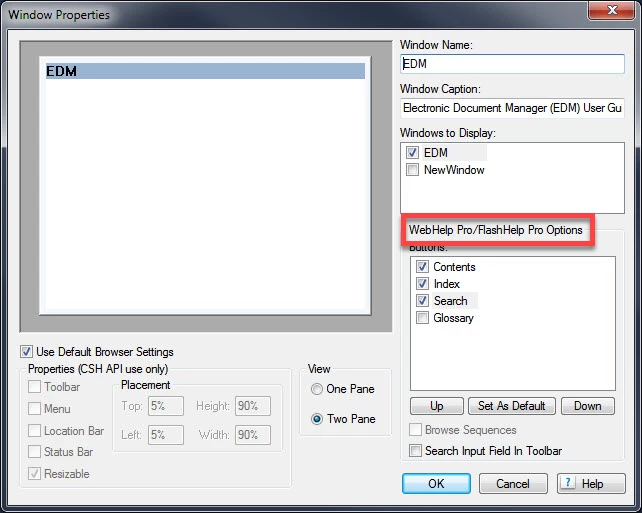
If you look at that image you shared, you will note that those options are only for WebHelp Pro and FlashHelp Pro. Responsive is a totally different animal.

That's why the image is still showing up.

I'll see if I can look at my version 11 and figure a way to banish the Glossary. If so, I'll post back.

Cheers... Rick


Okay, see if the video linked below helps.

I created this using my computer with version 11 on it. When I try to view from this computer, the volume seems kind of low. So you may need to adjust your volume.

Click here to view

Let me know if this worked for you!

Cheers... Rick

2 replies

Captiv8r
Legend
October 24, 2017

What version of RoboHelp are you using?

Earlier versions that began supporting the Responsive output may not sport the options to turn off the Glossary.

Cheers... Rick

Jeff_Coatsworth
Community Expert
Community Expert
October 24, 2017

She's on RH11 - make sure you're patched up & then go grab his layout from https://www.wvanweelden.eu/blog/2015/05/14/adobe-robohelp-responsive-theme-1-layout-toc-only to play around with under the hood.

Jeff_Coatsworth
Community Expert
Community Expert
October 24, 2017

What output format are you trying to hide it in?

chelluvsGod
Inspiring
October 24, 2017

Responsive HTML5 Output. Sorry for not including that.

Thanks,

Michele

Captiv8r
Legend
October 25, 2017

Well, define "compatible". LOL

From the aspect of upgrading the project, sure. You just install RoboHelp newer, then open the project using the new version of RoboHelp.

The issues we see stem from really super old code trying to work in a newer environment. But if your project just began life in version 11, you should be good to go.

But you are using Responsive HTML 5 as your output. What often happens with upgrades is that some aspect of your Responsive HTML 5 layout gets munged or no longer works. The fix is pretty straightforward though. You just create a new layout and the new layout code gets copied in.

Cheers... Rick


I've just been reminded that you may be asking if you upgraded your project by opening it in RoboHelp 2017 Release, will you still be able to open it and make edits using version 11?

Unfortunately, the answer to that is no. You cannot use RoboHelp 11 to edit the project once you have opened it using 2017 Release.

Thus you honestly need to make a backup copy before opening it in 2017 if you think you may want to return to 11. And of course, if you added something while in 2017 and wanted it in 11, you would have to either re-create the work or import any topics from the 2017 version to the 11 version. (keeping in mind that any feature specific to 2017 won't be understood by 11)

If you need help with making a backup copy, I have a video on that. You may view it by clicking this handy link.

Cheers... Rick