
Inspiring
October 31, 2020
Question

RoboHelp 2019: Not seeing the output presets menu for Microsoft HTML Help

  • October 31, 2020
  • 3 replies
  • 285 views

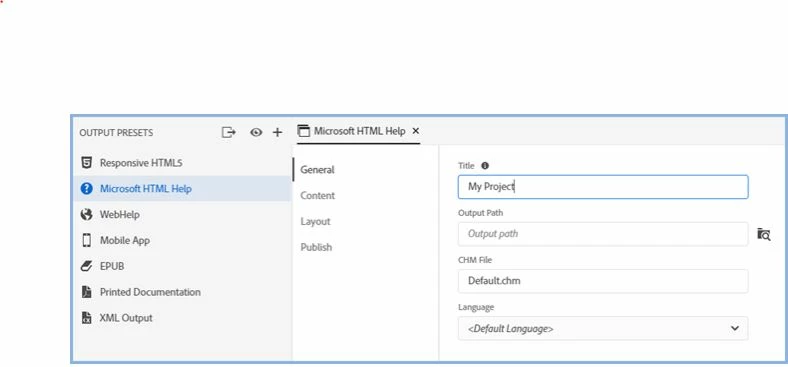
When I click on Microsoft HTML Help in the Output Presets menu, I don't see the menu that shows the General, Content, Layout, and Publish options, as shown below. I'm trying to see where my .chm file is located. What am I missing?
    This topic has been closed for replies.

    3 replies

    Peter Grainge
    Community Expert
    Community Expert
    October 31, 2020

    No worries. Take a look at the RoboHelp Reimagined sample project. Lots of How To information there.


    Help others by clicking Correct Answer if the question is answered. Found the answer elsewhere? Share it here. "Upvote" is for useful posts.
    Peter Grainge
    Community Expert
    Community Expert
    October 31, 2020

    Click the Edit option or double click Microsoft HTML Help.


    Help others by clicking Correct Answer if the question is answered. Found the answer elsewhere? Share it here. "Upvote" is for useful posts.
    Inspiring
    October 31, 2020

    Ahhhh! We tried every other type of click except that one. Now where do I find the "embarrassed" emoji here??


    Thank you for answering that newbie question!

    Peter Grainge
    Community Expert
    Community Expert
    October 31, 2020

    What are you seeing? 


    Help others by clicking Correct Answer if the question is answered. Found the answer elsewhere? Share it here. "Upvote" is for useful posts.
    Inspiring
    October 31, 2020

    Hi Peter,

    BTW, we're on RoboHelp version 2019.0.14.

    Here's what we see: