



ChadPink
Inspiring
September 8, 2023
질문

RoboHelp 2022.2.22 Does not open index.htm file

  • September 8, 2023
  • 10 답변들
  • 3532 조회

I just recently uninstalled/rebooted/installed my Robohelp due to a different issue. 

With the same version installed, I get this warning when I open my RH project:
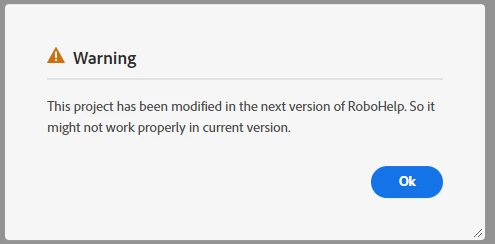
I click OK, generate a Responsive HTML5 output, no errors, but the index.htm file does not open correctly. It just keeps "thinking." I tried to open in Edge thinking Chrome might be the culprit, but I'm getting same issue.
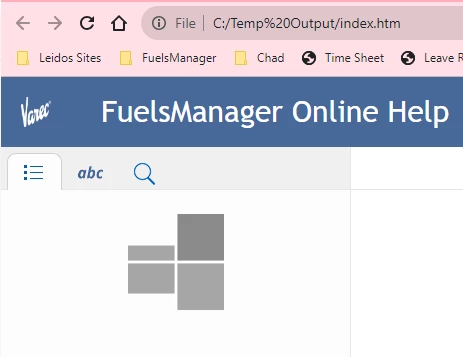

Any ideas?


    이 주제는 답변이 닫혔습니다.

    10 답변

    Peter Grainge
    Community Expert
    Community Expert
    September 27, 2023

    Is there any source control involved here?

    ________________________________________________________

    My site www.grainge.org includes many free Authoring and RoboHelp resources that may be of help.


    Use menu (bottom right) to mark as Best Answer or to Highlight particularly useful replies. Found the answer elsewhere? Share it here.
    ChadPink
    ChadPink작성자
    Inspiring
    September 27, 2023

    No, at this point, this is all just on my local machine. 
    But yeah, it's also not working on source control because obviously I check in what I have on my local.

    Thanks, Peter! I'll get with Adobe Support.

    Peter Grainge
    Community Expert
    Community Expert
    September 27, 2023

    I showed you the lines created in a RoboHelp output and they differ from what your developer says. 


    When you generate, everything in the folder gets deleted and generated again. Publishing is different but that's not what we are talking about.


    So many times I see people say they are on the latest version but when you ask for specifics, they aren't. I think here you do mean 2020.3.


    I think you are going to need to take this to Adobe Support. See https://helpx.adobe.com/contact/enterprise-support.other.html#robohelp for your Adobe Support options. The email link tcssup@adobe.com is recommended as it reaches a team dedicated to Technical Communication Suite products including RoboHelp.


    It makes no sense for 2020.3 to tell you the project needs updating so it looks like somewhere back along the line, the project got messed up.


    Please let us know the outcome.

    ________________________________________________________

    My site www.grainge.org includes many free Authoring and RoboHelp resources that may be of help.


    Use menu (bottom right) to mark as Best Answer or to Highlight particularly useful replies. Found the answer elsewhere? Share it here.
    ChadPink
    ChadPink작성자
    Inspiring
    September 27, 2023

    After I updated to the latest version, I no longer get the "upgrade" prompt when I open the project.


    Peter Grainge
    Community Expert
    Community Expert
    September 27, 2023

    Forget my suggestion about rebuilding the project, I was thinking of a different file.


    This is the content of an index.htm file I just checked.


    ****************************************

    <?xml version="1.0" encoding="utf-8" ?>
    <!DOCTYPE html>
    <html lang="en" xmlns="http://www.w3.org/1999/xhtml"><head>
    <meta http-equiv="X-UA-Compatible" content="IE=edge"/>
    <meta name="viewport" content="width=device-width, initial-scale=1, maximum-scale=3, user-scalable=yes"/>
    <title>My Project</title>

    <script type="text/javascript">//<![CDATA[

    gRootRelPath = ".";
    gCommonRootRelPath = ".";

    //]]></script>
    </head>

    <body>
    <script src="./template/scripts/redirect.js"></script>


    </body></html>


    ****************************************


    I can't comment on the lines the developer has added.


    Are you on 2022.2 and still getting the warning when you open the project? I'm not clear on that but if you are getting the warning, I suggest that needs to be fixed first.

    ________________________________________________________

    My site www.grainge.org includes many free Authoring and RoboHelp resources that may be of help.


    Use menu (bottom right) to mark as Best Answer or to Highlight particularly useful replies. Found the answer elsewhere? Share it here.
    ChadPink
    ChadPink작성자
    Inspiring
    September 27, 2023

    I'm on the latest version:

    The Dev said he added the lines that were missing in my index.htm.

    So, how do I get those lines back in the index.htm? Does the index.htm file get generated each time I generate an output?

    Peter Grainge
    Community Expert
    Community Expert
    September 26, 2023

    If those lines are in other index.htm files, it could be the issue. If you still have doubts, it's not difficult to rebuild the project in less than 30 minutes. I'll provide instructions in the morning, it's late here. 

    ________________________________________________________
    My site www.grainge.org includes many free Authoring and RoboHelp resources that may be of help.


    Use menu (bottom right) to mark as Best Answer or to Highlight particularly useful replies. Found the answer elsewhere? Share it here.
    Peter Grainge
    Community Expert
    Community Expert
    September 11, 2023

    Create a folder c:\Testoutput and generate to that.

    ________________________________________________________
    My site www.grainge.org includes many free Authoring and RoboHelp resources that may be of help.


    Use menu (bottom right) to mark as Best Answer or to Highlight particularly useful replies. Found the answer elsewhere? Share it here.
    ChadPink
    ChadPink작성자
    Inspiring
    September 26, 2023

    Updates on this issue. Still cannot open the index file. I got approved for admin rights, I now have that in place.
    I generated my project while logged in to my admin account, the same issue. [index.htm file does not open correctly. It just keeps "thinking."]


    I got with our developer and he said my index.htm file was missing some files. Does anyone know what this is? Sorry, I can't explain it detail. Too technical for me. He did say "CSHParam" was missing from index.htm

    Our Developer figured out a way to fix the issue; however, it was done by manually updating the index.htm file. It might work in the mean time since we have a SW release coming soon. But it's not ideal.


    ChadPink
    ChadPink작성자
    Inspiring
    September 26, 2023

    These are the lines that our Dev added to make the index.htm file work.


    Peter Grainge
    Community Expert
    Community Expert
    September 11, 2023

    Try the link I gave you. 

    ________________________________________________________
    My site www.grainge.org includes many free Authoring and RoboHelp resources that may be of help.

    Use menu (bottom right) to mark as Best Answer or to Highlight particularly useful replies. Found the answer elsewhere? Share it here.
    ChadPink
    ChadPink작성자
    Inspiring
    September 11, 2023

    It's the same file name 😞


    Peter Grainge
    Community Expert
    Community Expert
    September 11, 2023

    The file name doesn't change. Download it and install. 

    ________________________________________________________
    My site www.grainge.org includes many free Authoring and RoboHelp resources that may be of help.


    Use menu (bottom right) to mark as Best Answer or to Highlight particularly useful replies. Found the answer elsewhere? Share it here.
    Peter Grainge
    Community Expert
    Community Expert
    September 11, 2023

    Blocked for you or they don't want it installed? It can be downloaded from Download RoboHelp and RoboHelp Server (adobe.com).


    The only other way to get that message would be you had an earlier update of 2022. Either 2022.0 or 2022.1.


    You could also try creating a new preset or with the project closed, delete the .rh folder and then reopen the project.

    ________________________________________________________

    My site www.grainge.org includes many free Authoring and RoboHelp resources that may be of help.


    Use menu (bottom right) to mark as Best Answer or to Highlight particularly useful replies. Found the answer elsewhere? Share it here.
    ChadPink
    ChadPink작성자
    Inspiring
    September 11, 2023

    Blocked for me. 
    No, my previous version was 2022.2.2 (I had to look at the screenshot on the other thread 🙂 ) Each time I close my project and open it, I get the Warning.


    Peter Grainge
    Community Expert
    Community Expert
    September 11, 2023

    If it was 2022.2 and showing the image in your first post, then someone must have opened it in 2022.3. That is likely but not definitely the cause of the problem. 


    Can you not just apply Update 3?

    ________________________________________________________

    My site www.grainge.org includes many free Authoring and RoboHelp resources that may be of help.


    Use menu (bottom right) to mark as Best Answer or to Highlight particularly useful replies. Found the answer elsewhere? Share it here.
    ChadPink
    ChadPink작성자
    Inspiring
    September 11, 2023

    No, it's blocked by our IT.

    I'll have to download patch 3 installer to my machine or have a link to it so our IT knows what to install.

    Peter Grainge
    Community Expert
    Community Expert
    September 10, 2023

    Which version is showing in the Help menu?


    Edge is built on Chrome so while it could be the issue, it is unlikely.

    ________________________________________________________

    My site www.grainge.org includes many free Authoring and RoboHelp resources that may be of help.


    Use menu (bottom right) to mark as Best Answer or to Highlight particularly useful replies. Found the answer elsewhere? Share it here.
    ChadPink
    ChadPink작성자
    Inspiring
    September 11, 2023

    It's the same as the previous one I uninstalled.


    Jeff_Coatsworth
    Community Expert
    Community Expert
    September 8, 2023

    Your reinstall may have picked up patch#3 that just recently came out - I'd update to it anyway for the fixes.