JenniR_12
Inspiring
May 6, 2024
Question

Robohelp 2022 - Filter button not showing on Output (Frameless Oceanic)

  • May 6, 2024
  • 8 replies
  • 1565 views

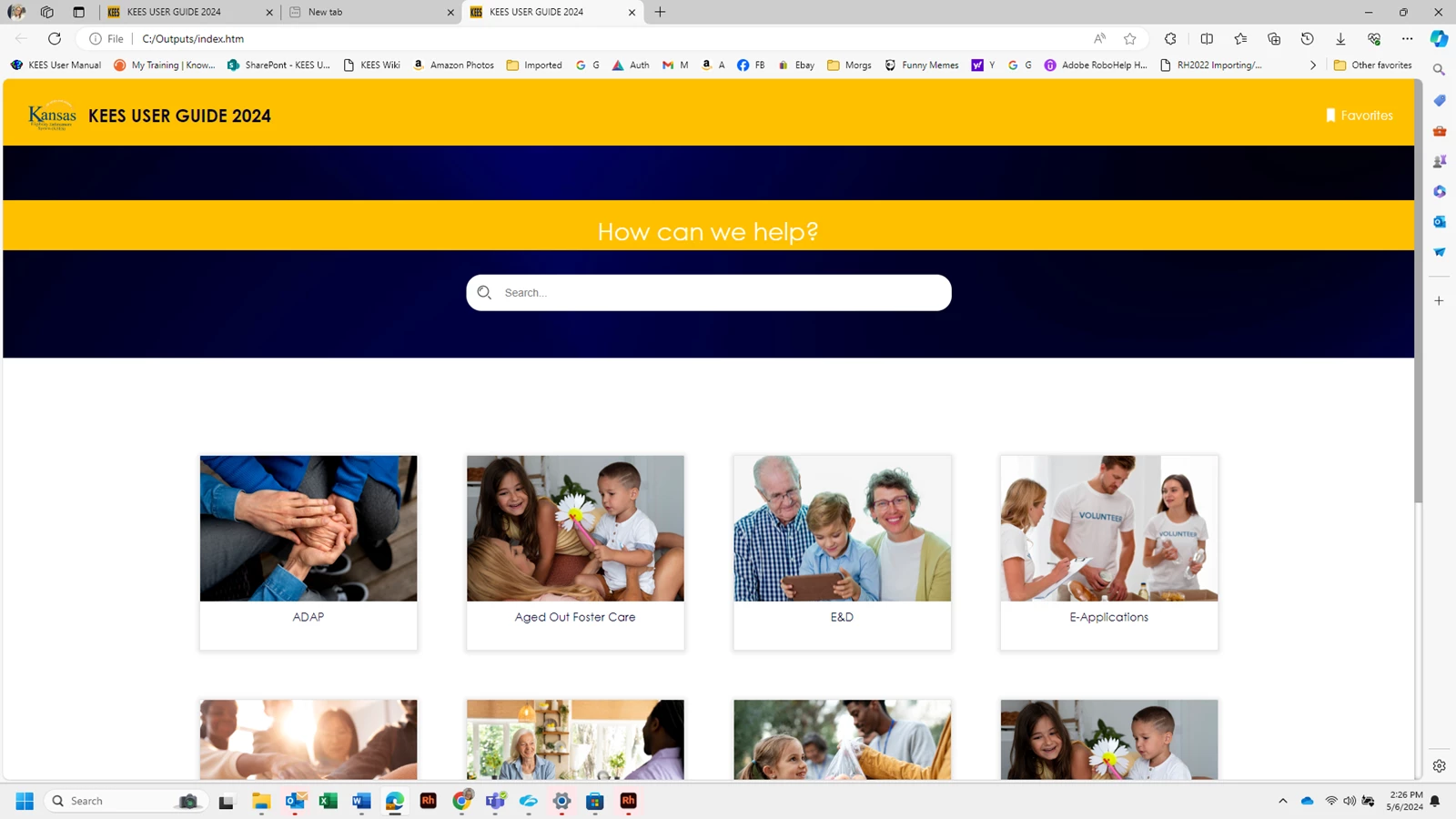
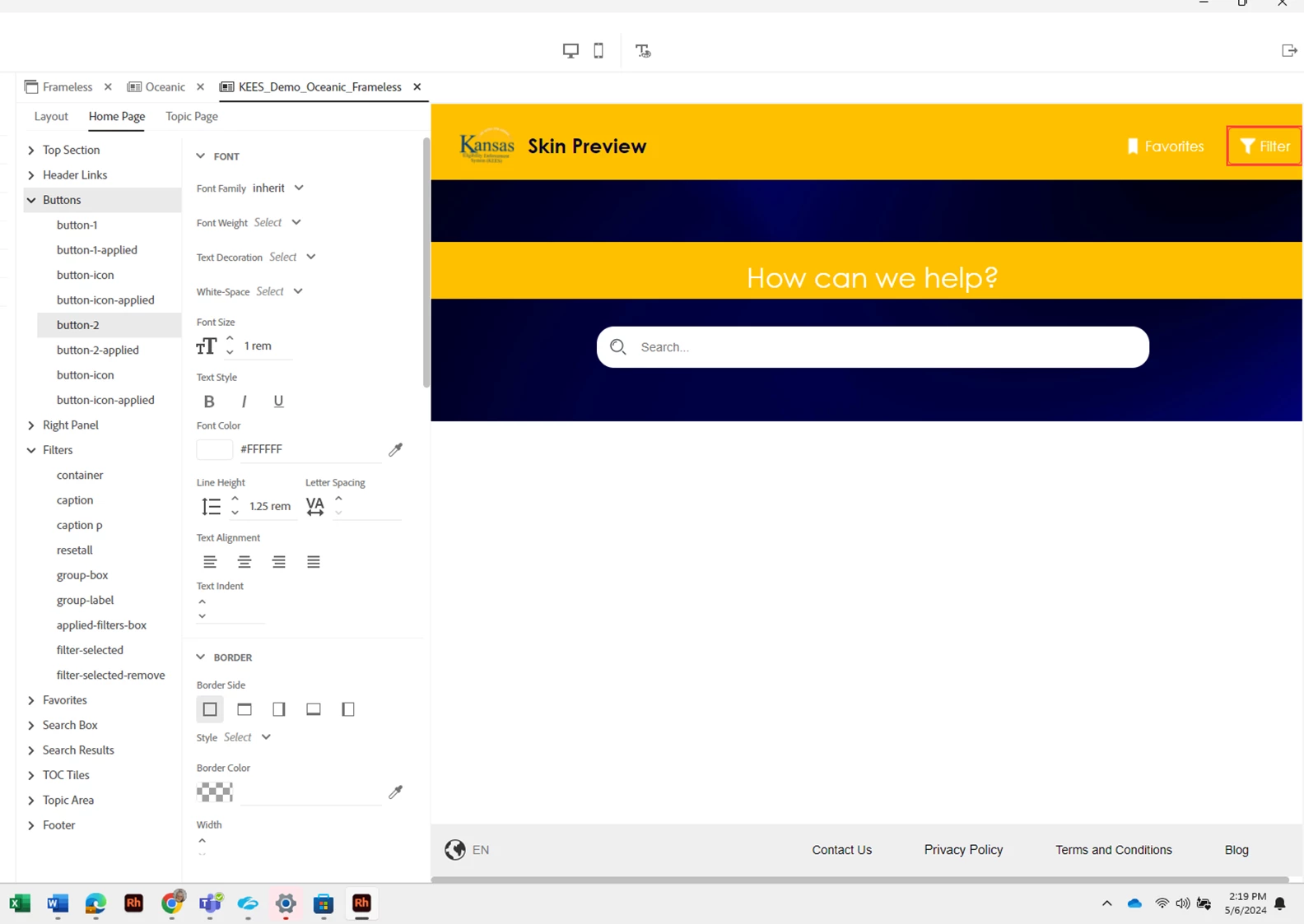
I am having an issue where the Filter opitions are not showing on my Frameless Oceanic Output.  It all looks right in the skin editor, but once I generate and view, it's gone.  See screenshots below.  First screenshot shows the Filter option in the skin editor and the 2nd screenshot shows the actual output where Filter is missing.  oes anyone know why or how to correct this?


    This topic has been closed for replies.

    8 replies

    Peter Grainge
    Community Expert
    Community Expert
    May 10, 2024

    I just tested the Orange and Oceanic templates with my site. I applied one tag to one topic and another tag to another topic. All other topics were left untagged. The filter button appeared and worked just fine.


    It should not be necessary to tag all topics so something else is at play.

    ________________________________________________________

    My site www.grainge.org includes many free Authoring and RoboHelp resources that may be of help.


    Use the menu (bottom right) to mark the Best Answer or Highlight particularly useful replies. Found the answer elsewhere? Share it here.
    Inspiring
    May 10, 2024

    Yes, it was a problem with my build tags. I think the filters was not showing up because my tagged topics were not being included like I thought they were.

    Peter Grainge
    Community Expert
    Community Expert
    May 7, 2024

    Item 53 at https://www.grainge.org/RoboHelp_Gems/RoboHelp_Gems.htm#miscellaneous also covers search priorities.

    ________________________________________________________
    My site www.grainge.org includes many free Authoring and RoboHelp resources that may be of help.


    Use the menu (bottom right) to mark the Best Answer or Highlight particularly useful replies. Found the answer elsewhere? Share it here.
    Peter Grainge
    Community Expert
    Community Expert
    May 7, 2024

    The standard search is what it is. Filters reduce what the user can see and search on so I would say you need them. Yes it is going to be difficult without the input of a subject matter expert guiding you. 


    The preview is not meant to be exact but close to. Some people will use scripts that change things at the end of the generation process. The preview cannot account for them. Also the preview has no knowledge of what settings you might apply in the preset. There are also parts you can set to not display. They have to remain in the preview so that you can change that option. These are things you will find out as you go.


    As with any software, teach yourself is always going to be more difficult than being taught. 

    1. Try reading a topic a day on my site.
    2. Try Kevin Siegel's Iconlogic site. Courses you can attend, tutorials you can download and one to one. Fees are payable.

    ________________________________________________________

    My site www.grainge.org includes many free Authoring and RoboHelp resources that may be of help.


    Use the menu (bottom right) to mark the Best Answer or Highlight particularly useful replies. Found the answer elsewhere? Share it here.
    JenniR_12
    JenniR_12Author
    Inspiring
    May 7, 2024

    Thanks, Peter.  I appreicate you 🙂

    Jennifer Rogers
    Peter Grainge
    Community Expert
    Community Expert
    May 7, 2024

    @WoutJacobs The only time you should need to tag all topics is where there are no topics that are to appear regardless of filter. If a topic is tagged, it will appear or not based on the filter applied, untagged topics will always appear.

    ________________________________________________________

    My site www.grainge.org includes many free Authoring and RoboHelp resources that may be of help.


    Use the menu (bottom right) to mark the Best Answer or Highlight particularly useful replies. Found the answer elsewhere? Share it here.
    Inspiring
    May 8, 2024

    That is correct Peter, unfortunately the users want to have everything to be 'filterable'. This is especially the case since tagged and filtered topics do not show up in the search results, which is what my audience really wants.

    Untagged topics always show up, which clogs the search results horrendously.

    Peter Grainge
    Community Expert
    Community Expert
    May 8, 2024

    I believe the old RH dynamic content filter worked the way I'd envisioned - only the filter options you selected were displayed in the output / considered in search.


    Not to my knowledge but would this work? Apply a new tag to topics that are not tagged at the moment,. Then add that option to the filters. Say the topics are menus and you have say Indian, Chinese and European, they are obvious filters. With currently untagged apply another filter called say All Cuisines, your currently untagged topics. That way users could search just their top cuisine and then add the other topics (the prviously untagged stuff) if they so choose.

    ________________________________________________________

    My site www.grainge.org includes many free Authoring and RoboHelp resources that may be of help.


    Use the menu (bottom right) to mark the Best Answer or Highlight particularly useful replies. Found the answer elsewhere? Share it here.
    Peter Grainge
    Community Expert
    Community Expert
    May 7, 2024

    The point of the preview is to show you what can be in your output. What is actually in your output is down to what you set up.


    Filtering doesn't just happen by magic. You have to tell RoboHelp what the filters need to do, which topics to exclude. It's described in RH2022 Dynamic Content Filtering (grainge.org), As well as the topic, there is a link to Matt Sullivan's webinar on the subject. 


    Once you have set up the filtering, you select it in the preset. It's a dropdown because you might have different filter sets for different outputs.


    ________________________________________________________

    My site www.grainge.org includes many free Authoring and RoboHelp resources that may be of help.


    Use the menu (bottom right) to mark the Best Answer or Highlight particularly useful replies. Found the answer elsewhere? Share it here.
    Inspiring
    May 7, 2024

    The dynamic content filter in RH2022.3.93 is very finnicky in my opinion, so I'm not sure if JenniR_12 will actually get the desired result.

    I could only somewhat get the dynamic content filter to work after tagging all 1722 topics in the project (as a test). I wonder if other users also experience the same struggles?


    Inspiring
    May 10, 2024

    I thought I was seeing a the same thing but it turns out that it was a problem with my build expression that was causing none of the topics with the tags to be included in the output.

    Jeff_Coatsworth
    Community Expert
    Community Expert
    May 6, 2024

    Have you fooled around with the size of the page in the browser? I find that some responsive elements appear & disappear at different screen sizes - you can simulate a lot of that by grabbing a corner and expanding/contracting the topic.

    JenniR_12
    JenniR_12Author
    Inspiring
    May 6, 2024

    I haven't even looked at the size of the page in the browser (mainly bc I'm not sure how to do that).  Are you saying that if I click on a corner of the web page and try to drag it bigger or smaller, different things show up?  I've tried and nothing happens when I try to drag it.  My mouse pointer doesn't change.


    Jennifer Rogers
    Peter Grainge
    Community Expert
    Community Expert
    May 6, 2024

    It's late here so I'll have to look in the morning. I'm not at a RoboHelp machine. 

    ________________________________________________________
    My site www.grainge.org includes many free Authoring and RoboHelp resources that may be of help.


    Use the menu (bottom right) to mark the Best Answer or Highlight particularly useful replies. Found the answer elsewhere? Share it here.
    JenniR_12
    JenniR_12Author
    Inspiring
    May 6, 2024

    Thanks, Peter.  🙂

    Jennifer Rogers
    Peter Grainge
    Community Expert
    Community Expert
    May 6, 2024

    Have you selected the filter in the preset? 

    ________________________________________________________
    My site www.grainge.org includes many free Authoring and RoboHelp resources that may be of help.


    Use the menu (bottom right) to mark the Best Answer or Highlight particularly useful replies. Found the answer elsewhere? Share it here.
    JenniR_12
    JenniR_12Author
    Inspiring
    May 6, 2024

    Hi Peter.  I think so.  I can see it showing in the preset.  Is there a specific place (that I'm not finding) to tell the Filter option to show up?  It's showing up in the livepreview on the preset.  (screenshot 1 in my OP).  


    Jennifer Rogers
    JenniR_12
    JenniR_12Author
    Inspiring
    May 6, 2024

    It's not showing on the topic page either on the output but IS showing on the live preview in the preset.  It's just missing.  The Favorites and Share options are showing on both the preset and the output.  Just the filter is missing.


    Jennifer Rogers