Exit
  • Global community
    • Language:
      • Deutsch
      • English
      • Español
      • Français
      • Português
  • 日本語コミュニティ
  • 한국 커뮤니티
0

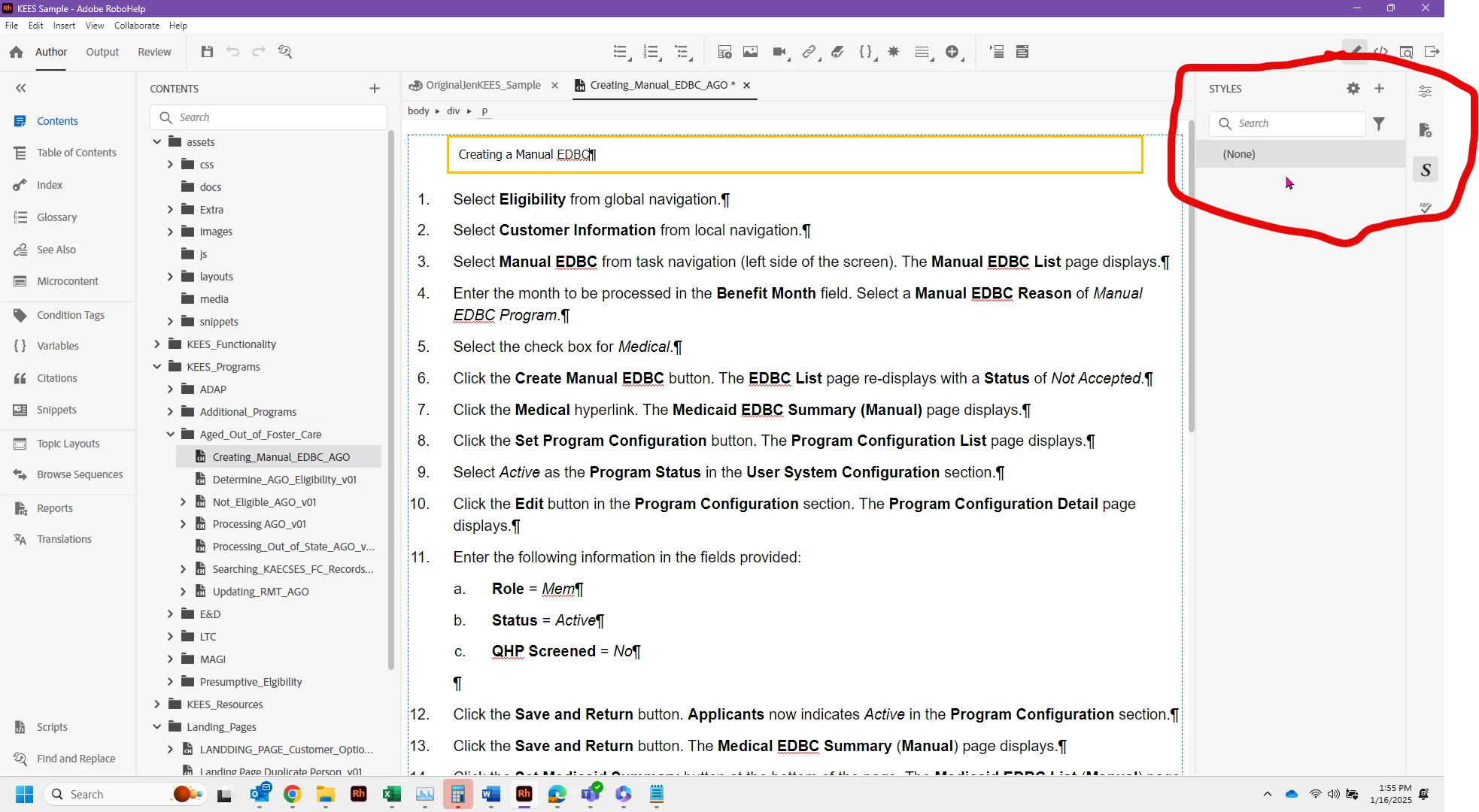
Robohelp 2022 - Styles are missing - it shows NONE in the pane on the right where styles r listed

Contributor ,
Jan 16, 2025 Jan 16, 2025

Robohelp 2022 2025-01-16_13-55-23.pngI have done something to make my styles show NONE on the far right side.  I've been using the same CSS all morning with no problems.  I tried to edit one of the styles and it seemed to go fine, but when I switched over from my CSS to my topic the style pane on the far right switched to NONE.  I opened a different topic and switched to the CSS referred to above and it also says NONE.    Any quick fix on this?  I can pull the backup of the CSS file.  Just curious what happened. 

Jennifer Rogers
322
Translate
Report
Community guidelines
Be kind and respectful, give credit to the original source of content, and search for duplicates before posting. Learn more
community guidelines

correct answers 1 Correct answer

Contributor , Jan 17, 2025 Jan 17, 2025

Thank you everyone for the suggestions.  I got the CSS from my backup.  I had just added a couple of styles to the one that bit it - so obviously it was the pilot and not the plane on this deal.  I had to have done something while in the css working with the new styles that made it break.  I just readded to the one from backp and we are back up to speed.  Thank you all for responding.

Translate
Community Expert ,
Jan 16, 2025 Jan 16, 2025

It's either fix what you broke in the CSS or get the backup. Your choice.

________________________________________________________

My site www.grainge.org includes many free Authoring and RoboHelp resources that may be of help.


Help others by clicking Correct Answer if the question is answered. Found the answer elsewhere? Share it here. "Upvote" is for useful posts.
Translate
Report
Community guidelines
Be kind and respectful, give credit to the original source of content, and search for duplicates before posting. Learn more
community guidelines
Community Expert ,
Jan 16, 2025 Jan 16, 2025

There might be a warning in the CSS as to where the issue is.

________________________________________________________

My site www.grainge.org includes many free Authoring and RoboHelp resources that may be of help.


Help others by clicking Correct Answer if the question is answered. Found the answer elsewhere? Share it here. "Upvote" is for useful posts.
Translate
Report
Community guidelines
Be kind and respectful, give credit to the original source of content, and search for duplicates before posting. Learn more
community guidelines
Contributor ,
Jan 17, 2025 Jan 17, 2025

Either your stylesheet link got broken, or the stylesheet syntax got messed up.


WoutJacobs_0-1737103137282.png


Given the provided info it's probably the latter. But without seeing the stylesheet itself, that's all we can say.

Translate
Report
Community guidelines
Be kind and respectful, give credit to the original source of content, and search for duplicates before posting. Learn more
community guidelines
Contributor ,
Jan 17, 2025 Jan 17, 2025
LATEST

Thank you everyone for the suggestions.  I got the CSS from my backup.  I had just added a couple of styles to the one that bit it - so obviously it was the pilot and not the plane on this deal.  I had to have done something while in the css working with the new styles that made it break.  I just readded to the one from backp and we are back up to speed.  Thank you all for responding.

Jennifer Rogers
Translate
Report
Community guidelines
Be kind and respectful, give credit to the original source of content, and search for duplicates before posting. Learn more
community guidelines
Resources
RoboHelp Documentation
Download Adobe RoboHelp