
Known Participant
July 7, 2010
Question

RoboHelp 8 crashes on Windows 7

  • July 7, 2010
  • 15 replies
  • 21926 views

I have used RoboHelp for years and we have just purchased new laptops with Windows 7, we are finding that it appears that RoboHelp 8 will not run on Windows 7.

The software appears unstable as even the simplest action crashes RoboHelp, the Event Log shows:
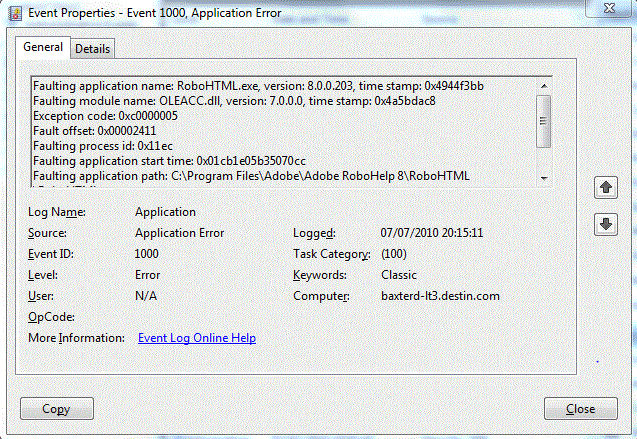
Can anyone help with how to resolve this issue?

This topic has been closed for replies.

15 replies

January 7, 2011

Thank you! Thank you! I have 64-bit Windows 7 Home Premium on my new HP Laptop and am on a 30-day trial for RoboHelp 8 (used RH 5 some time back and now the company wants a documentation update). After turning off services and turning them back on one at a time, I determined the culprit was my Biometric Authentication Service (Mfg: DigitalPersona, Inc.). It works in conjunction with the Validity VCS Fingerprint Service, but the fingerprint service wasn't the one that was making it crash. After searching online I found that I could turn the Biometric Service back on after reading http://social.answers.microsoft.com/Forums/en-US/addbuz/thread/15fff39b-69a7-48f4-b932-58d4c330984e which makes several suggestions. This is what I followed:

Method 2:
Reconfigure HP Security Manager (HP SimplePass Identity Protection)*

A.  Click on Start>All Programs>HP SimplePass Identity Protection
B.  Expand Password Manager, and select Settings
C.  Uncheck the prompt to add logons for logon screens option, click Apply, then restart the system

* This solution was provided by HP.  We don't know what other effects they can expect from making the noted changes, and you may want to contact HP for more information if you chose this workaround and need more detail. 

I do use the fingerprint service to initially log in, but not for anything else.

Hope this helps!  If it weren't for this forum, Adobe would have lost a sale...  Thanks again!

Suzy L. 

Captiv8r
Legend
January 7, 2011

Welcome to our community Suzy

And congratulations on your first post being so helpful to others! That's pretty unusual around here. Not that we mind at all with assisting folks, but many arrive here as their last resort and are looking for help.

If you could please do us all a huge favor we would most appreciate it!

The favor?

Please report the same to Adobe as a bug. That way it will be logged in their databases for things to check and/or know about that affect RoboHelp. You can pretty much copy and paste the info you typed earlier.

Link to the bug reporting form is in my sig.

Cheers... Rick

Helpful and Handy Links

RoboHelp Wish Form/Bug Reporting Form

Begin learning RoboHelp HTML 7 or 8 moments from now - $24.95!

Adobe Certified RoboHelp HTML Training

SorcererStone Blog

RoboHelp eBooks

January 7, 2011

Done!

Known Participant
December 16, 2010

I posted the original thread regarding RoboHelp 8 crashing when you moved over the menu items. I now have RoboHelp 8 working perfectly well in Windows 7. The issue was resolved by disabling all non-Microsoft Services in the 'Services' tab of the System Configuration.

Inspiring
December 20, 2010

Duncan

Thank you for responding. You are correct one of the services was the problem. I will do some research to determine which service it was but after shutting off all non Microsoft services robohelp runs great.

Thank you again

Tawni

EileenPalsson
Inspiring
May 13, 2011

Tawni, did you ever figure out which service was causing your problems?

Suzi solved the problem with Biometric Authentication Service, but my PC isn't running that service, so I'm looking for another culprit.

In the meantime, I guess I will have to switch off the services one by one until I find the one causing the problem -- assuming that a service is actually causing the problems in my case!

If I find the culprit (or another solution), I will post it here.

/Eileen

Inspiring
December 15, 2010

I am also running robohelp 8.02 on a windows 7 pro 64 bit. I am having the same problem with my menus, If you select a menu you must deselect that menu before selecting a diferent menu or robohelp will crash. robohelp will also crash if you select the same style to reapply the style. I have been running robohelp since robohelp 5.0. Now with my new laptop robohelp is very unstable. I am trying to run the health advisor as discussed earler it this forum and will post back to advise if it helps.

Captiv8r
Legend
December 15, 2010

Hi there

You might try configuring the menus different than the default in an attempt to see if this is the culprit.

Cheers... Rick

Helpful and Handy Links

RoboHelp Wish Form/Bug Reporting Form

Begin learning RoboHelp HTML 7 or 8 moments from now - $24.95!

Adobe Certified RoboHelp HTML Training

SorcererStone Blog

RoboHelp eBooks

Inspiring
December 15, 2010

I tried changing the menus to fully display yesterday with no difference in performance.

But thank you for trying.

Tawni

December 1, 2010

I have the same problem on Windows 7 laptops

I had a previous Windows 7 laptop and Robohelp 8.02 started crashing. When I got a new computer it was OK for a few weeks - but started crashing again a few days ago.

At first this was intermittent, and I thought I'd solved it by rebuilding the project (manually importing the topics), but that was not the case.

I am not allowed to run these magic cleaners...

Two questions

1. Is it a problem only on laptops?

2. Is one solution to run Robohelp in vmware?

Peter

Peter Grainge
Community Expert
Community Expert
December 1, 2010

How big is the CPD file?

I have RoboHelp 8 running quite happily on a 32 bit Windows 7 machine.

Any source control involved?


See www.grainge.org for RoboHelp and Authoring tips

@petergrainge

Use the menu (bottom right) to mark the Best Answer or Highlight particularly useful replies. Found the answer elsewhere? Share it here.
August 16, 2010

I am evaluating Help tools for my organisation, and compatibility issues with Windows 7 would be a massive issue, as all our tech authors and consultants are on Windows 7. Our current tool has issues with Windows 7 and some of my colleagues use it on an XP VM, which is far from ideal.

Reading through this thread I was starting to think that D.B's issue had to be down to local config, but now it seems others have the same problem.

I will watch this thread with interest. I will not be popular if I go for Robohelp, and then we have more Win 7 issues.

Participating Frequently
August 15, 2010

A colleague and I (both working from different locations but on Windows 7 32 bit machines) are having the same problem with

RH8 crashing. In addition, Outlook, Word, PowerPoint - most other applications open will crash without cause as well. Installation of RH8 has been completely unstable on Windows 7 for us.

Peter Grainge
Community Expert
Community Expert
August 15, 2010

So all your apps are crashing and you report RH is unstable! Sounds like it is something else that is unstable or am I missing your point?


See www.grainge.org for RoboHelp and Authoring tips

@petergrainge

Use the menu (bottom right) to mark the Best Answer or Highlight particularly useful replies. Found the answer elsewhere? Share it here.
Peter Grainge
Community Expert
Community Expert
May 18, 2012

This week, I started having issues (again) with RoboHelp 8 hanging and crashing. I looked at the Event Viewer and saw that (again) ntdll.dll and MDBMS.dll were crashing RH.These DLLs are used by other applications and, no suprise, we've had many MS updates lately. I found this website http://social.technet.microsoft.com/Forums/en-US/w7itprogeneral/thread/983a9985-7eaa-4e31-a0d8-b2b34442a937/ that explains about ntdll.dll and possible fixes for it. Probably reinstalling RH again will fix my issue. I just wanted to let everyone here who has had this issue know that it's not RH's fault, it's the darn DLLs. (Yes, I need to upgrade to v9. (Has anyone using v9 had this crashing/hanging problem?) I get similar problems with PhotoShop, but not as often. It would be nice if Adobe simply routinely released updates to refresh the DLLs, AFTER MS pushes their updates. (But, I play the lottery, too.) 


I am not aware of anyone having issues caused by those DLLs and Microsoft patches with either 8 or 9. It seems more related to your environment.

I assume your installation was patched to 8.0.2.

Can you try working on a different PC for a while? I suspect there is a fundamental problem with your PC and that it may be a reinstall of the operating system is needed. Speak to your IT guys on that.


See www.grainge.org for RoboHelp and Authoring tips

@petergrainge

Use the menu (bottom right) to mark the Best Answer or Highlight particularly useful replies. Found the answer elsewhere? Share it here.
Known Participant
August 12, 2010

There is no network involved here, the lapotop is not connected to a VPN/network, it runs completely stand alone.

Known Participant
August 12, 2010

We do not connect to a network to work on the files, all work is done locally.

Captiv8r
Legend
August 12, 2010

Hi Duncan

Peter is well aware that you are working on the files locally. What he is asking if you have tried disconnecting your computer from the network and trying to work. See if you are able to sever the connection (usually by disconnecting the LAN cable from the network card) and see if that makes a difference in the behavior of RoboHelp. Does it still crash if you do this? Does it even start up? What is the behavior?

The thing is, we are finding ourselves in somewhat uncharted waters with your particular setup. Personally, I'm using Windows 7 64 bit and RoboHelp 8 works just fine most of the time. It's crashed on me once or twice, but that doesn't surprise me much as I always am running gobs of applications and very seldom reboot the computer.

Cheers... Rick

Helpful and Handy Links

RoboHelp Wish Form/Bug Reporting Form

Begin learning RoboHelp HTML 7 or 8 moments from now - $24.95!

Adobe Certified RoboHelp HTML Training

SorcererStone Blog

RoboHelp eBooks

Known Participant
August 12, 2010

We work on the files locally, not over a network and we are not using Source Control.

I have noticed if I run the  'Program Compatibility' for RoboHelp it reports that 'RoboHTML is incompatible'.

Peter Grainge
Community Expert
Community Expert
August 12, 2010

Yes I know you work on the files locally. My point was to try working whilst disconnected from the network. Not the same thing.


See www.grainge.org for RoboHelp and Authoring tips

@petergrainge

Use the menu (bottom right) to mark the Best Answer or Highlight particularly useful replies. Found the answer elsewhere? Share it here.
Known Participant
August 11, 2010

Yes we have tried the 'simple uninstall and reinstall' all of which are performed as Administrator and we have tried right clicking and running as Administrator.

We have even reinstall Windows, installed just RoboHelp and RoboHelp crashes.

Dell replaced the hardware as original Windows Explorer was crashing and Dell felt confident that a new hard drive would fix the fault. It did not and when they looked into the event logs for the Explorer crash they found a software conflict which appears to be RoboHelp - since removing RoboHelp, Windows Explorer does not crash.

Peter Grainge
Community Expert
Community Expert
August 11, 2010

You may have covered this but I haven't looked back through the thread and it's late here so I'm skipping that. Have you tried working whilst disconnected from the network?


See www.grainge.org for RoboHelp and Authoring tips

@petergrainge

Use the menu (bottom right) to mark the Best Answer or Highlight particularly useful replies. Found the answer elsewhere? Share it here.