
Participant
November 13, 2009
Answered

Robohelp 8 HTML wants to use notepad as an editor

  • November 13, 2009
  • 3 replies
  • 893 views

Hi,

I'm just getting started with RoboHelp HTML. One of my major tasks will be to import existing Microsoft HTML Help projects into Robohelp. I just imported my first existing MS HTML project into Robohelp using the hhp file. The topics all appear to have imported correctly. However, when I double-click on a topic, the topic opens in Notepad rather than Design Editor. Why are the topics opening in Notepad and are there some settings I can change to make them open in Design Editor instead?
This topic has been closed for replies.
Correct answer Captiv8r

Hi there

Click Tools > Options > Associations tab.

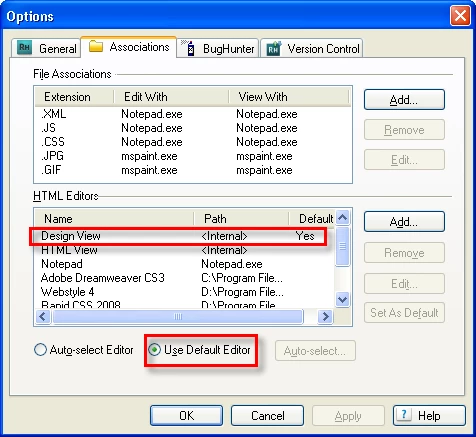
From there, ensure Design View is the default editor, then select the Use Default Editor option.

Cheers and happy RoboHelping! Rick

Helpful and Handy Links

RoboHelp Wish Form/Bug Reporting Form

Begin learning RoboHelp HTML 7 or 8 within the day - $24.95!

Adobe Certified RoboHelp HTML Training

SorcerStone Blog

RoboHelp eBooks

3 replies

Participant
January 19, 2012

Thanks! Your an angel! It works now.

Eye_CAuthor
Participant
November 13, 2009

Thanks Rick, your solution worked well.

Captiv8r
Captiv8rCorrect answer
Legend
November 13, 2009

Hi there

Click Tools > Options > Associations tab.

From there, ensure Design View is the default editor, then select the Use Default Editor option.

Cheers and happy RoboHelping! Rick

Helpful and Handy Links

RoboHelp Wish Form/Bug Reporting Form

Begin learning RoboHelp HTML 7 or 8 within the day - $24.95!

Adobe Certified RoboHelp HTML Training

SorcerStone Blog

RoboHelp eBooks