
Inspiring
January 4, 2010
Question

RoboHelp 8 numbers not appearing as in WYSIWYG

  • January 4, 2010
  • 1 reply
  • 858 views

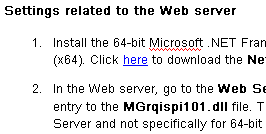
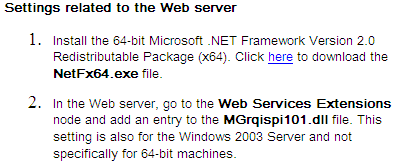
Since updating to RoboHelp 8.02, the fonts of the numbers in numbered steps are not appearing correctly in the generated CHM.

I am attaching 2 images - 1 is of how the numbering appears in the WYSIWYG and 1 of how it appears in the generated CHM.

The font and size change.

I've looked at various sites explaining how to use numbering, but couldn't see what to update to change the font and size of the numbers.

Thank you,

Debbie

WYSIWYG:
Generated CHM:
This topic has been closed for replies.

1 reply

Peter Grainge
Community Expert
Community Expert
January 4, 2010

Are you saying this was OK in 8.0.1? I doubt it as that patch did nothing that would affect numbering. Maybe you mean you upgraded to 8.0.2 from RH7 or earlier. If that is the case, you need to look at the LI tag. What is puzzling is the difference between Design Editor and output. Try in a new temporary project and assuming that works with the default CSS, start examining the differences. Post back if no progres.


See www.grainge.org for RoboHelp and Authoring tips

Follow me @petergrainge

Use the menu (bottom right) to mark the Best Answer or Highlight particularly useful replies. Found the answer elsewhere? Share it here.
dsarigAuthor
Inspiring
January 6, 2010

The problem is now solved. I did the following:

I opened up my project's CSS in a Text Editor.

I then posted the following text at the beginning of the CSS and the problem was solved:

li {font-family: "Arial Unicode MS", sans-serif;
font-size: 10pt}

Additional notes:

I was mistaken about 8.0.2. I had updated, but the update did not take.

I'm not sure when the problem started. I did not have the problem when working with RH6, so the problem may have started when I upgraded from 6 to 8.

Another interesting thing, the problem did not exist in topics that I hadn't recently opened. Every time I opened a topic that looked okay, the problem then existed in that topic.

Thank you,

Debbie

dsarigAuthor
Inspiring
January 10, 2010

Sorry but I still not clear. Different projects can of course get different results as each has its own style sheets. In the same project do you both get the same results and in both source and output?


See www.grainge.org for RoboHelp and Authoring tips

Follow me @petergrainge


Yes. Same project - two different machines - same output.

But once we fixed the "Lists" style on my machine and the "UL" and "OL" styles on his machine, the problem was solved.