
April 9, 2013
Question

RoboHelp 9 Will Not Compile Web Help

  • April 9, 2013
  • 1 reply
  • 2382 views

Windows 7 Professional 640-bit

Microsoft Office 2010

RH 9.0.2.271

I have several projects for which I compile Web help.

Compiling the projects has been no problem in the past.

I have made no known changes to the computer or user rights.

Now, RH stops responding when the compile starts. The stop is very early in the process.

I can compile CHM files.

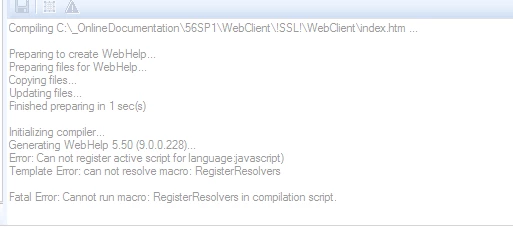
In Output View, I see the following message:

Initializing complier

Generating Webhelp 5.50 (9.0.0.228)…

Error: Can not register active script for language javascript

Template Error: can not resolve macro: RegisterResolvers

Fata Error: Cannot run macro: Register Resolvers in compilation.
While searching for an answer, I tried the following without success:

Note: I am an administrator on the computer. I have always been an admin on the computer.

I have not uninstalled/reinstalled RH so there should be no issues with administrator privileges.

I ran the RH executable as an administrator using a variety of methods like right-click RoboHTML.exe and click Run as Administrator.

Project is on local drive.

Created a new project.

Compiled the sample projects contained in RH.

Created a new SSL.

Create a new target folder for the output.

Copy the LNG file from the "!Language\<current-project-language>" folder to the project folder.

From the project settings dialog, change the project language to a different language, and then change it back to the current language.

Deleted CPD file.

Deleted !Language! folder.

Word macro security is Enable all macros.

Can anyone help me find something I have not tried.

This topic has been closed for replies.

1 reply

Jeff_Coatsworth
Community Expert
Community Expert
April 9, 2013

Sorry, are you saying that you tried generating WebHelp for one of the sample projects and it failed too? If so, then something is either damaged in your install of RH or some Windows security update has tightened up your JavaScript settings. If not, then it's got to be something in the project.

April 9, 2013

Jeff,

Yes. I did try to compile WebHelp using one of the sample projects.

I have successfully created WebHelp in the past using my same projects. One troubled project was compiled successfully in October 2012.

I have changed nothing about the RH install.

Any idea what Windows security update might be at fault? Any idea how to determine if this is the case? Any ideas how to solve the problem?

April 9, 2013

Ok, if none of the projects work then it's got to be either the RH install or your environment. I'd first try the RH install - deactivate, uninstall, reinstall, reactivate - then test again with the sample projects. Still failing? Check your environment - got an IT department? Windows installed any changes since it last worked?


Jeff,

By the way, thanks for trying to help.

What do you mean by deactivate? How do I do that?

I can handle the uninstall, reinstall, reactivate.

As for my environment, what should I check assuming the reinstall doesn't work?

I do have an IT department. They have little or no RH knowledge.

There have been numerous Windows changes (updates) installed since the projects last worked.