
RoboHelp 9 Will Not Compile Web Help
Windows 7 Professional 640-bit
Microsoft Office 2010
RH 9.0.2.271
I have several projects for which I compile Web help.
Compiling the projects has been no problem in the past.
I have made no known changes to the computer or user rights.
Now, RH stops responding when the compile starts. The stop is very early in the process.
I can compile CHM files.
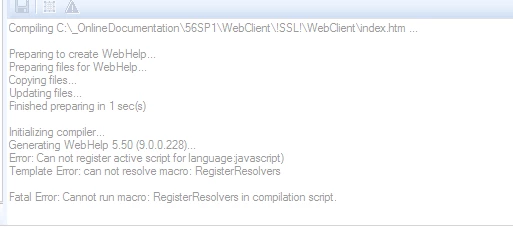
In Output View, I see the following message:
Initializing complier
Generating Webhelp 5.50 (9.0.0.228)…
Error: Can not register active script for language javascript
Template Error: can not resolve macro: RegisterResolvers
Fata Error: Cannot run macro: Register Resolvers in compilation.
While searching for an answer, I tried the following without success:
Note: I am an administrator on the computer. I have always been an admin on the computer.
I have not uninstalled/reinstalled RH so there should be no issues with administrator privileges.
I ran the RH executable as an administrator using a variety of methods like right-click RoboHTML.exe and click Run as Administrator.
Project is on local drive.
Created a new project.
Compiled the sample projects contained in RH.
Created a new SSL.
Create a new target folder for the output.
Copy the LNG file from the "!Language\<current-project-language>" folder to the project folder.
From the project settings dialog, change the project language to a different language, and then change it back to the current language.
Deleted CPD file.
Deleted !Language! folder.
Word macro security is Enable all macros.
Can anyone help me find something I have not tried.
 AdChoices