
Known Participant
November 6, 2009
Question

RoboHelp Crashing Also Messes up Pop-Up Windows

  • November 6, 2009
  • 1 reply
  • 877 views

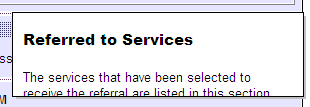
I opened the HHP file to recover the missing topics and fix the TOC.  Everything appeared fine, however, when I compile the WebHelp, the pop-up windows cut off text, which makes the WebHelp useless for users (see example below).  Does anyone have a work around for this fresh heck?
This topic has been closed for replies.

1 reply

Peter Grainge
Community Expert
Community Expert
November 6, 2009

Please take a look at Before You Post. It would help to know what version you are using and whether all the patches are applied for that version.


See www.grainge.org for RoboHelp and Authoring tips

Follow me @petergrainge

Use the menu (bottom right) to mark the Best Answer or Highlight particularly useful replies. Found the answer elsewhere? Share it here.
Known Participant
November 6, 2009

Sorry, Peter.  I've got RoboHelp Version 8.0.1.204.  I had this version installed a month or so ago.  I had the updates installed earlier in the week, and then noticed this after that.  Of course, I had the missing topics issue as well that called for me to open via the HHP file.  I could be wrong, but the timing suggests this is related to RoboHelp 8 project crashing issue that you've been discussing this week.

Peter Grainge
Community Expert
Community Expert
November 9, 2009

Peter,

Thanks for getting back to me.  When I go into Add/Remove, it appears as though I can only remove RB 8.  My only option (see image below) is to Remove all installed components, which I believe would remove RB 8 from my PC in its entirety.  I don't see a "Refresh" button in this Add/Remove program that you referenced.  Unfortunately, it doesn't list the updates seperately.  If I do remove RB 8, I'll be forced to contact the IT dept to have them do the re-install.

Since this occurred in the same timeframe as the RB 8 crashing last week, for which you mentioned Adobe is working on DLLs, I'm wondering if I should perhaps wait for Adobe's updated DLLs before I deal with de-installing/re-installing.


That should only remove 8.0.1 and that has been my experience. Press F5 to refresh.

I offer no guarantees, I just report the way I have been told it should work and the way I have found it does work. Your mileage may vary!


See www.grainge.org for RoboHelp and Authoring tips

Follow me @petergrainge

Use the menu (bottom right) to mark the Best Answer or Highlight particularly useful replies. Found the answer elsewhere? Share it here.