
Participant
June 10, 2010
Question

Robohelp HTML (RH8): Index tab (CHM output) contains corrupted characters (Czech language)

  • June 10, 2010
  • 3 replies
  • 3884 views

Hi all,

I have a RH8 project in Czech language. When I generate the output into CHM format, the Index tab doesn't display correctly the Czech special characters. Notes:

1.- HHK file enconding is correct (UTF-8)
2.- Index displays correctly in Robohelp.
3.- Any other output looks all good (File -> Generate PDF, File -> Print Index, WebHelp output, ...). The index displays all Czech special characters correctly.
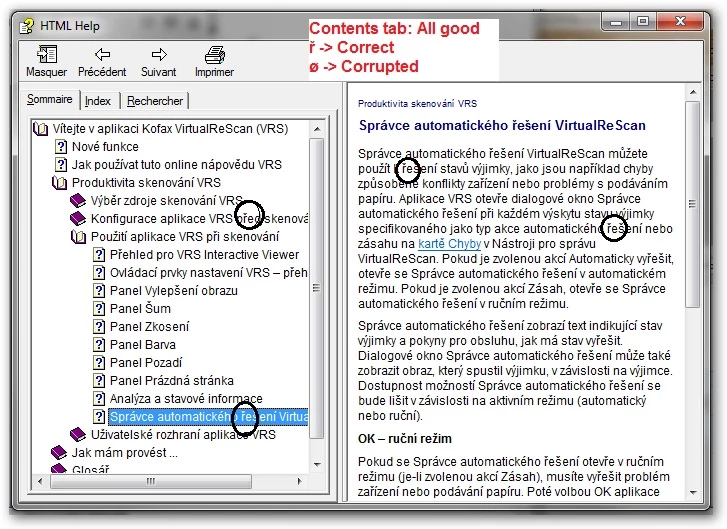
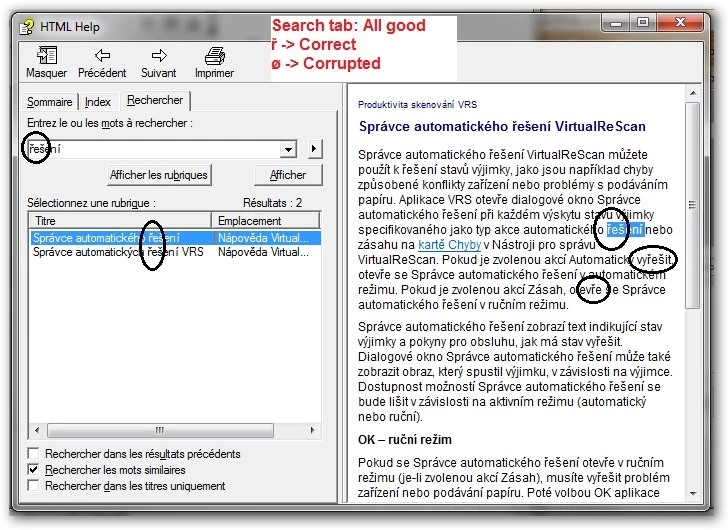
4.- In the CHM generated, except for the index tab, the special characters  display correctly: TOC, Search tab, HTML pages ...

So the problem is exclusively with CHM output and only in the Index tab.

Please, help.

Héctor.

Here are 4 screenshots:

01 - Robohelp project (All looks good).jpg (TOC, Index and content).

02 - CHM output - "Contents" tab looks good
03 - CHM output - Index tab corrupted (and compared with Index from Robohelp, which looks good)

04 - CHM output - Search tab looks all good
This topic has been closed for replies.

3 replies

Inspiring
July 7, 2010

Hi Héctor

Not sure if you've managed to solve your problem, but I had the exact same issue and found a possible solution.

All the index entries in my project are in the *.hhk index file (not in the topics themselves).

What I did:

(backup your project of course :-))

1) Go to File > Project Settings.

2) Under Index, deselect the Binary Index check box.

3) Click Use and OK.

4) Open the index (which loses its sort order for some reason) and sort it (right-click a top-level keyword > Sort > Current level and below)

5) Build and check.

Hope this helps!

Torgeir

INK Norge AS

Jared Hess
Legend
August 3, 2010

One large aspect of my current job at our company is to compile localized help projects that come back from translation into the .chm output. We support over a dozen languages, so I get odd characters all the time in the index tab and sometimes in the contents tab. Our company has yet to localize a RH project though and our process is to decompile the RH built English .chm and send out the decompiled files for localization. I then recompile the localized files into a .chm format using FAR HTML a very useful third party tool in my opinion.

Given the above process we do, I'm not sure if this applies in your situation, but I figured I'd share anyway as it may give you some ideas of things to try.

I do two things whenever I get weird characters in TOC or in the Index (again this is all outside of RH):

  • First, I open up the .hhp file inside of FAR HTML and make sure the correct language is set under Project Settings.

  • Second, (I'm using Vista...) I open up "Regional and Language Options" from the Control Panel. On the Administrative tab under Language for non-Unicode programs, I click Change system locale. A Regional and Language Settings dialog with a single drop down appears. I then select the target language from that list and click Ok. My computer restarts and I recompile in that system locale and it nearly always clears up weird character problems.

From my experience it seems that not all aspects of the MS Help compiler support unicode and so this step is needed for our process. Perhaps RH has a way of doing this already on its own. But, it may be worth a shot to compile in the system locale of your target language.

Good luck!

Participant
July 6, 2010

To start with: Thanks, Eileen & Peter.

To Eileen: Yes, the project is set to Czech. All other languages work just fine (Russian, French, Italian, ...)
To Peter: I'm using UTF-8, which works just fine for all other languages and "everywhere" for Czech, except for the index tab.
To Eileen: Good it's working for you! Not here. I created the index and get the same. Also, that approach would not feasible in my case. Big amount of entries.
To Peter: Thanks for the 2 last tips (Update DHTML & Convert RoboHelp edited topics to HTML). Unfortunately, none of them worked.

Sadly enough, I still have the problem.

And to finish with: Thanks again, Eileen & Peter. :-)

Héctor.

EileenPalsson
Inspiring
June 30, 2010

Hi,

Did you find a solution to the problem?

This may seem like an obvious thing, but since you didn't mention it: Is your project set to Czech (File -> Project Settings) ?

I am having similar (but not identical) problems in a French translation. I see the errors (1) on the Search tab and (2) in the dialog that is displayed when you click an index keyword that has two or more "hits". In this case it is the é and è characters that are displayed as something else. The strange thing is that not all of them are displayed incorrectly! Some topic titles containing these letters display fine, while others are displayed incorrectly. I can't see what is wrong, despite a detailed analysis of the topics and the HHK file.

I'm hoping that if you solved the problem in your Czech CHM file, it will give me a clue to what I need to fix in my French project.

Thanks

Eileen

Peter Grainge
Community Expert
Community Expert
June 30, 2010

Not my area but are you using a Unicode font?


See www.grainge.org for RoboHelp and Authoring tips

@petergrainge

Use the menu (bottom right) to mark the Best Answer or Highlight particularly useful replies. Found the answer elsewhere? Share it here.
EileenPalsson
Inspiring
June 30, 2010

I don't know - is Arial a Unicode font?

Another thing I thought to ask the original poster: Is each topic set to Czech in its Properties? (I had a brainstorm and thought I might have skipped setting some of my topics to French, but no -- they all have the correct language marker.)

/Eileen