
bcampana1
Participant
June 27, 2014
Question

Robohelp to PDF

  • June 27, 2014
  • 1 reply
  • 532 views


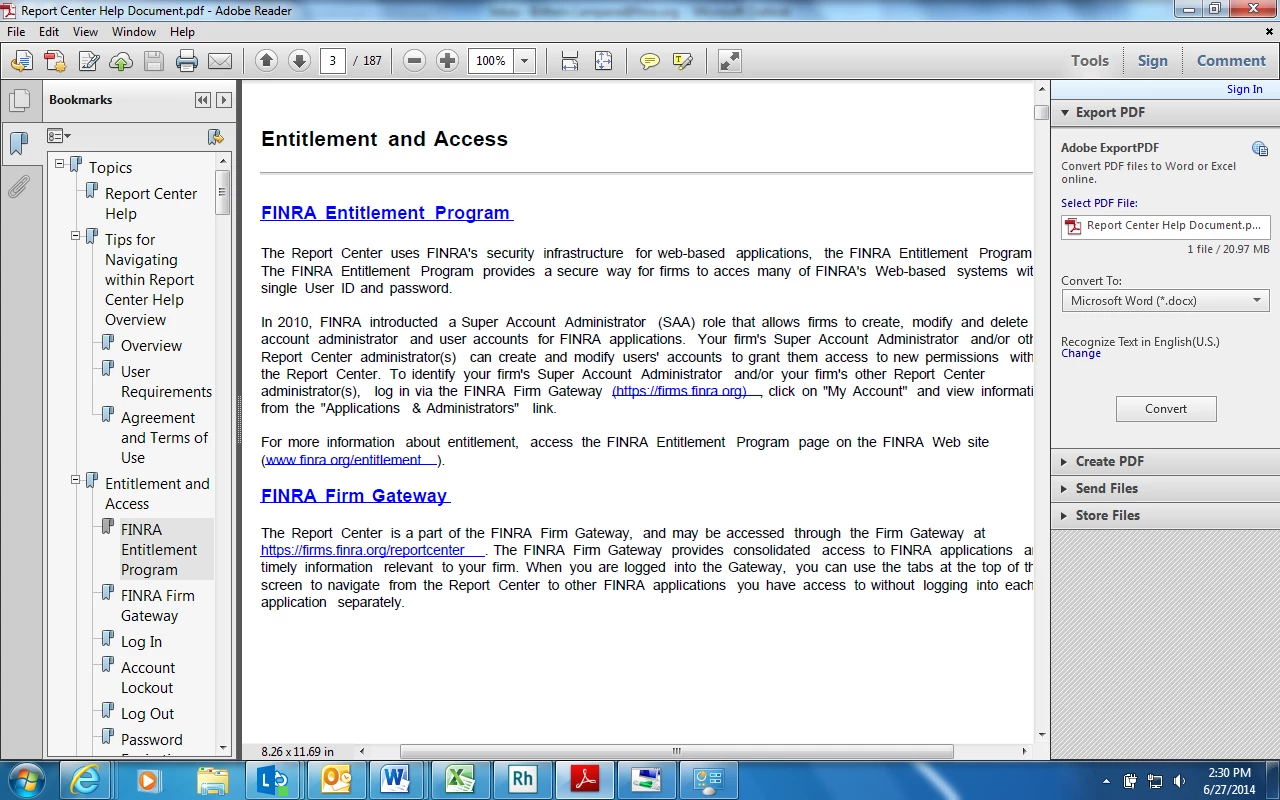
I am trying to export my robohelp file to PDF. However, when I go in to generate the PDF version, some of the links do not look the same way as they do in robohelp or in a HTML version. They all work, but some of them have longer lines underneath the hyperlink.

I have double checked under the HTML version  and in the hyperlink properties that there are no extra spaces in the hyperlinks and they still appear this way in the PDF version. Any ideas how to fix this formatting issue? Thanks.
    This topic has been closed for replies.

    1 reply

    Peter Grainge
    Community Expert
    Community Expert
    July 1, 2014

    I think the first step would be to create a Word document instead of a PDF and see if that has the same problem.


    See www.grainge.org for RoboHelp and Authoring tips

    @petergrainge

    Use the menu (bottom right) to mark the Best Answer or Highlight particularly useful replies. Found the answer elsewhere? Share it here.
    bcampana1
    bcampana1Author
    Participant
    July 1, 2014

    No issues in a word document. I also tested it by creating a separate word doc with a hyperlink and then creating a PDF version to make sure there was no error with the PDF creation software. Everything looked good there, too.

    Captiv8r
    Legend
    July 1, 2014


    I am using Robohelp 11. When I go in and create it through the "PDF for Review" it appears in the layout that I want but it has the issue of the hyperlinks being underlined too far.

    But when I go in to create a PDF version through printed documentation, the link underlining issue goes away. However, I am having some strange repetition of certain pages...

    As you can see, the "Tips for Navigating within Report Center Help Overview" heading is repeated as well as the page itself. This is only occuring for this page and the Entitlement and Access page. The rest are ok... I would use the printed documentation PDF version if I could resolve this issue. Or I would use the PDF for review function if I could resolve the underlining issue for the hyperlinks.

    Thanks!


    PDF for Review is not really an output intended for final distribution. The Printed Documentation output is designed for that.

    Of course, just like eating raw cookie dough, you are always free to do what you want with things. (such as using the PDF for Review as an output)

    Cheers... Rick