
Exit
  • Global community
    • Language:
      • Deutsch
      • English
      • Español
      • Français
      • Português
  • 日本語コミュニティ
  • 한국 커뮤니티
0

Runtime Error - Microsoft Visual C++

Guest
Oct 12, 2011 Oct 12, 2011

Guys,

Trying to install Robohelp 9.0 for our users.  Robohelp works fine, its just Robohelp for Word does not work at all and throws up an error every single time.  We have applied the 9.0.1 patch also. These are Dell 980 boxes with Windows 7 64bit - Office 2007. 

We are admins and have installed, and Robohelp for Word works fine for us admins.  However, when a user logs in and launches Robohelp for Word, they always get a "microsoft visual C++ runtime library error".  Every single time. 

We have uninstalled, made the user an admin, logged in as them and installed only to get the same result.

Is it something in the appdata folder?  Some kind of permissions somewhere since us admins can launch Robohelp for Word, but a general user (even with admin priv's) cannot?

Thanks for any info!
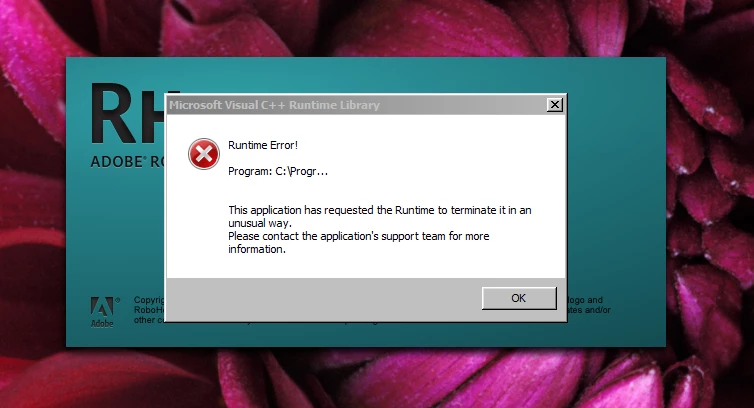
error.png

TOPICS
Classic
4.7K
Translate
Report
Community guidelines
Be kind and respectful, give credit to the original source of content, and search for duplicates before posting. Learn more
community guidelines
Community Expert ,
Oct 12, 2011 Oct 12, 2011

I have seen that but probably over 10 years ago so forgive me if I don't recall the exact details. At that time I know much less about the intricacies of RoboHelp and believe we had to uninstall both RoboHelp and Word and then reinstall Word first then RoboHelp. That of course was with much older versions of both applications.

What I would try now is giving one user a new profile with admin rights and without deleting the old one, at this stage. See if that alone helps.

If that alone does fix it then it's your call as to whether to change the user to the new profile with the attendant downside or try the next option.

The next option is to remove both apps and consider using RevoUninstaller (Google it) with the Advanced options. Make sure you only delete registry stuff shown in bold text. You will see what I mean and as admins you will find it is a straightforward app. It is free and we have seen a number of issues fixed using that tool. It is of course at your risk. I keep the portable version on a flash drive.

Beyond that it's likely a call to Tech Support and as an installation problem it is free.

I would appreciate you posting back the fix that works.


See www.grainge.org for RoboHelp and Authoring tips

@petergrainge

Help others by clicking Correct Answer if the question is answered. Found the answer elsewhere? Share it here. "Upvote" is for useful posts.
Translate
Report
Community guidelines
Be kind and respectful, give credit to the original source of content, and search for duplicates before posting. Learn more
community guidelines
Guest
Oct 12, 2011 Oct 12, 2011

Thanks for the reply. 

I forgot to add that to my original post.  Yesterday, we created the user a new profile and gave her admin rights and under her profile we installed Robohelp.  Still, the same error.  But again, when us real admins login it works?! 

Unfortunately we don't have RevoUninstaller on our approved software list, so we can't install. 

Guess I will be making a call to Adobe.

Translate
Report
Community guidelines
Be kind and respectful, give credit to the original source of content, and search for duplicates before posting. Learn more
community guidelines
Community Expert ,
Oct 12, 2011 Oct 12, 2011

I found this similar report.

http://forums.adobe.com/message/1946812#1946812

Worth checking the permissions have filtered through?


See www.grainge.org for RoboHelp and Authoring tips

@petergrainge

Help others by clicking Correct Answer if the question is answered. Found the answer elsewhere? Share it here. "Upvote" is for useful posts.
Translate
Report
Community guidelines
Be kind and respectful, give credit to the original source of content, and search for duplicates before posting. Learn more
community guidelines
Community Expert ,
Oct 12, 2011 Oct 12, 2011

This thread suggests trying right clicking the shortcut to RoboHelp and clcking Run As Administrator.


See www.grainge.org for RoboHelp and Authoring tips

@petergrainge

Help others by clicking Correct Answer if the question is answered. Found the answer elsewhere? Share it here. "Upvote" is for useful posts.
Translate
Report
Community guidelines
Be kind and respectful, give credit to the original source of content, and search for duplicates before posting. Learn more
community guidelines
Guest
Oct 12, 2011 Oct 12, 2011

Just tried the right-click runas administrator and still a no go

Translate
Report
Community guidelines
Be kind and respectful, give credit to the original source of content, and search for duplicates before posting. Learn more
community guidelines
Community Expert ,
Oct 12, 2011 Oct 12, 2011

The only threads I found where the problem was fixed was when RevoUninstaller was used. I understand your difficulty there and while it may be too late this time, you might want to consider it for the future.

If you want to search the forums I was using C++ runtime error as the search string. After you have entered the string, you will have the option to limit the search to just that forum. If you don't use that, the search will be across all Adobe products. That said, the fix for another product might work here.


See www.grainge.org for RoboHelp and Authoring tips

@petergrainge

Help others by clicking Correct Answer if the question is answered. Found the answer elsewhere? Share it here. "Upvote" is for useful posts.
Translate
Report
Community guidelines
Be kind and respectful, give credit to the original source of content, and search for duplicates before posting. Learn more
community guidelines
Community Expert ,
Oct 12, 2011 Oct 12, 2011

One late thought. Try disabling any Word add-ins.


See www.grainge.org for RoboHelp and Authoring tips

@petergrainge

Help others by clicking Correct Answer if the question is answered. Found the answer elsewhere? Share it here. "Upvote" is for useful posts.
Translate
Report
Community guidelines
Be kind and respectful, give credit to the original source of content, and search for duplicates before posting. Learn more
community guidelines
Guest
Oct 13, 2011 Oct 13, 2011

Thanks.  We'll try to disable the add-ins.

I called Adobe and their tech is escalating it to Sr tech's.  She said she believes she has seen that before and they had to go thru the registry and delete a bunch of stuff, but she wasn't absolutely sure.  Sounds fun.

Translate
Report
Community guidelines
Be kind and respectful, give credit to the original source of content, and search for duplicates before posting. Learn more
community guidelines
LEGEND ,
Oct 13, 2011 Oct 13, 2011

Hi there

Perhaps you might also give some thought to abandoning use of RoboHelp for Word and instead consider using RoboHelp HTML?

Pretty much the only reason I would ever consider advising folks to use RoboHelp for Word would be if they were a holdout and still creating WinHelp. Nearly everything these days is HTML based and if what you will be creating is also HTML based, it would behoove you to seriously consider using RoboHelp HTML as you will find yourself frustrated with trying to do things using RoboHelp for Word that are stupid simple in RoboHelp HTML.

Just a thought to consider... Rick

Helpful and Handy Links

RoboHelp Wish Form/Bug Reporting Form

Begin learning RoboHelp HTML 7, 8 or 9 within the day!

Adobe Certified RoboHelp HTML Training

SorcerStone Blog

RoboHelp eBooks

Translate
Report
Community guidelines
Be kind and respectful, give credit to the original source of content, and search for duplicates before posting. Learn more
community guidelines
Community Expert ,
Oct 13, 2011 Oct 13, 2011
LATEST

Editing the registry sounds right, essentially why I suggested RevoUninstaller.


See www.grainge.org for RoboHelp and Authoring tips

@petergrainge

Help others by clicking Correct Answer if the question is answered. Found the answer elsewhere? Share it here. "Upvote" is for useful posts.
Translate
Report
Community guidelines
Be kind and respectful, give credit to the original source of content, and search for duplicates before posting. Learn more
community guidelines
Resources
RoboHelp Documentation
Download Adobe RoboHelp